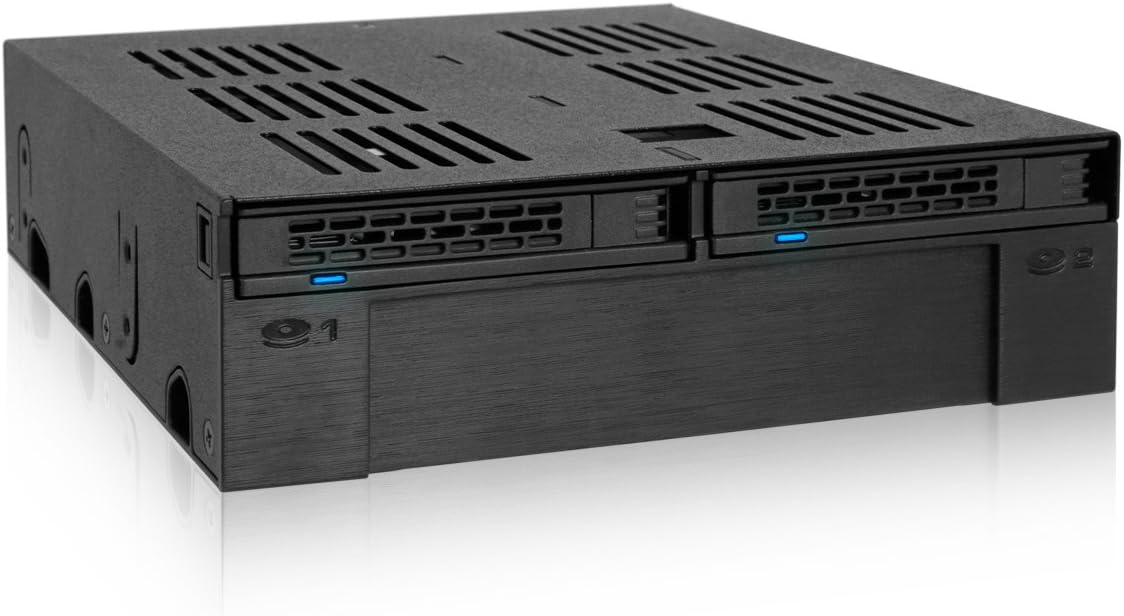
MB322SP-B
Product ID: 39175712
Details
- BrandICY DOCK
- ColorBlue
- Hardware InterfaceSATA 6.0 Gb/s
- Hardware PlatformPC
- MaterialMetal
⚡6 Gb/s SATA III data transfer speed
💾2 bays for 2.5" SAS/SATA SSD/HDD
🛠️Robust metal enclosure for durability
Desertcart purchases this item on your behalf and handles shipping, customs, and support to Hungary.
💼 Elevate your workstation with seamless dual-drive agility!
The ICY DOCK ExpressCage MB322SP-B is a professional-grade 2-bay mobile rack designed for 2.5" SAS/SATA SSDs or HDDs, fitting into a standard 5.25" external bay while adding a 3.5" slot. Featuring a durable metal enclosure and SATA III 6 Gb/s interface, it supports hot-swapping drives with secure ejection mechanisms. Ideal for power users managing multiple OS setups or high-speed storage needs, it ensures data integrity by keeping drives powered and offers a compact, space-efficient solution with a 3-year warranty.


| ASIN | B00X5HAKXC |
| Best Sellers Rank | #284 in Enclosures |
| Brand | ICY DOCK |
| Color | Blue |
| Compatible Devices | Laptop |
| Connectivity Technology | SATA |
| Customer Reviews | 4.5 out of 5 stars 430 Reviews |
| Data Transfer Rate | 6 gigabits_per_second |
| Enclosure Material | Metal |
| Global Trade Identification Number | 04711132869576 |
| Hard Disk Form Factor | 3.5 inches |
| Hardware Interface | SATA 6.0 Gb/s |
| Hardware Platform | PC |
| Item Weight | 347 g |
| Manufacturer | ICYDOCK |
| Material | Metal |
| Mfr Part Number | MB322SP-B |
| Model Number | MB322SP-B |
| Number of Items | 1 |
| Number of Packs | 1 |
| Supported Devices Quantity | 3 |
| UPC | 884826002352 |
| Warranty Description | 3 Year Warranty |
D**R
My alternative to dual-booting
This thing is really handy. Mounts in a 5.25" bay, maximes use of space by offering another 3.5" bay (which I populated with a USB 3.0 hub). And there's a lot of different uses to having two hotswap 2.5" drives. What I've done is kind of unconventional, but really handy for what I need. The problem stems from dual-booting not being a perfect solution to having two frequently used operating systems. Sometimes dual-booting just causes problems. So, what I've done is invested in a second, small SSD for my second OS. Windows 7 is my daily driver, and I occasionally need to use Windows 10 for other things. I've had W7 installed on an SSD for years now, so I picked up a small SSD to install W10 on. This device has two SATA data ports, one for each SSD. I've simply left the second port disconnected, so my computer only sees one boot SSD at a time. If I need to switch operating systems, I power down the computer, I swap the SSDs to the opposite bays, and suddenly my computer is running the other OS. So handy. I wish that the device had separate SATA power connections for each drive, as well, but it doesn't. So even though one of my SSDs in this scenario is going unused, it's still using power. But, I'm sure I'm using this in a very esoteric, unintended way, so I can't fault them too badly for that design choice. Besides, it's not all bad having the unused SSD powered on. Data degradation can occur over time if an SSD (or any storage media for that matter) isn't receiving power, so since this remains powered on, the SSD's error checking systems are always working preventing any data degradation. It's also worth noting that I saw no performance impact between SSD directly connected to my motherboard versus an SSD in this device connected to the motherboard. I ran a CrystalDiskMark test before and after installation, and the results were well within typical variability. So, it's safe to assume that the SATA connections are just simple passthroughs and there is no signal manipulation occurring. Since my boot SSDs are now accessible from the outside of my computer case, I was worried about the possibility of accidentally ejecting them during use by bumping my knee into the computer or something, but that's not an issue. You need to press pretty firmly on a really particular spot for the SSD to eject. I'm not concerned about it.
K**H
Well made mobile rack for SSD's.
Love it. Works perfectly. I just wish there was something to put in the middle, which is just a hollow space. At least the middle has a cover over the end.
B**4
Met or exceeded expectations for install in LGA1366 HP Workstation
I finally went ahead and purchased 1 of these mobile hot swap racks after a long time (1-2 years of eagerly wanting it, when listed price and my own budget constraints finally aligned. My expectations for it were very high, building as time passed and I kept revisiting online listings for it. I installed it in one of my older LGA1366 workstations without any issue or complication. It adds cosmetic appeal to the workstation tower, and more importantly has functioned flawlessly - without any issue so far, whether HDD or SSD, for common drive operations/file transfer or when hot-swapping. I like the additional benefit of freeing up one SATA power connector (this uses 1 to power both 2.5" drive bays). My only criticism of this and other Icy Dock products would be the pricing - normally too high given the materials and estimated overall costt per unit to produce - but as mentioned, with patience and good fortune, I was able to buy one of these finally at a price that was affordable to me. Emphatic 5 stars for this 2+1 mobile rack by Icy Dock.
B**Y
Pretty Solid Storage Solution
I'm using this in my HAF912 case so I can set up a raid 1 with two 2tb HDDs. I works really well for that. In the open 3.5" bay I have put a Roswell multi-card reader. Some information for consideration. This is not part of ICY Dock's tough armor series. As such, the trays for the HDDs are made of plastic. While this doesn't affect the function as far as I can tell it's not as nice of quality as some of their tough armor series products. The outermost material on the device is still metal so it still has good build quality there. I do also like the fact that on sata power connector powers both drives. No 4 pin molex connectors like on comparable storage solutions. All in all this is a great product i just wish the drive trays were completely metal for a more stable mount.
R**Y
Great Product
I have multiple ICY DOCK products and I like virtually all of them. I tinker with hardware setups and run all kinds of off-the-wall stuff. I have a bunch of old hardware and it is nice to be able to eject an SSD or HDD and plug another one in. I also like being able to store my files on the HDD and then plugin various SSD with different Linux Distros and still be able to have all the files in the same structure. Maybe this is not how others use this, but it works great for what I need it to do.
D**R
Makes for very efficient use of those old 5.25 drive bays.
I was replacing an older system containing an SSD and 3 x 3.5 HDDs with a Dell Optiplex with 2 x 3.5" bays and 2 x 5.25" bays. The 2 BAY HDD CAGE cage converted the unused 5.25" bay to the perfect format to house the SSD operating system drive and the 3rd 3.5" HDD, and still leaves me with an open 2.5" bay for easy expansion. I bought a second 2 BAY HDD CAGE for another system that I had already put a plain 3.5 to 5.25 adapter into. The 2 BAY HDD CAGE makes so much more efficient use of the 5.25" bay. The only complaint (or more accurately, warning ) I have is that right-angled SATA power and data cables wouldn't connect to the connectors of the 3.5" HDD housed in the 2 BAY HDD CAGE because the 5.25 bays in both of my computers were deeper in length than the ICY DOCK, leaving a .5" lip of sheet metal sticking out behind the HDD and preventing right-angled cables from having room to connect. So if you plan to use the 3.5" bay, make sure you have a straight ended SATA power and data cable available to plug into the HDD.
E**F
Wonderful ICY DOCK drive bay combination module
This cage does a marvelous job of arranging space for two SSDs and a 3 1/2" HDD. You need a long shafted magnetic screw driver to attach the screws that mount the 3 1/2" drive. It's tricky but not impossible. The SSD cages are very handy. I put my boot drive in the left hand bay. You have to be careful of which cable connects to your primary SATA port on your motherboard. My case needs longer SATA cables to reach from my drive cage to the motherboard, you'll want to measure and get longer cables if needed. One disappointment was that the SATA connector on the right side SDD slot broke off during my effort to install. So I am needing to buy another unit to replace my original purchase in order to use both SDD slots. It's plastic so be more careful than I was.
D**D
Universal Hard Drive Cage Replacement
For this new build im working on I was actually given this free Corsair Spec 03 by a friend. Well, whoever had used it before took out the hard drive cage and I wanted a place to put hard drives and ssds without worrying about compatibility with the case. Well this is just the solution. Its the size of an optical drive, streamlining the process of finding a cage that can fit your case. So as long as you have an extra space there you can use this. I could also see someone wanting this to clear space in the bottom for a radiator or to make ssd intallation easy. Overall great product.
R**S
God, but has become expensive...
I purchased this in 2021 for $59.00, it is now $76.17 at the time of this review...Why? The removable bays work well, and I used the 3.5" space for a card reader. It is unfortunate that it is getting more difficult to find cases to fit front panel devices. It is too bad that they are not priced more reasonably.
M**T
pratico e comodissimo, con accessori.
Ottimo box per alloggiare ssd o dischi meccanici sia da 2,5 che da 3,5. Buona qualità costruttiva e praticità d'uso molto valida, soddisfa le mie esigenze si alloggiamento dischi e sostituzione rapida per quelli da 2,5. Completo di viti per fissare i vari dischi.
J**E
Sehr guter 5 Zoll Einbaurahmen
Dieser Wechselrahmen kann zwei 2,5 Zoll und eine 3,5 Zoll Festplatte beherbergen und findet seinen Platz in einem 5 Zoll Schacht. Die Verarbeitung ist, obwohl dieser aus Kunststoff besteht, sehr wertig und stabil. Hinten befindet sich ein SATA Strom- und zwei SATA Datenanschlüsse. Selbst SATA Kabel mit Arretierung rasten ein. Alle benötigten Schrauben sind im Lieferumfang enthalten. Der Einbau ist selbsterklärend. Von mir gibt es eine klare Kaufempfehlung.
F**O
Feo pero SUPER UTIL
Excelente producto FEO, pero excelente producto Quite la unidad de DVD y coloque este aparato y he puesto 1 HDD 3.5 y 2 SSD quedo un moustro Ahora por espacio y velocidad no tendremos problema
C**N
Pratique, rapide, facile... que du bon.
A la place de mon lecteur DVD, j'ai installé ce module MB322SP-B couplé avec le MB741SP-B, ce qui fait 3 disques 2,5 (HDD et SSD) extractibles. Configuration très bien pensée. Le montage est facile et les performances au maxi. L'extraction et le remplacement des disques sont très simples. Attention lors des manipulations, les tiroirs sont peut-être un peu fragiles, sauvages s'abstenir ! Sinon c'est top, allez-y.
Trustpilot
1 month ago
2 weeks ago