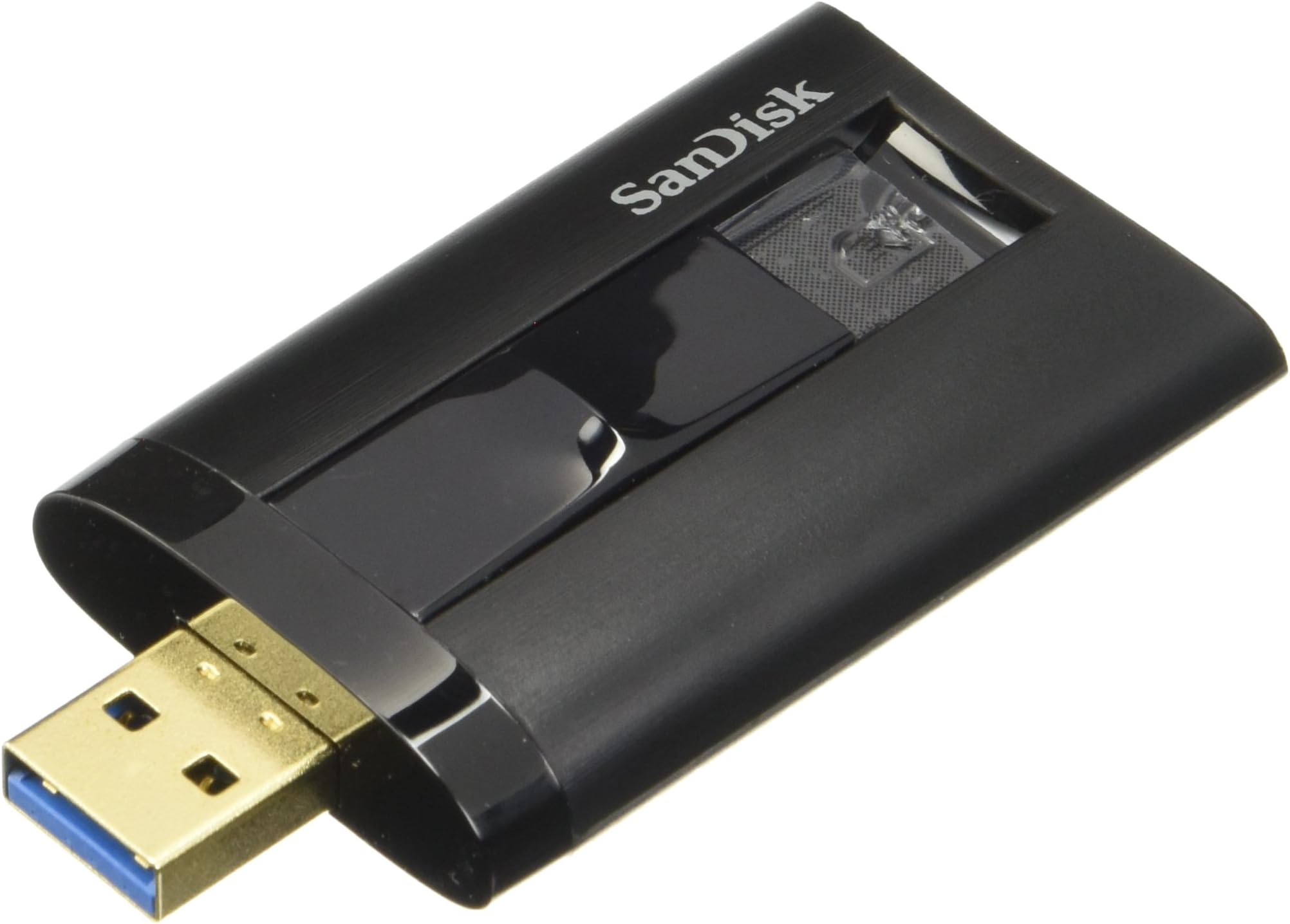
SanDiskExtreme PRO Card Reader - External (SDDR-329-A46)
Product ID: 3857203
⚡500 MB/s speed
📸UHS-II compatibility
🔄USB 3.0 interface
Buy anything from 5,000+ international stores. One checkout price. No surprise fees. Join 2M+ shoppers on Desertcart.
Desertcart purchases this item on your behalf and handles shipping, customs, and support to Hungary.
🚀 Elevate Your Workflow with Speed!
The SanDisk Extreme PRO Card Reader (SDDR-329-A46) is a high-performance memory card reader/writer designed for SD UHS-II cards, featuring a USB 3.0 interface that delivers transfer speeds of up to 500 MB/s. It is compatible with USB 2.0 and UHS-1 cards, making it an essential tool for professional photographers and videographers seeking efficiency and reliability.
G**Y
Casing is NOT as bad as everyone says it is...
Before purchasing this, I read that it is "flimsy" which I didn't really understand until I got it, now I do. I can agree with that. It's just like those light use flash drives where you can barely put any pressure on it and it will bend slightly while connected to the USB port.The slider though is pretty annoying, but not a deal breaker. If you do not get it into the USB port the very first time, the usb will retract a little bit back into the casing, and you have to slide it back out again. Obviously, if you get it precise every-time you wont have to worry about that happening.Now, I did not knock off a star because of that. But for the design of it, its a little thicker than it needs to be. It will come into contact with other USBs near it in any direction. It is expected since an SD card is pretty wide, but the casing still could've been more slimmed down to avoid this issue. I had to rearrage my USBs so that this would be on the corner usb because it would not fit between 2 usbs in the middle of a row.THE CASING isn't that weak as everyone says it is. Its decently durable. It will probably survive the 100000 drops since its tiny. If you step on it thought, you'll probably break the slider, which will render it useless. Literally, if you dont step on it or smash it, it will survive the every day throws on the desk or drops on the floor, no big deal.ALSO note, my PC Case (NZXT Switch 810) the front I/O panel with the USBs, is SLIGHTLY inwards into the case with a tiny tiny gap (like 1/4 of a centimeter) which made it just enough not for the big body of this card reader not to fully go into the usb port. So, I HAVE to put it into the back of my PC every time making it very difficult to take in and out over and over again. Was on a budget, and do not want to buy an usb extension adapter for this, but I have too in the future.If you plug this into a usb 2.0, don't even bother buying it. Get a 2.0 reader. You'll get 35-48mbs write speed if you do. And I have to do that because my front usb 3.0s of my case wont fit it, and my motherboard does not have 3.0s.Other than those flaws that probably only effect me, it works as it should with speeds as sold. Can't complain. The design could be redone if anything, I'd still recommend this to anyone looking to buy it
R**D
I like this card reader
At first I thought this can't be worth the bucks they are asking for. It's a very light plastic feeling build. But the thing does work well for what it is, once I figured out how to use it properly. And the only comment I can personally make as far as speed as this device goes, it seems quite fast to me compared to my other card readers.I've used it over and over again to see if I could break it with overuse and it seems to keep on working, once I learned how to use it properly. I learned that before you extend the USB reader for insertion into the computer, you must place the card in the reader and push down the card all the way until there is just a few centimeters of the top edge showing. Until it can't go any further of course. You'll know. And it stays there secure. Then you slide the USB extender out by simply pushing/sliding the front part of the indented slide handle. Not the rear part of the indented slide handle. The extender comes out smooth and locks into place nicely and then you insert the USB reader into the computer. It reads perfectly and instantly it seems.Remove the reader and then slide back using the front part of the indented slide handle and the USB card comes out along with it. It actually works quite nice and I kinda like it. If you don't mind spending this amount of money for such a seemingly simple device, I think it's an OK reader. My point is that once I learned how to use this properly and efficiently, I was and am very happy with it. These are expensive cards and I suppose that's why the reader is expensive as well. Otherwise, I think you'll like it. I'm keeping the box anyways for 30 days and I'm going to keep using it extensively and if I notice a change, I'll comment here. But right now, after handling this quite extensively for a day I'm perfectly happy with it. Richard
P**A
Super fast reader to match your super fast computer
This is a review of the SanDisk ExtremePRO UHS-II SD Reader/Writer, when used in combination with the SanDisk 16GB ExtremePRO UHS-II Memory Card.The Reader/Writer:This Reader/Writer is clearly the fastest way to read photos of video back into your computer from the camera.Note however that i am reading into an iMac with a Fusion drive, which has a super fast internal flash assisted hard disk. Once I have the photos in my computer, backing them up via USB3 to another fast hard disk is much slower. So be aware that there can be lots of things in your photography acquisition, processing, and backup pipeline that will slow things down. A super fast card reader/writer and matching memory card are only one element.TheCard:I used the 16Gb card in my Fuji X-T1 camera. I works very well. The X-T1 is capable of producing 8 RAW file images per second, and each RAW image is going to be about 33.6MB in size. The camera will buffer about 20 RAW files in the camera while it is writing them to the memory card. This calculates out to just under 270MB/s, so my hope was that this card would allow the X-T1 to acquire greater than 2 1/2 seconds of 8fps images. In theory, I should shave been able to shoot almost 5 seconds at 8fps before the camera switched to a slower frame rate. Unfortunately, this does not appear to be the case. In my simple testing, it appears that the camera can only write the to the card at around 100-150MB/s, which means that the buffer write time is reduced with this card, but it isn't eliminated. In all fairness to the X-T1, I know of no camera on the market today that is capable of shooting at 8fps until the card fills up. Perhaps an upgraded X-T2 in a couple of years will solve this problem.
A**N
Five Stars
It is fast and dependable.
Trustpilot
2 days ago
2 weeks ago