Desertcart purchases this item on your behalf and handles shipping, customs, and support to Hungary.
🎶 Elevate your studio game with the Impact LX25+ — where pro control meets instant inspiration!
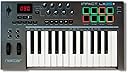
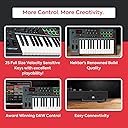
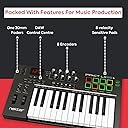
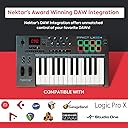
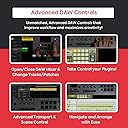
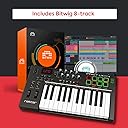
The Nektar Impact LX25+ is a compact, USB-powered MIDI controller featuring 25 velocity-sensitive synth-action keys, 8 back-lit drum pads, and comprehensive DAW integration for 11 popular software platforms. Designed for portability and professional tactile control, it includes a fader, knobs, transport buttons, and a sustain pedal socket. Compatible with Mac, PC, and iOS, it comes bundled with Bitwig Studio 8-track DAW and Cherry Audio plugins, making it a ready-to-play solution for producers and performers seeking seamless music creation.


| Additional Features | Portable |
| Asin | B01M0KBF9F |
| Best Sellers Rank | #50,342 in Musical Instruments (See Top 100 in Musical Instruments) #180 in Computer Recording MIDI Controllers |
| Brand Name | Nektar |
| Color | Dark Grey |
| Compatible Devices | PC |
| Connectivity Technology | USB |
| Connector Type | USB |
| Control Method | Touch |
| Control Type | Keyboard Controller |
| Customer Reviews | 4.6 4.6 out of 5 stars (1,571) 4.6 out of 5 stars |
| Global Trade Identification Number | 00859383002329 |
| Hardware Interface | USB |
| Hardware Platform | Apple ARM, Apple silicon |
| Human Interface Input | Keyboard |
| Included Components | 5 Cherry Audio plugins, Nektar registration required to receive claim email, Bitwig Studio 8-Track Licence card, Impact LX25+ Keyboard, USB Cable, User Manual |
| Instrument | Keyboard |
| Instrument Key | Any |
| Item Dimensions D X W X H | 10.5"D x 18.75"W x 2.75"H |
| Item Type Name | MIDI Controller |
| Item Weight | 4 pounds |
| Keyboard Description | MIDI music keyboard |
| Manufacturer | Nektar Technology Inc. |
| Manufacturer Part Number | LX25+ |
| Material Type | Plastic |
| Mixer Channel Quantity | 16 |
| Model Name | Impact LX+ |
| Model Number | Impact LX25+ |
| Model Year | 2016 |
| Noise Control | None |
| Number Of Items | 1 |
| Number Of Keys | 25 |
| Platform | Mac, iOS |
| Product Style | Full Size Keys |
| Size | 25 Keys |
| Supported Software | Bitwig, Cakewalk, Cubase, Digital Performer, FL Studio, GarageBand, Logic, Nuendo, Reaper, Reason, Studio One |
| Unit Count | 1 count |
| Upc | 859383002329 |
| Warranty Description | 2 year manufacturer. |
User
Fits my bill
I play in a performance band and was looking for a portable full size Midi Keyboard for playing solo parts with various instrument settings. The Nektar IMPACT LX25+ fits the bill with its price point and functionality. As opposed to some negative reviews on the stiffness of the keyboard (I am a piano player), I found that the keys of the LX25+ are more resembling those from a good quality electronic keyboard (except for the lack of weighted action). We can also easily set the velocity curve with a wide range of sensitivity too fit our playing style. I would highly recommend setting this up as a first step., It would make the usage experience a lot more pleasant.The layout of the controls are better than my other Midi controllers / keyboard. We can easily change the octave, transpose to other keys, and changing the Midi channel with a press of a button (once it is properly configured) . Integration with my existing DAWs are smooth as silk. The keyboard is immediately recognized as soon as I plug it in my desktop PC and laptop with the DAWs launched. The Nektar website also has scripts available for integrating with Ableton (to a certain extend). This keyboard also works seamlessly with my Samsung Android App (I use Sound Camp) and external Midi sound module.The unit is a bit large than I expected but it still fits inside my backpack which is important for me to carry around. The 25 keys work fine for me as I am using it mainly for playing solos passages in the band without accompaniment. Overall , a great unit for performing solos live and arranging music with my DAWs.
User
Love it! Love it! Love it!
Great little keyboard, but with full-sized keys.I have two other controller keyboards. Both M-Audio, one is 49 keys, one is 61 keys. They're good, but this is great. Actually also might make one a better keyboard player, by forcing you to concentrate on just two octaves, rather than noodling around the length of a longer keyboard. With just two octaves, you can "see" patterns and chords easier. Though you can go up and down to full 88 keys with buttons. But two octaves at once is a good teaching exercise.And since it's smaller, it leaves room for a cat on my keyboard stand. And there's pretty much always a cat there now. (Stand is a board on a towel on a keyboard stand).PROS:--Solid build. Keys are good. Pads have an amazing feel.--Can control your DAW - almost makes a soft synth into a hardware synth.--You can sit across the room and play it, without being a slave to sitting at a computer. Once auto-mapped, you can change pre-set patches on a softsynth. And on some, you can control some of the parameters. Plus, play keys and drum pads. (M-audio is the other keyboard that can do that, but not nearly as easily and elegantly as this one does.)--Easy to map your DAW (download software from manufacturer's site after registering)--Pretty lights that change color on the pad when you play them! Looks trippy in the dark.CONS:--Keys are kinda stiff. Some people might hate it. Probably not good if you have hand pain issues. On the other hand, playing it may actually strengthen your hands.--Keys are physically kinda loud when you press them. Make a dull thud sound.EDIT AFTER 2 WEEKS OF PLAYING IT A LOT: The keyboard dull thud got much less after a little while. And I think the keys are still stiff, but my hands actually got stronger playing it (!), so it's not an issue now. I dig the feel.Someone else here said it takes two buttons to remotely change synth patches but that's not true on Cubase. Just takes one at a time, going up or down the list in your DAW from this keyboard.All in all I'm very happy with it. It's a heck of a lot of controller for 100 bucks.
User
Perfect for FL Studio
I own several MIDI controllers but they were so tedious and time consuming to integrate with FL studio. I bought the Nektar LX 25+ specifically because it's designed to integrate with FL Studio among several other DAWs. Integration was super easy! I have a bigger more expensive keyboard for complex melodies, but this one is way better as a compact MIDI controller for FL.The drum pads and rotary encoders are super easy to assign to any parameter. Also, they feel great! The other controls are all auto-mapped and easily enable toggling & control of the channel rack, the mixer, the plugins and even the effects. You can also switch from pattern to song mode and have full transport controls including the metronome.Don't waste your time with those mini controllers. The tiny keys are really limiting artistically. The Nektar has full size keys which are much better! They aren't weighted, but they are velocity sensitive and work great for rhythm and bassline composition. The unit is super light weight, but it feels pretty solid. I bought it to toss in my bag on the go. It's a little big for a normal backpack but it will fit in any pack made for 25 key keyboards.Overall, I'm blown away at what I got for the price. I haven't even tried the free Bitwig software it comes with. Again, don't expect it to feel like a $1000 keyboard, but IMHO there is no better MIDI controller at this price-point for FL Studio.
User
Stiff, but good.
I bought the Nektar Impact LX25+ to control my VSTs and drums within Ableton, hoping to add some humanitarian to the MIDI, without a controller taking up a lot of desktop real estate. This definitely does the job. Although Nektar didn't list Ableton as being a compatible DAW when I bought it, it was pretty easy to set up and works exactly as expected.Pros:-The velocity sensitivity works as expected on the keyboard. I have largely been able to play expressively with any VST in my arsenal and assign the mod wheel, fader, and knobs very easily to any parameter I've tried. It tracks really well.-The size is perfect for my setup. It's small enough and short enough to fit on my traditional QWERTY keyboard tray and slide under the desk, and unobtrusive enough to sit on the desktop. It can also slide nicely under a monitor riser, freeing up more real estate on a desk without a keyboard tray.-Wheels. The mod and expression wheel feel and respond great. It's also a LOT better than a combined joystick for controlling the parameters you intend (I'm looking at you, Akai).Cons: It's stiff. I mean really stiff. It makes the keyboard feel a bit odd, as it responds well to pressure/velocity, almost like it's semi-weighted (It's not), but it doesn't bounce back the way you'd expect. It took some getting used to. Also, the pads, while definitely velocity sensitive, took some acclimating. They are also stiff, and didn't seem to respond to a light touch at first.Overall: The build quality feels really solid. That does lead to some stiffness and a subsequent learning curve. But, once you get the feel of it, it does everything I could ask of it, even in Ableton. Also, while the keybed and pads are stiff, the wheels, fader, and knobs are spot on. I feel like this one is often overlooked in my quest for a DAW controller, but I'm more than happy I took the time on it. Solid buy.
User
Great 25 KB Integrates great with FL Studio 11 only on 64Bit
In my opinion this is the best 25 key keyboard controller on the market . The build quality is great, has decent weight to it which I like. THIS IS NOT a cheap tiny 25 key designed to fit anywhere, They have the Nectar SE25 for that.People typically say the keys are not sensitive at all, and very loud Keys when played. Those are not as important to me honestly and Who wouldn’t love a soft weighted keyboard for the price right? Well sadly they don’t exist , M-audio’s controllers feel great, quiet and soft but the reliability is the big part. Their controllers Ive heard had the ghost key issues where the black keys playing even tho it’s not being pushed down.The Nectar Impact works reliable, midi functions are a breeze, keys are semi weighted, and the drum pads are good enough to work with I’m not much of a fan of them. The keys and build quality really do the job for me tho. However the icing on the cake is the DAW integration. After registering your product you can choose which DAW you’ll use it with then you could download the files to have the knobs and pads already mapped out accordingly. Most keyboards could do this however you have to map it out one by one, for each DAW you use. The whole package all in one really helps your productivity. I strongly recommend the impact line, I bought the 49 keys impact after this which I would so recommend.
User
great MIDI controller for the beginner and enthusiast alike
I am not a professional musician, though I do gig a bit, nor am I a pianist, so consider this review within that context. That said, I really love this MIDI controller. I was originally going to go with the AKAI MPK mini, which is quite a bit more transportable, but this won me over for a couple of reasons:- it has full-sized keys- it integrates rather seamlessly with most DAWs (I mainly use GarageBand--told you, I'm not a professional--but have toyed around with Cubase and Bitwig)- it can be powered by an iPad with the appropriate Lightning to USB adapterI also considered the Novation Launchkey 25, but it was bigger and more expensive.I mainly bought it around to "doodle" on, but also to do note entry in Finale. It works well for all of these, and due to it's relatively small size, I can pretty much bring it anywhere. It easily connects to both my iPad and my Mac, with little to no configuration required.The only cons I have experienced are minor:- it would be nice if the keys were piano weighted, but that would make it heaver, obviously- the keys themselves are a bit wiggly, but operate wellOverall all, though, this is a great controller, and great bang for the buck.
User
Great for the price
This is such a handy piece of gear, and has instant compatibility with most DAWS out there. I use Reaper, and it was instantly recognized and ready to load in. It works great for transport and mixing controls, the pads are awesome, the keys feel good and not springy and cheap, I'm really amazed at the functionality for the price. I also bought a separate Nektar expression pedal that plugs directly into this unit to control certain features in my amp sims. A great set up for a killer price.
User
Works Well With GarageBand
I purchased this as a control surface for GarageBand and picked it over the Akai and the similarly-priced units because it had transport keys. So from the door those transport keys, among other crucial functions, didn't map properly. Frustrated, I emailed Nektar and didn't expect a response immediately. What I got was a response the same day. They told me my software had become corrupt and offered a fix...I had to clear out the corrupted installation files and reinstall. That's it. Two minutes later everything worked the way it was supposed to. You can produce an entire song with this unit and never have to touch your computer, that's what I was after. I'm somewhat of a beginner and the LX25+ was easy to figure out and came with a physical manual as well as an online one. The only thing I would consider a "negative" for some people is that it's not really portable. It's a big, solid unit. But you're not going to put it into a backpack and stroll off with it. It's meant to be stationary in your home but it's not THAT huge, you could easily pack it up and take it with you...just not in the same laptop bag that your computer is in. Btw the laptop in the pic is a 13" MacBook Air, and that makes the LX25+ look larger than it is since it's such a small computer. All-in-all this was a great purchase and I'm very pleased.
User
Works fine
I had an old Studio One version 3 which isn't fully supported. Not a problem in my case since I was about to upgrade to version 7 anyway. Once upgraded, the integration worked fine.Other than that the keyboard feels solid and the full size keys are good.
User
solid
Solid piece of gear that connected easily with my Cubase DAW. Layout is well done and buttons and knobs are responsive. The pads are good quality but are not as responsive as I would like. I checked out a few midi controllers in this price range but this is the one I went to in the end. Very good value for the price.
User
Fabulous MIDI / Controller. Just what I needed.
I have two old hardware synths and Reaper. Although my synths are great at making incredible noises, they can also be used as MIDI keyboards. But it's clunky; I can't get a five octave keyboard on the desk (so they're not conveniently sited), and these keyboards can't control the play back or mixers, and they don't have drum pads. Functional, but not ideal. What should I do? I know; why not buy a modern two octave controller?Doing some research, this one seemed like the Reaper community's control keyboard of choice. With manufacturer supplied DAW support, it's excellent. A few quick setup steps gets you where you need to be -- register the device with Nektar, they'll link you to a zip file with an executable and some Reaper-specific doc. Run the executable, follow the simple steps you need to make in Reaper's config, and you're off. Easy -- takes less than ten mins.As for the device itself -- brilliant. USB powered (so no power cables to add your under-desk spaghetti). But with no need for a driver install. Works out of the box. Feels solid, with professional quality resistance on the faders and pots. Nice keyboard for the price; not weighted, but springy rather than flabby. I'm using the default sensitivity curve since I unboxed in and it's good and subtle, but if you want to change the velocity sensitivity, there are five choices of curve. And you can load user or default instrument maps (default drum pads worked straight away with the Manda Audio MT Power Drumkit VST, for example). So no more config required except for advanced tweaks. You can save five user preset maps in the keyboard itself -- but Reaper's "learn" functions and the ability to save unlimited instrument or device maps via Reaper dialogues essentially means you can set up anything with a bit of patience.Nice navigation too -- you quickly learn some easy shortcuts, like changing the octave of the keyboard, or speedily navigating to the mixer. You can control the mixer's volume or pan using the pots for eight tracks, and jump to the next eight using a quick shortcut. You can display a VST instrument GUI and hide it with button combos, and manage the playback.Very configurable, very functional, productive straight away. What an excellent device. I recommend, especially for Reaper users although I've heard good reports for Ableton and Pro Tools users, too. I can't imagine what I would have got for less than £100 that would have been better. Good work Nektar.EDIT: Just updated slightly to correct some atrocious typo's.EDIT, JUNE 2022:I just was talking about controller keyboards to a studio pal and wondered if my review was still here -- and here we are! I would like to report that my Nektar is still working perfectly. I use it nigh on every day.Some of the negative reviews I see near here may be worth commenting on. I can tell some were by people who are new to Music Production or who didn't read the manual. There are three things that I've spotted a few times:- One or two seem to have been broken on arrival. (My response -- that could happen with basically anything in the world. Return it for a refund and order another one. Stuff happens -- why moan about something like that?!)- Some people have reported that they feel like the have to hit the keys hard. What you need to do in this case is change to one of the alternative "velocity curves". Nektar have thought about this and implemented velocity curves to suit different playing styles.- Some people have reported about a delay. Well, yes. There are a variety of things to consider; most professional DAWs (I use Reaper, but there are many others) allow you to manage latency. You might need to adjust the latency in your setup -- it doesn't really mean there's an issue with the Nektar. It's more likely to be your USB connectors, bluntly. Anyway, pro music producers understand this and set up latency compensation accordingly. Also, if you're using a software synth (commonly a VSTi or similar), beware you're not using a patch with a slow attack time. If you don't know what that means then you need to look at some YouTube videos on Synth Theory, not blame the Nektar.As I say, as an experienced producer, I can tell some of the newbie comments. My advice is to beware not to confuse people's inexperience with actual problems with the Nektar.Now, all that said, I wouldn't want to discourage Newbies ever. Music production is an amazing, incredible journey. there is much to learn. The Nektar is a great tool in your armoury, honestly. Good luck.(PS. I promise I don't work for Nektar or anything! Ha ha! I just know £77 well spent when I see it!)
User
Ottima tastiera.
Perfetta per lo scopo e anche di più se si vuole usare come Sinth a parte con il software proprietario. Inoltre la cosa davvero bella è la tastiera, tasti standard e ottimo touch.
User
Respectful Seller "Audio Company"
Nice and unopened packagestill testing it for any malfunctionskeys of Nektar Impact midi keyboard are very stiff, i didn't expect thatbut in common it is good for the price.
Trustpilot
1 week ago
1 month ago