
Desertcart purchases this item on your behalf and handles shipping, customs, and support to Hungary.
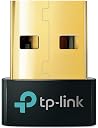
🚀 Elevate your PC’s wireless game with the sleekest, fastest Bluetooth dongle around!
The TP-Link UB500 Bluetooth Adapter leverages Bluetooth 5.4 with Enhanced Data Rate and Low Energy technology to deliver up to twice the speed and four times the range of older Bluetooth versions. Its nano-sized design ensures a discreet, always-plugged-in presence, while broad Windows compatibility and plug-and-play setup make it the ideal upgrade for professionals seeking reliable, high-performance wireless connectivity across multiple devices.
| ASIN | B09DMP6T22 |
| Best Sellers Rank | #1 in Bluetooth Network Adapters |
| Brand | TP-Link |
| Built-In Media | Bluetooth 5. |
| Color | Golden,Black |
| Compatible Devices | Laptop |
| Compatible Operating System Family | Windows |
| Customer Reviews | 4.5 out of 5 stars 22,014 Reviews |
| Data Link Protocol | Bluetooth |
| Data Transfer Rate | 2 megabits_per_second |
| Hardware Interface | Bluetooth 5 |
| Item Dimensions L x W x H | 0.74"L x 0.58"W x 0.27"H |
| Item Highlight | Plug and Play, Nano Design, EDR & BLE, Supports Windows 11/10/8.1/7 for Desktop, Laptop, Keyboard, Mouse, etc (UB500) |
| Item Type Name | Bluetooth Adapter |
| Item Weight | 2 g |
| Manufacturer | TP-Link |
| Mfr Part Number | UB500 |
| Minimum Required Operating System Version | Windows 8 |
| Model Number | UB500 |
| Number of Items | 1 |
| Number of Packs | 1 |
| Product Dimensions | 0.74"L x 0.58"W x 0.27"H |
| UPC | 840030703447 |
| Unit Count | 1 Count |
| Warranty Description | 2 year manufacturer |
A**R
Works on my Linux kernel 6.16+, and it's upgraded to BT 5.4!
This works at a Bluetooth 5.4 level if you're using a Linux kernel of 6.16+. I'm not sure what kernel number the driver was updated to that, but I can verify it with 6.16+. If you're Linux machine doesn't already have Bluetooth, then this is just an easy plug-and-play. If you've got one of those internal cards that combine both Bluetooth and Wi-Fi, and you're trying to stop the conflicts from the fight over the antenna and signals, then you'll have to disable the Bluetooth portion of your card or this will conflict with your existing hardware. Even if you're on Windows, you'd need to disable the internal Bluetooth hardware. Now, I can't speak for Windows, haven't used it in years, but on Linux, it's fairly simple to disable the Bluetooth without disabling the Wi-Fi. Now, why exactly is it that they say this only supports Windows and not Linux, when it clearly supports Linux? Here's my break down of it. If you're a Linux user, you might be interested to know this, because it can give you confidence when purchasing: #1: It didn't used to support Linux, but Linux added the support in the kernel around 5.8+. If you've got that or higher, you should be good. The higher kernel you have, the more features and upgrades you'll get out of it. #2: User manual. This thing is small and highly simplistic. All the instructions are "How to pair a device in Windows" kind of instructions. That very simple instruction can change drastically from Linux distro to distro, and DE to DE. They aren't going to kill that many trees for the instructions. This was so worth it. I was using one of those internal cards, but with Wi-Fi and Bluetooth on the same chip, my music would cut out several times per minute while I was streaming. That's a big no go for me. This has fixed my issues, and all my streaming is now completely stable, for both the Wi-Fi and my Bluetooth, because this TP-Link Bluetooth dongle does not interfere with my internal Wi-Fi card. Finally, a stable Bluetooth connection that I can be happy with.
C**S
Solved my WFH setup issue instantly (plug and play!)
As I work from home, I need a lot of peripherals hooked up to both my home computer and my work computer. As some of my gear started to get old, I replaced them, only to find that my computer did not actually have proper Bluetooth support built in. Bummer. Fortunately, this TP-Link USB Bluetooth Adapter solved the problem completely. Not a bummer at all! The connector fits easily into a standard USB port, and with next to no fiddling on my computer, it connected right away to the wireless trackball I ordered. It hasn't given me a single problem since hooking it up. That is really all I need from tech like this: a decent, reliable device that works at a reasonable price.
E**C
Exactly what I needed!
I recently purchased the TP-Link USB Bluetooth Adapter, and it has exceeded my expectations in every way. This small device delivers big performance, making it an excellent addition to my setup. Easy Setup Right out of the box, the adapter was incredibly easy to set up. The plug-and-play functionality worked seamlessly, and I was connected to my Bluetooth devices within minutes. For Windows users, the drivers provided ensure smooth operation without any hiccups. Reliable Performance One of the standout features of this adapter is its reliability. Whether I’m connecting to my wireless headphones, a Bluetooth speaker, or transferring files via Bluetooth, the connection is always stable and lag-free. It has great range too, so I can move around freely without losing the connection. Compact and Durable Design The compact size of the adapter is another plus. It’s unobtrusive when plugged in, making it perfect for laptops or desktops without built-in Bluetooth capabilities. Despite its small size, it feels well-made and durable. Improved Connectivity for Older Systems This adapter breathed new life into my older computer, allowing me to use modern Bluetooth peripherals without any issues. It supports the latest Bluetooth versions, so I can enjoy faster speeds and better compatibility. Why I Like It I like the TP-Link USB Bluetooth Adapter because it’s affordable, reliable, and performs exactly as advertised. It’s the perfect solution for anyone needing Bluetooth connectivity without the hassle. Whether you’re gaming, listening to music, or syncing devices, this adapter gets the job done effortlessly. Final Thoughts Overall, I highly recommend the TP-Link USB Bluetooth Adapter to anyone in need of a simple yet powerful Bluetooth solution. It’s a small investment that makes a big difference in day-to-day connectivity.
A**A
Easy fix
The built-in Bluetooth antenna in my computer kept going out, so I bought this one as a replacement. It was super easy to set up: just disable your current Bluetooth driver in device manager, plug in this dongle, and restart your computer. The instructions say to get the new driver from their website, but mine found it automatically. So far it’s been working great, and I love how small the adapter is so it’s not really in your way. I use an Xbox controller for gaming, and haven’t had any issues so far with the connection or response time. This is a great option for a great price.
A**N
Seems to work ok. Works on Windows7 Pro. But only suports lower quality music bit rates.
Review date: 3-16-2025, Revision: C. I'm using it with all, very old stuff - It works good So far (connected to to USB2.0). It sounds good, despite it being SBC/AAC Bluetooth audio... Computer: HP Compaq 8000 Elete Minitower (not the small one at all). Upgraded with Samsung SSD-840-EVO-256GB system hard drive, USB3.0 via PCIe and SATA3.0 card). OS: Windows 7Pro 64b OEM up to date (really!). I have a Avantree CARA-2 BT receiver meant for car use. I'm using it on my home (AV receiver) stereo (TEAC AG-D8900, 5channel x 100Watts ) to pass the PC's music etc. Here the down side. It only supports, BT SBC and AAC. Not Apt-X or the HD version. So I went and found an audio 20Ft cable and connected it to my stereo directly, and surprisingly, I did not notice any difference. I believe, I was listening to CD quality music. This might be an issues if your an audiofile, high-end type. This It makes little difference if your listening to MP3 files, at 320kbps or less (this is the max possible for a MP3). BT SBC is maxed out at 320kbps. I went and stated a CD on my PC. I cant tell the difference between the Avantree BTDG-80-P (somewhat new ~year or so old), does Adp-X (the CD quality codec). ----------------------------------------------------------------------------------------------------------------------------------------- Review date: 1-27-2024, Revision: C. Two Stars for Laptop use. Seems to work, for some devices but not others... My setup: T500, Windows 7Pro64b. I wasn't able to make my Logitech M505 Mouse, to work with the UB500, nor my headphones. The One of the problem I'm trying to solve is, that to use anything new USB wise, I'll need to decide which I can do without, the USB/ WiFi, the USB/ Mouse, or this USB/ UB500 BT dongle? I don't do USB hubs on laptops, its a computer not an octopus... I tried to connect to my PXC-550-II. I was unable to make these work. Its a driver issue. Not sure if its sennheiser or this dongle. This happens with I add new hardware, to connect these headphones, one of the peripheral drivers doesn't load. Sennheiser, has failed to respond to my emails... I've purchased another brand dongle. https://www.amazon.com/dp/B088LNPXNN This one connects to both my BT speakers and the headphones. After using TP-Links customer support without success, I've returned the UB500, as its doesn't work. Goodluck...
T**Z
Compact, Reliable, and Easy to Use
“I’m very happy with this USB Bluetooth adapter. It’s small and compact, so it doesn’t take up much space, and it was easy to set up and use. The connection has been reliable, and it works great for adding Bluetooth capability to my computer. A simple and convenient product that does exactly what I needed.”
E**H
Plug and play easy
I can't believe I didn't find this before! It works perfect it didn't need me to download anything and paired instantly with my controller now I can play games on my couch definitely recommend
Z**Z
FACT vs. FICTIONAL ADVERTISING
We recently purchased a trio of TP-Link Bluetooth USB adapters as a single Amazon order: 1.) TP-Link UB400 Bluetooth 4.0 Nano USB Adapter [UPC: 845973099664] 2.) TP-Link UB500 Bluetooth 5.3 Nano USB Adapter [UPC: 840030703447] 3.) TP-Link UB500 Plus Bluetooth 5.3 Long Range USB Adapter [UPC: 840030703447] The primary (and by far most important) of our 3 purchases was the first (UB400), intended to add BT functionality to an older – but otherwise pristine and fully-functional – XP-based laptop lacking that intrinsic capability, and which we intend(ed) to repurpose for LPPAN communications with a centralized BT receiver. The latter 2 purchases (those involving the UB500 series) were of far less importance, being simply speculative, spur-of-the-moment additions, intended to determine whether – as suggested by TP-Link – they might potentially improve BT function and stability in a pair of newer Window computers already equipped with functioning onboard Bluetooth stacks and radios, but positioned at increasingly greater distances, relative to the older laptop, from the referenced BT receiver [hence, the choice of plain and long-range versions of the UB500 series]. As per both TP-Link's UB400 website and Amazon pages (NB: not only at the time of purchase, but currently, as well), this particular Bluetooth 4.0 adapter is advertised as being compatible with ALL versions of Windows – with the apparent exception of Vista – from XP to W11 ["TP-Link USB Bluetooth Adapter for PC, Bluetooth 4.0 Dongle Receiver, Plug & Play, Nano Size, EDR & A2DP Technology, Supports Windows 11/10/8.1/8/7/XP for Desktop, Laptop, PS4/ Xbox Controllers (UB400)"] with the proviso that the two older operating systems (XP and 7) would first require installation of a "driver" available for free from TP-L's website ["Plug N' Play for Windows 11, 10, 8.1, and 8... For Windows 11,10, 8.1, and 8, just plug UB400 into your computer to enjoy a fast, convenient Bluetooth connection. Windows XP and 7 are also supported by installing the driver from TP-Link's website*... *To download the driver, go to TP-Link's website, search for the UB400 product page, click 'Support,' and then select 'Driver.'" / "Q: What operating systems are compatible with the UB400? A: Current supported operating systems include Windows 11/10/8.1/8/7/XP, driver needed for Windows 7/XP. Does not support Mac OS and Linux."]. Upon receipt of the UB400 (which for obvious reasons was unpackaged first of the three), we promptly downloaded and installed TP-Link's requisite XP/W7 software package in PRECISE accordance with their instructions. The so-called "driver" file from their website (UB400_Driver.zip), extracted and then run under elevated "Administrator" privileges on an XP Pro SP2 (32-bit) installation lacking ANY Bluetooth stack (let alone an active MS one capable of interfering with the process) and absent any active Windows Defender or anti-virus interference, installed successfully with neither problem nor difficulty. The resultant Cambridge Silicon Radio Ltd. Harmony Wireless BT Stack & GUI (for the record, at some 425GB uncompressed, a massive piece of bloatware for any typical-of-the-era XP installation on a 60-80GB PATA/IDE 2.5" internal laptop HD) were now obviously available, although unable either to recognize or activate the USB 2.0-installed TP-Link UB400 dongle. Furthermore, no appropriate driver for same could be found on the post-install system, whether via XP's built-in driver-search function or through our own extensive, system-wide exploration (indeed, unlike with its comparable W7-11 driver package, which contains a "BT_Driver" subfolder comprising multiple further OS-specific driver subfolders, each containing the anticipated .cab and .inf files, a thorough internal search of TP-Link's XP "driver" package, including within all archive files therein, likewise failed to identify and/or locate any actual driver files, per se). Scouring both TP-Link's website (and following all their "troubleshooting" advice, with careful attention to every detail, noting and testing every possible nuance or ambiguity) as well as a host of potentially pertinent postings from across the Internet, we identified and tested every conceivably useful variation in installation procedure, however minute or subtle, that might amend the situation, but all to no avail (despite more than a dozen such additional installations over the course of nearly two weeks' time, preceded in every instance with complete reversal of the previous via Revo Uninstaller Pro v3.2.1.0). When further extensive research failed to turn up even the slightest possible solution, we finally unplugged the UB400 adapter and returned it to its original (inner) plastic packaging and (outermost) cardboard box, preparatory to arranging for return of same to Amazon. Only at this point did we happen to notice that the box in which our (purportedly XP-compatible) UB400 arrived, contrary to ongoing TP-Link claims on both their own and their Amazon UB400 pages, listed only "Win 11/10/8.1/7" as the full extent of compatible operating systems, with further examination of the packaging disclosing a sticker beside the surface-printed UPC Code (845973099664) indicating – in addition to the particular "S/N" and generalized "P/N" (0152602538) – that the model received was "UB400(US)" (NB: "MADE IN VIETNAM"), and additionally identifying this particular adapter as being "Ver. 2.6" (with an additional signifier, of unknown meaning or importance, immediately below same, appearing in this instance as: "1L"). Further Internet research, including across all relevant sections of TP-Link's U.S. and (accessible) worldwide websites, strongly suggests that ONLY TP-Link UB400 "Ver. 1.0" to "Ver. 1.8" (introduced, apparently, in 2012 and c.2018, respectively) can be deployed under XP (SP2 or 3) via the TP-Link-provided software package (again, the questionably-named "UB400_Driver.zip") installing the previously denoted CSR Harmony Wireless Software Stack (i.e., BT stack & GUI). With introduction of the "Ver. 2" series adapters (c.2023-4), including the latest "Ver. 2.6" variant here at issue, the XP-relevant "driver" package available for download from the TP-Link website is no longer compatible with ANY of their BT 4.0 adapters presently available for purchase - whether through Amazon, their own website(s), or elsewhere - and the comparable driver package specifically for the UB400 Ver. 2.6 device (currently, V2_1.9.1051.3012.zip) contains no driver whatsoever applicable to Windows XP. In other words, TP-Link continues to advertise their current UB400 BT 4.0 adapters - whether on Amazon, their own series of worldwide web pages, or elsewhere - as being fully compatible with XP when, in fact, NONE of them are (and haven't been for at least a year or two); it likewise continues to insinuate that this non-existent XP-compatibility can be actualized by installation of a cartoonishly massive (but ultimately "XP-friendly") "driver" software package freely available for download from their website(s), when in fact, that software does not – because it cannot – do anything of the sort, being entirely incompatible with any currently available retail version of the UB400 BT 4.0 adapter; AND they likewise continue to then proffer an extensive series of "troubleshooting" steps in the now-inevitable event an unassuming customer, attempting to deploy this (TP-Link recommended) hardware-software combination for its express purpose (i.e., adding BT functionality to an XP SP2-3 installation otherwise lacking that capability), should find – against all expectations – that the purchased UB400 simply and repeatedly fails to work under XP, no matter how carefully TP-Link's installation instructions are followed, or how many slightly varied versions of same are attempted, essentially thus throwing good time and effort after bad. In the (unlikely) event TP-Link should respond productively to this review, which is to say, by 1.) providing a means to selectively procure a "Ver. 1" series adapter (with guaranteed functionality under XP via the still-available "driver" download package) and/or 2.) providing a functional new "driver" download package extending the advertised XP-compatibility to their current "Ver. 2" series adapters, or 3.) at very least (and at long last), correcting their long-standing false advertisement re. the (absolutely nonexistent) XP compatibility of their current product line, then we will revisit this review and, as warranted, amend the presently given rating (which, for the record, would for obvious reasons stand at zero stars, save that Amazon requires at least a single one be "awarded"). Caveat emptor (& venditor), Z.
T**R
Plug and play
Installation is simple. Simply just plug this into your PC, and you now have bluetooth. No extra steps, thats really it. It works as advertised.
E**D
ممتازه و تؤدي الغرض
جيده جدا. وتؤدي العرض معي بقلها ٣ سنين و تعمل كا اول يوم
R**.
Muito bom
Cumpre o que promete, muito bom
A**I
Başarılı urun
Tek tuk problem yaşadım ama bir tanesi ana cihazla alakali olabilir: 1) Bluetooth kulaklik ve Bluetooth hoparlör aynı anda pcye bağlıyken ufak ufak güç kopuslari oldu. 2) bt çalışmasını beklediğim mekanik klavyemin 3 farkli Bluetooth modunda da pc üzerinden bu klavyemi göremedim. Bir ihtimal aynı anda cihaz çalıştırırken problem oluyor olabilir. Ama uygulamasını doğru yapmadığım için de olabilir, win 10 driver doğru yükleme vs eksikliğinden bu 2 problem oluşmuş olabilir. Bunlara rağmen minimum 4 puanı hak eder.
م**ي
ممتاز ويشبك بسرعه
ممتاز ويشبك على طول معك بدون مشاكل
Trustpilot
4 days ago
1 month ago