Buy anything from 5,000+ international stores. One checkout price. No surprise fees. Join 2M+ shoppers on Desertcart.
Desertcart purchases this item on your behalf and handles shipping, customs, and support to Hungary.
🔒 Elevate your home security game with pro-grade 24/7 surveillance
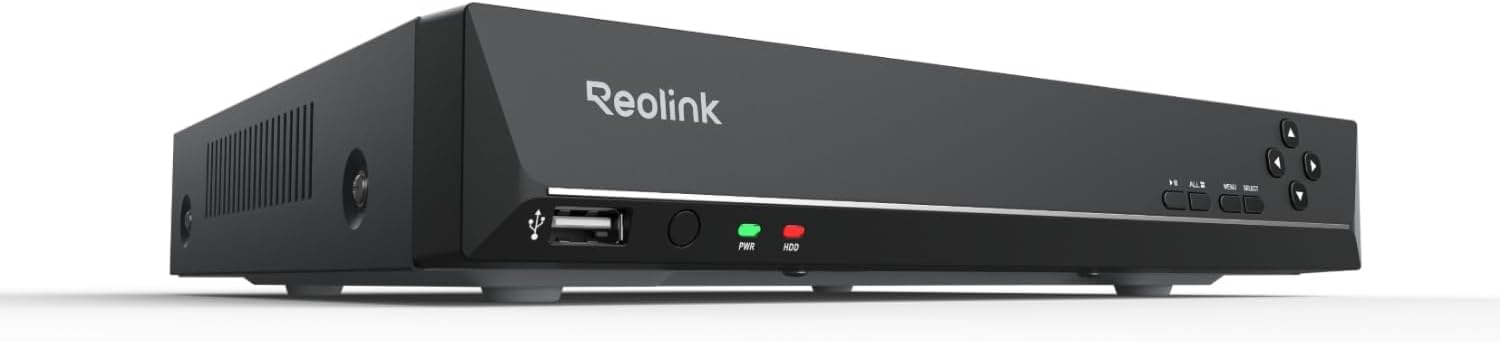
The REOLINK 8CH Network Video Recorder (RLN8-410) is a professional-grade PoE NVR designed exclusively for Reolink IP cameras, supporting up to 8 channels with 16MP to 4K resolution. Featuring a pre-installed 2TB hard drive for continuous 24/7 recording, it offers plug-and-play setup via a single Ethernet cable, smart human/vehicle/animal detection, and seamless remote access through free apps—empowering millennials to build a cutting-edge, reliable home security system with ease.


| Asin | B01D2TQXJW |
| Audio Input | RCA |
| Best Sellers Rank | #5 in Surveillance Video Recorders |
| Brand | REOLINK |
| Compatible Devices | Not support Third-party camera, Only work with Reolink Camera |
| Connectivity Technology | Ethernet, HDMI, VGA |
| Customer Reviews | 4.4 4.4 out of 5 stars (2,237) 4.4 out of 5 stars |
| Hard Drive Size | 2 TB |
| Item Dimensions L X W X H | 10.24"L x 9.06"W x 1.61"H |
| Item Weight | 6.28 Pounds |
| Manufacturer | Reolink Digital |
| Media Format Digital Video | HDD |
| Memory Storage Capacity | 2 TB |
| Mfr Part Number | FBA_RLN8-410 |
| Model Number | RLN8-410 |
| Number Of Channels | 8 |
| Smart Home Compatibility | Smart Home Compatible |
| Total Usb Ports | 2 |
| Unit Count | 1.0 Count |
| Upc | 749110052362 |
| Video Input | IP Input |
| Warranty Description | 2-Year Litmied Warranty |
| Wattage | 25 watts |
User
Best stand alone Security DVR I have seen. Everything you need.
This is my second Reolink DVR. I still have my first one, but this is the one that supports the newer OMVI 3i PoE camera (That I love). Reolink makes reliable and amazing security products. No subscriptions, just great security. I can access my cameras anywhere I have internet access. This unit has 2T of storage, and I can record a weeks' worth of 8 channels of high quality footage. I like the Power over ethernet (PoE) because I have network cables and access all over my place. Easy to set up, easy to use, and peace of mind.
User
Great Budget Friendly NVR
I purchased the Reolink RLN8-410 NVR without a hard disk drive as I would be providing my own. I purchased this NVR to replace an old Reolink NVR that does not have all the new features and camera support. So far this NVR has worked flawlessly. I installed a 4TB Wester Digital Purple Surveillance Drive and the NVR immediately detected it and has been storing and accessing video perfectly fine. I am using the NVR indoors and noise levels are not noticeable near my TV. The installation and configuration of this NVR is very easy and a non-technical person can get this up and running very easily with default plug/play settings.Pros:-PoE-No subscription-AI features (Person, vehicle tracking)
User
Good NVR replacement.
Replaced an older Reolink NVR after it got wet and stopped working. Swapped my existing hard drive into this one and everything came back up without any problems. Setup was straightforward and it recognized the system quickly.So far it's been running reliably and does exactly what I needed it to do.
User
Solid NVR for local recording with no subscription required
Using this NVR as the backbone of my home security setup with four cameras and it has been solid. The onvif compatibility makes it easy to add cameras from different brands. Recording is consistent and reviewing footage is straightforward through the Reolink app. The setup process requires reading the manual but the instructions are clear. Local storage means no subscription fees which was a major factor in choosing this setup. The device runs quietly and the build quality is sturdy.
User
works well
just installed an 8 camera reolink system. i will be brief, and i write this as someone who has installed a lot of camera systems: 1. these are much less expensive than prior systems i've installed. for the function? it's a small fraction. 2. they are very easy to activate - but note, you do need to scan the QR code. I added them to the app first, then the nvr. 3. from time to time the nvr glitches: the picture on the camera stays in IR mode while in the app it is color. power cycling doesn't fix it, but going in and changing the camera from color mode to (I forget what) and back does. 4. the AI function of these things if flat out creepy, but very effective. highly recommended.
User
A great, quiet NVR to pair with your Reolink Wifi Video Doorbell
This is a great NVR. Easy setup with my Reolink WiFi Video Doorbell, quiet operations, and not too bulky (not VCR-sized lol). I maintained complete usage of my Reolink WiFi Doorbell - as someone who's read mixed reviews about this, and the noise, I'd like to provide as much info as possible.I first connected my video doorbell to my WiFi during its setup, physically hooked up the video doorbell (powered by my old doorbell wires), and ensured everything ran smoothly in the app.From there, I physically connected the NVR to the same network (doorbell on WiFi broadcast from a modem, NVR connected to a network switch plugged into that same modem via ethernet). I had to plug the NVR into a monitor via HDMI and set everything up with the included mouse (including inputting passwords - ouch).Once the NVR settings were good (the setup is very easy to go through step-by-step), I added my video doorbell within the NVR's interface (still using my monitor, etc). Once I input my camera's admin login info, it began displaying the doorbell's video on the monitor.From there, it automatically recognized the NVR in the Reolink app (you may need the NVR's admin/password setup you created, if you setup a separate admin account for the NVR vs the doorbell. I did).I have both the doorbell and NVR (which redundantly shows the doorbell) on my app. The NVR is recording 24/7 from the doorbell, and I choose to not have any notifications turned on for it (but you can redundantly setup notifications for it - you do lose out on certain notification types through the NVR alone, though). On that last note, it's why I also kept my doorbell in the app - I can keep the local recordings on its SD card, get notifications of movement/packages/etc by keeping the doorbell as its own device on the app. I still get notifications for doorbell presses and can talk through my doorbell over the Reolink app just fine.If you do what I did, you will (or should) have the same setup as I do. Local 24/7 recording on the very quiet NVR (seriously I'm obnoxious about wanting things silent, and it's a foot away from me. There is no fan noise, only very minor hard drive noise sometimes), local event-based recording on the doorbell's SD card, and notifications for events on my phone. The NVR's 24/7 recording also denotes events, and you can filter (all through the app, too).I don't know what functionality people have lost, but I bought the white NVR. I can confirm you can use the WiFi doorbell over WiFi (not POE) with this NVR, as long as it's connected to the same network. You get 24/7 recording and you get to keep notifications. Your WiFi's speed will affect your experience, but this was mine. If you were someone who was looking for this info, as I had been prior to ordering, I hope this helps.
User
Unresponsive customer support - no phone support - do not call reolink-support (dot) com
NVR arrived DOA. Splash screen starts and no following user setup screen appears as expected. Emailed support today and after 12 hours, no response. Called (what I thought to be their tech support - reolink-support) and after two minutes, tech wanted to share the screen, put me on hold for a few minutes then returned to say my gigabit fiber internal network was "dropping packets." He said he would switch me to a "network expert" but there was, "uhh, a charge for that." I quickly terminated the shared screen and hung up. Obviously a scam site playing on the reolink name. Email to the company has not been returned. Ufortunately, I took a day off from working to install the cameras and nvr.Hard drive spins up. Cameras engage, even night vision red LED ring on the two cameras plugged in come on when the room is dark. I do a bunch of home automation work with home assistant and have been a programmer all my life. This is not my first rodeo. I love the reviews of this equipment but there have been warning flags from this purchase and unfortunately, this and the cameras will go back to Amazon. I guess I will overpay for products which don't have reliability or privacy concerns. I knew I shouldn't have made this choice.** Edit - Customer support emailed me a day later and worked through a couple of solutions. In my case, I had the local monitor connected to the NVR directly with an HDMI cable. For whatever reason, their modified firmware on top of the linux core did not have updated drivers to allow the new user login dialog to work correctly. I had to find a vga-vga cable to use which allowed the screen to properly display the initial login setup. As a side note, the device was noted on my lan as a generic "network device" and not designated with some form of appropriate title. When I discerned which IP had been given by dhcp, when logging into that IP, I was met with a login prompt and not the expected setup dialog. NVR setup *must* be performed locally on the machine before it can be accessed on the LAN. This is not an unusual behavior, but something of note. During initial setup, make sure you have a vga to vga cable and monitor which will accept this connection. Using the HDMI out of the NVR box did not work for me. YMMV. I was surprised their normal support device did not note this although my initial email explained my setup and a video was sent to them showing the connections and machine response. All is working as expected now.
User
Excellent system that doesn’t break the bank.
After owning this over a year now, we really enjoy the simplicity of the REOLINK system overall! I can check all my cameras from anywhere. The customization of the cameras and what they can detect, and when is really helpful!The paired cameras are able to hear and broadcast sound, which is an added bonus to the security of the system. Camera clarity is fantastic!
User
Great experience with system so far
Great experience with system so far. Everything has been very plug and play. Even for remote access via my cell phone. No need to port forward.PROS-Tons of customizable options to meet your needs-Ease of use-Ease of remote viewing setupCONS-Expensive (but if it lasts more than 4 years, its worth the price)
User
Buen grabador
Me gusta el servicio de REOLINK. Lo recomiendo mucho. Si tienes algún problemas les escribes y siempre contestan. Se actualizan constantemente. Tengo años adquiriendo la marca REOLINK y sigo comprando por el buen servicio y calidad.
User
Solid multi-camera recording system
This 8-channel NVR system provides solid security recording capability for a home or small business setup. The interface is straightforward to navigate and the system handles multiple camera feeds reliably. Video playback and motion detection features work as expected. The build quality is decent for the price point. Setup requires some networking knowledge, so buyers without experience might want professional installation. Storage capacity is good for extended recording periods. Overall, it's a practical choice for those looking for a multi-camera surveillance system without excessive complexity.
User
Will work just fine with any Reolink directly connected cameras to NVR or ...
Use it for couple of months - no issues at all. High Quality unit, set up takes 5 minutes. Will work just fine with any Reolink directly connected cameras to NVR or connected through your local network with POE or regular power supply.Fan is quite loud, box itself is cold all the time so it works good, but the noise will be a pain so place it somewhere you will not hear it.
User
Works perfectly and easily
It's not often that home surveillance systems work so flawlessly and simply, but this one does. Just plug it in, set the schedule, and it goes to work.
Trustpilot
3 weeks ago
1 month ago