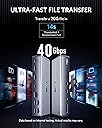
โก Elevate your workspace โ power, speed, and display like never before!
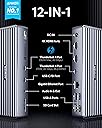
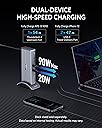
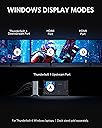
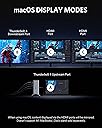
The Anker 777 Thunderbolt Docking Station is a premium 12-in-1 hub designed for Windows 10 Thunderbolt 4 laptops and compatible MacBooks. It delivers up to 90W laptop charging, supports a single 8K and triple 4K display output, and offers ultra-fast 10Gbps data transfer. With versatile ports including HDMI, Ethernet, SD card, and audio, it transforms your setup into a streamlined productivity powerhouse.


| ASIN | B0928W3XHD |
| Best Sellers Rank | #54,756 in Computers & Accessories ( See Top 100 in Computers & Accessories ) #1,773 in Laptop Docking Stations |
| Brand | Anker |
| Color | Gray |
| Compatible Devices | Laptop/Personal Computer |
| Customer Reviews | 3.7 out of 5 stars 682 Reviews |
| Hardware Interface | 3.5mm Audio, Ethernet, HDMI , Thunderbolt 4 , USB 2.0 Type A, USB 3.1 Type A, USB 3.1 Type C |
| Input Voltage | 120 volts_of_alternating_current |
| Item Dimensions L x W x H | 2.9"L x 1.3"W x 7.3"H |
| Manufacturer | Anker |
| Mfr Part Number | A8397 |
| Minimum Required Operating System Version | Mac OS 11 Big Sur, Windows 10 |
| Model Number | A8397 |
| Number of Items | 1 |
| Number of Ports | 12 |
| Product Dimensions | 2.9"L x 1.3"W x 7.3"H |
| Total Number of HDMI Ports | 2 |
| Total USB Ports | 4 |
| Total Usb Ports | 4 |
| UPC | 194644066697 |
| Warranty Description | 18 month warranty |
| Wattage | 90 watts |
T**M
For M1 MacBook Pro - the port matters
I've been using this hub now for 2 months and it has worked flawlessly. It's simultaneously supporting a 4k external monitor, external USB drive, USB printer, and USB keyboard while also charging the laptop. As of this morning, all of the USB ports on the back stopped working although the monitor worked fine. I called Anker support and was very fortunate to talk to someone who previously worked for Apple up until recently. After I told him the model of MacBook he knew that it only has two USB-C ports on the left side, and asked me if I had it plugged into the rear most port on the laptop. That was true, and after he recommended switching it to the front most port on the laptop, all worked well. As far as I knew, these ports were supposed to be identical, but apparently the are not. But it is interesting that the hub worked fine for two months. Anyway, I just wanted to post this in case anyone else runs into this issue where there ports stop working.
K**T
Could not get HDMI to work on this dock, BUT see updates in review text
UPDATE 2/2/2023 The unit was sent back to Anker for a full refund. I cannot fault their support (thanks Alyssa). But, the bottom line is that I could NOT get this dock to drive the TV in my offjce. See below for details. I wanted to like this dock. It is made well. HOWEVER, HDMI just doesn't work. I have been talking with Anker tech support. They had a variety of suggestions to troubleshoot however this was of no help. I have now tried 4 different HDMI cables from the 777 into the TV in my home office. I tried both HDMI ports on the 777. NONE of these cables to the TV work when connected to the 777. ALL of the same cables work when directly connected to the HP laptop. One of the cables that I tried also works when connected to my Vankyo projector. That same cable also works when connected to various TVs in locations where I teach. I do NOT have DP to HDMI cables or USBC to HDMI cables and do NOT want to go on a cable hunt just to test out this Anker device. The common denominator that fails is the 777 dock, therefore I CANNOT recommend this dock. I have a variety of Anker products and like the brand a lot. HOWEVER, although I like the dock itself...it's no good to me as it just doesn't work with the HDMI ports. I now have a separate part of Anker offering a refund. I had previously sent back both the dock and stand to Anker in Ontario, CA as directed by Anker support. They processed a refund BUT only for the dock and NOT the stand. Iโm still trying to get the refund processed for the stand. Maybe if others return this dock and standโฆ.they should go through Amazon and not Ankerโฆthat is probably much easier? I still like Anker products and have used quite a few in the past. I will continue to use them as my needs dictate. UPDATE 2/8/2023 I have found out after returning the Anker 777 dock that it "may" have been OK with HDMI. HP states that my laptop has "(2) USB4โข with Thunderboltโข Gen 4 Type-C port; 40 Gbps signaling rate (USB Power Delivery, DisplayPortโข 1.4, HP Sleep and Charge) " One would think that from item 2 above that both the Thunderbird4 ports are identical, right? I can tell you that HDMI via the dock works OK to my office TV when the Thunderbolt4 cable supplied with the dock when plugged into the Thunderbird4 port on the right side of the HP laptop. It does NOT work when plugged into the port on the diagonal right rear corner of the laptop. This leads me to the conclusion that either that corner port is faulty or is just NOT the same as the port on the right side of the laptop. I have raised my review to 4* on Amazon and posted this information there also. I hope that this may help you or another customer.
J**E
Awesome solution for home office with MacBook Pro M3
I use my MacBook Pro M3 for working from home, with two external screens. I was using the HDMI port for one and a thunderbolt / HDMI adapter for the second. Also had a USB extender to connect printer, scanner, headphone charger, misc chargers... Between all those and the charger as well, the portability was basically lost as it was such a pain to move the laptop to actually use as a laptop. Now that I have this, it's just one plug to grab the computer and go wherever I want. It's been working great for me. My only complaint is that (at least on the MacBook Pro) the two HDMI only put out a mirrored signal, and I still have to use the USB-C/Thunderbolt to HDMI adapter to get two separate displays to work. Not sure why that is the case but from the research I've done it seems the only way for it to do dual monitors for MacBook. Outside of that there is nothing to complain about. One little bonus - our MacBook Air came with USB-C charging only, but the new MacBook Pro came with a separate charger and I was not expecting that the thunderbolt ports would allow charging via the 777 - but it does! I was expecting to have to keep the charger and the thunderbolt going to the 777 to have this work, but I don't even need to use the Apple charger since the thunderbolt does take the charge as well. Overall, I wish it wasn't so expensive, but it is a great convenience if you move your computer around much at all.
R**W
When brand become it's most valuable attraction, it's destined to fail
I purchasing this because recent upgrade my laptop to Lenovo Legion 7i and MacBook Pro 16 2021, both of them have TB4 ports, so I want to also upgrade my current 4 years old Thinkpad TB3 dock to TB4 too. My instinct is go to upgrade it to Thinkpad TB4 dock since it's old brother serves me well. However, my search for it land in the Anker's TB4 dock page due to it's paid advertisement, it has almost everything I want for a TB4 and include a UHS-II SD card is really a bouns than Lenovo's. Since I have lots of Anker's chargers and it's a renowned company now what would go wrong? Disaster happens. At first glance, it appeared to slimer and shiny than my old TB3 dock, it made with aluminum case screams for premium all around. But after I connected it to my MacBook Pro, it starts to show issues: The dock suffers from random disconnections and poor Thunderbolt 4 support. Sometimes it's just the daisy chained thunderbolt 4 device that disappears then reconnects, sometimes the entire dock loses connection from the host. Directly connecting thunderbolt devices works just fine, something in the design of these docks is not right. Then I started reach for firmware update page to check if it could be solved by software update, but I found none, even in Anker's own webpage says they don't have any update or update ability on this device. I'm so shocked for such a complex and expensive device, there is no update. During my tenure with Thinkpad TB3 dock: it have some glitches at first but after countless firmware updates, it make connection flawless on both Mac and Windows. I just couldn't believe Anker won't provide such essential update service. Thunderbolt dock are like computers themself, there are numerous different chips and protocols in the matrix to connect and communicate, it's very vital to have an open gate to update and keep up with old and new devices it need to compatible with. I won't recommend it to anyone want a serious dock solution.
J**D
$329 charging station
THIRD UPDATED REVIEW 2.5 YEARS AFTER PURCHASE I like Anker, and I'll buy Anker again. But I don't recommend this dock even for $200. The monitor issue never changed, never stopped happening. Even as I write this review with my plain-Jane set up with two HD monitors one or both continue to blink off for 10 to 30 seconds. The elaborate plugging/unplugging ritual to try and clear any hang ups either on my laptop or in the dock don't amount to much. If you read below, Anker reached out and sent me a new one at six months, and the issue is still the same across the two devices, so I am satisfied that this isn't a lemon. It's simply not reliable and I'm considering buying a new dock like CalDigit because I'm tired of screwing around with this. There will be no ROI and that's ok. SECOND UPDATED REVIEW SIX MONTHS AFTER PURCHASE: I like Anker, I'll buy Anker again. Having said that, I do not find this hub reliable and I do not recommend it. The monitors drop out unless you occasionally do a complete power-off/disconnect everything (including hub's AC cord) and then plug it all back in. My year-old Logitech webcam occasionally goes missing. What prompted me to write this second review is all the USB ports went out Minutes Before A Big Job Interview - I had to switch to my laptop camera and headset while on the Zoom call. It was a good interview, but no thanks to this hub. When I have something so important again, I will make DAMN sure I do a complete reboot of everything and test all peripherals a half hour before the start of whatever I need it for. This was really inconvenient and I'm not going to forget it for a long, long time. If I hadn't dropped $300 on it I would toss it out and get something I can count on. UPDATED REVIEW - see below: I like Anker a lot, and I'll buy Anker again. This dock IMO is not ready for use. From the beginning it cut out the monitors on my plain-Jane set up of on FHD monitor and one 4K and some charging cables. It appears power goes only to the USB-C ports and not to the USB-A and HDMI ports. I can power my new Lenovo Carbon X1 laptop and I can recharge my keyboard and headphones with the USB-C ports, but there is no power to the USB-A ports and I assume to the HDMI ports. No devices are recognized by my laptop despite the power connection working. Multiple reboots of laptop and dock, switching the cable around, flipping the connectors, swapping cables -- nothing makes a difference. The unit is definitely powered on, definitely worked (in its intermittent way) yesterday, and is not working at all today. I bought this in October and it appears I have until the end of this month to return it. I will see if I can get a fix I like, otherwise I will return it. I would not recommend it to a friend. UPDATE: Anker proactively reached out to me in January a week after I wrote my first two-star review, which was two months after I bought the dock. They offered to swap my unit with a new one, and I decided to take them up on it. Maybe mine was a lemon. The new unit is identical for hardware as far as I can tell, so maybe the firmware is different. Before shipping the new one, I also did as they requested and did more fiddling around with cables and reboots to make it work right. Turns out if the unit is getting all wackado, you shutdown your computer, unplug the dock from it, take all the cables out of the dock including the power cable, let it sit till all charge is gone (I ate lunch), then come back and incrementally plug everything back in. I rebooted my computer twice without the dock, I powered up the dock with nothing but the AC cable in it and back down, then plug just the dock into my computer so it recognizes the dock, then reboot with the dock plugged in, then shut down the computer, power off the dock, count to 10, power up the dock, plug in my two monitors, webcam, Jabra speakerphone, power up the dock, power up the laptop, and things seem to work well. By the way, I'm using a brand new Lenovo X1 Carbon that is Thunderbolt 4 compatible, two 27" Asus monitors (one is 4K but both are set to 1920x1080), a new Logitech webcam, and a Jabra USB speakerphone. Not too heavy a load and should be within the power and abilities of the dock. I'm using 5 of the 13 ports My benchmark comparison for good technology is the toaster. You never doubt it's going to make toast just the way you set it up to do every day. You don't even think about it. I feel like my Lenovo does this - it turns and goes just like I expect; the technology is invisible to the work at hand. This Anker 777 dock does not meet the toaster benchmark. I just now needed to go through this process again about a month after the last time, so I'm thinking on a monthly basis I need to do this big cleanse process so that all the innards get straightened out and recognize peripherals and computer components like it should. The dock works, and I'll keep it. I don't have time to go looking for something else. I still like Anker (that proactive service call is impressive), I like this 777 dock okay, and I would not recommend it to a friend.
J**E
Expensive dock but it is an amazing product (Worked with Dell thunderbolt three laptop)
I needed a dock for work as the provided dell dock was garbage so I set out to find an acceptable dock and have had great luck with anker in the past so I gave this one a go. I must say that the packing and build quality are top notch. Everything is beautifully machined and connectors are snug so I would say that you are getting what you pay for here. The four usb A ports are a major advantage over my old dell dock and I was able to hook up my 4k display with no issues at 4:4:4 60hz. One big question I had when buying this was the compatibility with the older thunderbolt three laptop that I had but I am pleased to say that this worked without any problems. My only gripe was the lack of a full sized displayport connector. Not a deal breaker by any stretch of the imagination but was a mild annoyance. All in all a great product and I can not recommend enough if your budget will allow for it.
L**N
Delivers more than expected...Not Really
I just received the Anker docking station (Power Expand Elite 12-1 Thunderbolt 4 Model No. A8397) a few days ago. I am using three (3) LG 4K monitors (LG HDR 4K Model No. 27UL500). My host is an LG Gram with the following specs: Processor: 11th Gen Intel(R) Core(TM) i7-1165G7 (EVO) @ 2.80GHz 2.80 GHz Installed RAM 32.0 GB (31.7 GB usable) System type: 64-bit operating system, x64-based processor Edition: Windows 11 Home Set up was straight forward and the diagram showing what cables go where is simple, albeit, I mistakenly connected the upstream Type C to my monitor using a Type C dongle to HDMI because the instructions confused me a bit. Luckily, it did not damaged my laptop as I immediately disconnected it. It is very easy to mistake this Thunderbolt port for that reason. I configured all three (3) monitors at 3840 x 2160 @ 60 Hz with no issues. My laptop tops out at 2560 x 1600 @ 60 Hz making it the fourth monitor. The video quality is amazing and there is no latency. I am using my laptop primarily for personal usage for productivity-only and not a gaming machine. I wouldn't recommend any other docking station other than Anker. I got to learn and use Anker when I was with a multimedia audio/video IT network company as an IT network engineer. It was then through installs of Anker's products that I got to learn its products are solidly built and I have never had any issues with Anker's quality and top-rated components. Expensive? Yes? You get what you pay for and this device performs exceptionally well. Updated 02/11/2023: I noticed annoying and intermittent issues with one or two monitors turning off and on. I would have to turn off and on the dock to stop this from happening. I tried setting one monitor to 30Hz, but the lag issue becomes an issue, but it appears to momentarily solve the problem. This problem appears to occur when my laptop is not in use and goes in sleep mode for several hours (8 hrs). I recently updated my computer with the latest Windows update and noticed a few flinkering issues as described. I checked Anker's website for any firmware updates and found nothing. The Intel chipsets are compatible per Thunderbolt specs. I'll determine if there is any update for the LG laptop. Given the issues described, I've lowered the 5 star review to a 4 star. Will keep you posted. Updated 02/16/2023: It is Friday, February 16, 2023. The flickering issues described are becoming more profound. I checked again on Anker's website for any firmware or software updates. Unfortunately, there are no updates. I have decided to return this product submit a refund. I would have loved to give this product another try, but fearing I would be wasting hours with their tech support (and I really don't have that much time to waste), I decided to reluctantly move forward to process a return yesterday. Meanwhile, I decided to buy an alternative and competing docking station (I would mention the name of the company, but Amazon may delete this review). At first, I couldn't connect all three 4K monitors, so I decided to update its firmware and software and BINGO! I have all three 4K monitors working including my laptop!!! My laptop is configured at 2560x1600 (scaled at the recommended settings of 150%). So far, there is no flickering and all monitors are set at 60Hz including the laptop. I really love the Anker brand. Their products are solid and high-quality built; however, the Power Expand Elite 12-1 Thunderbolt 4 Model No. A8397 missed the mark. Updated 02/20/2023: The competitor's docking station I purchased has been perfectly working fine for the past few days with no issues or problems -- I did a burn-in test leaving the docking station and all monitors running for about three days with no hiccups. I received an email from Anker today and I appreciate their willingness to find a solution. In their own words, they indicated that "we assume that our 777 docking station is defective or it does not work well with your setup." They indicated they have checked with their engineers and asked if I am willing to have an update. I don't know how long this "wait" will be. I have too much important stuff to work with; and video conference meetings I have, there is a risk of my monitors constantly turning off while sharing my screen during meetings. Again, I stand behind Anker any day and I highly recommend their products hands down. But I guess this product did not performed as I had expected or maybe this was a defective batch, I guess? I have dropped my rating to 2 stars -- and that's being very generous.
S**D
Nice docking station for Dell XPS 13
I am very happy with this docking station. I've always used a desktop tower at home, and I talked to people who used a notebook with a docking station, so I decided to give it a try when I needed to purchase a new computer. I was pretty apprehensive about trying this setup, but I am very happy with it. Here's what I have plugged in to this docking station: 32 inch Dell monitor, Blue Yeti mic, camera with a second mic, USB hub, 3.5mm speakers, Logitech wireless mouse, Logitech wireless trackball, Microsoft wireless keyboard, ethernet cable, Brother MFC printer, and it is powering my Dell XPS 13 as well as providing all of the connections. It does it all, and everything works well. There's one issue, but I don't know if it is the fault of the docking station, the XPS 13, or Windows 11. The computer will not go to sleep with this device or shut down the monitor. If I sleep it or lock the screen, it will just sit there and turn all of the screens on and off every ten seconds or so. The solution is to turn the docking station off when I'm not using it. When I do that, the XPS 13 and external monitor both go to sleep within a few minutes, and all is well. It's not too much of an inconvenience to tap the on-off button on the Anker, and when I flip everything back on, everything wakes up as expected and Windows puts everything back on the appropriate screen in the previous location. As noted, however, it isn't clear which device is at fault.
S**R
Great dock
Overall a great dock, as is all the stuff from Anker. My only wish would be to see a dock with some DisplayPort capability and not just HDMI. Otherwise, excellent product as always from Anker.
C**2
USB ports failed in 2 years.
Great at first, then 2 years in, USB became erratic. Now, I have to use an extra USB Hub on laptop, beating the purpose.
H**M
Poor Mac support
Doesn't support HDMI for my Macbook M1. USB ports and ethernet work fine. Power delivery is also wonky. Pretty disappointed overall. Use it mostly for my desktop at this point but its kinda silly that I can't use it for my other machine. Will replace with something else.
J**N
Worked great until USB-A ports stopped working
Avoid this dock - random death.
A**R
Great dock!
Looked for a great dock to fit my MacBook Pro and this checked all the boxes big time! Couldnโt be happier with it. Highly recommend this!!
Trustpilot
2 months ago
3 weeks ago