


🚀 Power your productivity with ASUS Prime B450M-A II — where speed meets style!
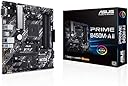
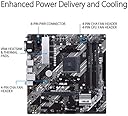
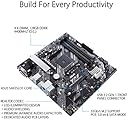
The ASUS Prime B450M-A II is a robust Micro ATX motherboard designed for AMD Ryzen processors across five generations. It supports up to 128GB DDR4 RAM with overclocking up to 4400MHz, features ultra-fast USB 3.2 Gen 2 ports, onboard M.2 NVMe storage, and advanced cooling solutions including VRM and PCH heatsinks with Fan Xpert 2+. With BIOS Flashback and Aura Sync RGB, it combines cutting-edge performance, durability, and customizable aesthetics for professional-grade PC builds.




| ASIN | B08KH12V25 |
| Best Sellers Rank | #100,933 in Computers & Accessories ( See Top 100 in Computers & Accessories ) #766 in Motherboards |
| Box Contents | Cables 2 x SATA 6Gb/s cables Miscellaneous 1 x I/O Shield 1 x M. |
| Brand | ASUS |
| Brand Name | ASUS |
| CPU Socket | Socket AM4 |
| Chipset Family | AMD B450 |
| Chipset Type | AMD B450 |
| Compatible Devices | Personal Computer |
| Compatible Processors | AMD 1st Gerenration Ryzen |
| Customer Reviews | 4.5 out of 5 stars 3,079 Reviews |
| DriveMemory Storage Capacity | 128 GB |
| Graphics Card Interface | PCI Express |
| Importer Contact Information | Rashi Peripherals Ltd ,Rashi Complex A Bldg,Survey 186 , Dongripada,Poman Village , Vasai Bhiwandi Road , Dist Thane – 401208 |
| Item Dimensions L x W x H | 24.1L x 5.1W x 24.4H Centimeters |
| Item Type Name | ASUS Prime B450M-A II AMD AM4 (Ryzen 5000, 3rd/2nd/1st Gen Ryzen Micro ATX Motherboard (128GB DDR4, 4400 O.C.), NVMe, HDMI 2.0b/DVI/D-Sub, USB 3.2 Gen 2, BIOS Flashback, and Aura Sync) |
| Item Weight | 953 g |
| Main Power Connector Type | 24-Pin |
| Manufacturer | ASUS GLOBAL PTE LTD, SINGAPORE, Asus |
| Manufacturer Contact Information | ASUS GLOBAL PTE LTD, SINGAPORE |
| Manufacturer Part Number | Prime B450M-A II |
| Memory Clock Speed | 2400 MHz |
| Memory Slots Available | 4 |
| Model Name | Prime |
| Model Number | Prime B450M-A II |
| Number Of Ports | 6 |
| Number of Ethernet Ports | 1 |
| Number of Items | 1 |
| Packer Contact Information | ASUS Global PTE LTD, 15A, Changi Business Park, Central 1, #05-01, Eightrium @ Changi Business Park, Singapore, 486035 |
| Platform | Windows 10 |
| Processor Socket | Socket AM4 |
| RAM Memory Technology | DDR4 |
| Ram Memory Maximum Size | 128 GB |
| S/PDIF Connector Type | Optical |
| System Bus Standard Supported | SATA 3 |
| Total HDMI Port | 1 |
| Total PCIe Ports | 1 |
| Total SATA Ports | 2 |
| Total USB Ports | 6 |
| UPC | 192876924990 |
| USB 2.0 | 12 |
| Unit Count | 1 Count |
| Warranty Description | 3 Years of Manufacturer Warranty |
N**N
Cant ask for More, Best Budget Motherboard for AM4 Socket
Bought this Motherboard to Pair it with Ryzen 5 4600G and it works out of Box without any need of any Bios updates. Has 4 Ram slots and supports higher Memory speeds. Best of all is M.2 Slot with 6 SATA ports, ( 5 SATA Ports are usable if M.2 is used. Bios flashback Feature in this Range is like Cherry on top. If you are Building a NAS or storage Device who needs More SATA connectors then this is the best Board in Budget Range. Have been using it for a week now and its amazing with 3.2 Gen 2 Ports available as well. Cant ask for more in this Budget!
A**R
Excellent budget-friendly B450 motherboard
I'm using it with my Ryzen 5 3600. It supports Ryzen 3rd gen and older out of the box. For 5th gen you'll need a BIOS update but you can easily do that with BIOS Flashback feature using a pendrive. There are plenty of features in here for a m-ATX motherboard. Overclocking support is also quite decent. I'm rocking a stable OC of 4.35ghz @ 1.3v, although beyond that it gets unstable regardless of voltage. RAM overclocking also works fine as long as you've good RAM like Micron or Samsung B-die. For insane OC and more headers you should go with a good ATX B450 motherboard, but for everything else this motherboard is perfect. Asus BIOS is easy to use too, although avoid installing Armoury Crate software in windows as it's quite useless and hogs CPU in background.
R**V
Its amazing for am4 socket need to update bios for smooth performance of windows 11
Its amazing for am4 socket need to update bios for smooth performance of windows 11 overall it's a good product from asus with 3 years brand warranty.
M**A
Good
Using with Ryzen 5 5600GT . Ready to use with this processor no need to update bios. 500Gb Nvme working well. install 24Gb of RAM 4+4+8+8 all working @ 2400Mhz, Max speed without overclocking is 2666Mhz. Overall good budget mother board.
M**K
awesome for 5600g
Supports Ryzen 5 5600G out of the box, no firmware update required. 4 ram used 3600 g skill its a good product , 1 issue with them , no screws given to put on cabinet , this is really worst , we have to keep 6 screws handy ok
D**.
BEST MOTHERBOARD IN THIS PRICE RANGE
YOU DONT HAVE TO WORRY !! THIS IS BEST MOTHERBOARD I HAVE USED TILL NOW !! IT HAS GPU PORT AND 4 RAM SLOTS EVEN WITH AURA RGB
D**L
Good still working after changing 4 cabinets
It's good for low budget PC and Also for mid range ones with am4 socket pretty durable easy to install if we use brain all ports are working great with speed
R**I
Budget motherboard for Ryzen CPUs with some premium features!
Supports Ryzen 5 5600G out of the box, no firmware update required. 4 DDR4 RAM slots, an M.2 slot for nVME SSDs and support for 6 SATA drives. Using M.2 will deactivate 2 SATA drive connectors. Has a heat sink for the voltage regulator modules (VRM). Has support for 2 case fans and an RGB header (Aura RGB) Easy flash Allows flashing of new firmware in BIOS without processor or RAM. Has front panel headers for Audio,USB 3.0 and USB 2.0 Software and BIOS features allow for enabling DOCP/XMP profile for high frequency RAM, overclocking of CPU and GPU, CPU undervolting and fan control, Bundled utilities (windows only) allows all of these features without going into BIOS If using DDR4 RAM with speed greater than 2666MHz, in BIOS enable DOCP profile equal to your RAM speed (example 3200MHz) AND set the FCLK value to Half of the frequency (1600MHz) if it does not get set automatically. Edit: incorrect mention of 4 SATA connectors changed to actual 6 SATA connectors Edit: The motherboard auto applies the overclock options under performance boost optimiser in BIOS. Disabling these options can improve thermals and improve processor longevity Edit: auto installs armoury crate software which is bloatware. disable option in BIOS and uninstall Edit: this motherboard only supports pcie 3.0 hence it will limit Processors and nvme ssds that use pcie4.0 or above. Also there are no power options in the BIOS so not a good choice for server use
C**E
affordable
I recently purchased the ASUS Prime B450M-A II AMD AM4 motherboard, and I'm impressed with its performance given its affordable price. The AMD AM4 socket ensures compatibility with a wide range of processors, offering flexibility for future upgrades. The motherboard's build quality is sturdy, and the layout is well-designed, making installation a breeze. The comprehensive set of features includes PCIe 3.0 support, M.2 slot for high-speed storage, and USB 3.2 Gen 2 ports for faster data transfer. The BIOS interface is user-friendly, allowing easy customization and optimization of system settings. While it may lack some advanced features found in higher-end models, it provides a reliable foundation for budget gaming or productivity builds. Overall, the ASUS Prime B450M-A II offers excellent value for its price, making it a solid choice for users seeking a reliable and cost-effective motherboard for their AMD-based system.
U**W
does not work
die motherboard + cpu does not boot. 4 beeps followed by 5 beeps. I tried this with different rams and difetent cpu's . wast of money
E**S
Perfect Ultra budget motherboard
This board is perfect for budget builds and/or first time pc building since the board isn't too complex and simple to work on. Been using board a for several months after building my pc around this board and hasn't caused me problems apart from pcie being gen3 which lowers the full potential of your gpu in terms of fps in games. Ryzen 5000 series CPU is more than capable of running AAA games (Recommend R5 5600 for budget gaming cpu). The BIOS for this motherboard is easy to use and you can just look it up on YouTube on how to use ASUS bios. Would've been great if there was another M.2 nvme slot unless you don't mind using ssd drives. Though you have to buy a wifi/bluetooth card (which are like $35CAD to $50CAD). Other than that, this motherboard is great for starters or someone who needs a budget AM4 mobo.
P**A
Excelente por el precio
Quizá le falte una ranura más para m.2 pero fuera de eso no le puedes pedir nada más, para ser la gama económica de asus es de muchisima calidad, solo tengan cuidado si no tienen un gabinete de tamaño considerable ya que esta es algo más grande que las micro atx estándar pero vale por completo la pena, mi próxima mb será una de gama alta de asus sin duda.
ش**ي
انصحكم لكن منفذ واحد SSD
اسطوريه
Trustpilot
1 month ago
2 months ago