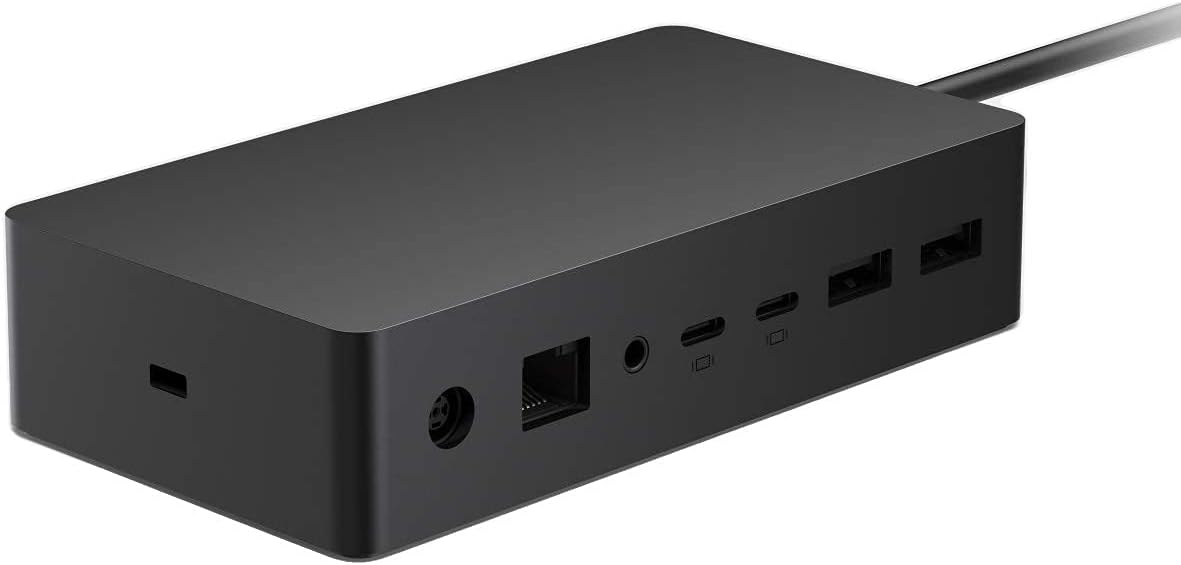

⚡ Unlock your Surface’s full potential with the ultimate docking powerhouse!
The Microsoft Surface Dock 2 is a premium wired docking station designed for Surface devices, featuring six USB 3.2 Gen 2 ports (including four USB-C), dual 4K display support at 60Hz, and a Gigabit Ethernet port. It delivers fast data transfer speeds up to 10 Gbps and versatile power delivery, making it an essential hub for professionals seeking seamless connectivity and enhanced productivity.
| ASIN | B08DG5RYXB |
| Are Batteries Included | No |
| Batteries | 1 AAA batteries required. |
| Battery Description | Rechargeable lithium-ion battery included. |
| Best Sellers Rank | #16,805 in Computers ( See Top 100 in Computers ) #98 in Laptop Docking Stations |
| Brand | Microsoft |
| Color | black |
| Connectivity Type | Wi Fi |
| Customer Reviews | 4.1 4.1 out of 5 stars (418) |
| Date First Available | 22 July 2020 |
| Item Weight | 513 g |
| Item model number | 1GK-00001 |
| Lithium Battery Energy Content | 1 Watt Hours |
| Lithium Battery Packaging | Batteries contained in equipment |
| Lithium Battery Weight | 1 Grams |
| Manufacturer | Microsoft |
| Number Of Lithium Ion Cells | 1 |
| Number of HDMI Ports | 2 |
| Number of Lithium Metal Cells | 1 |
| Operating System | Windows |
| Power Source | AC |
| Product Dimensions | 6.99 x 13 x 3 cm; 512.56 g |
| Series | 1GK-00001 |
| Wattage | 199 |
M**B
Recommended
It unleashes the power of the Surface device.
V**N
--
--
H**.
Some ports are not working
I have just discovered that the monitor port is not working. Unfortunately it is now to late to return it!
M**R
Faulty dock
Have had connectivity issues since the beginning. Now the USB slots for mouse and keyboard not powering and recognising and also the Ethernet LAN cable not available due to Dock issues.
N**B
Overheating
The dock overheats and Surface running on Windows 11 Pro keeps prompting me to use a legitimate charger to optimize battery charge. Please advise if facing the same issue.
S**Y
Larger power supply than Dock 1 for my laptop studio 2, low charging caution gone now
M**R
Don't risk cheaper alternatives/ I did and: - 1, it didn't have enough power to run my Surface Book 3. 2, Took ages to charge. 3, Would on work fully in one position. So to avoid all the above, choose genuine Microsoft only.
G**E
I initially tried to use less expensive third party docks connecting to a Surface Book 4 through the USB-C port. I needed to support two external 4K televisions (LG and Sony) as external monitors. None of the third party docks supported this adequately despite listing dual-4K support (two introduced noise when second monitor added, while a third overheated and shut down). The Microsoft dock works flawlessly, both directly to the monitors and through a dual-monitor KVM switch. I did have to add USB-C to HDMI adapters, for which I am able to use very inexpensive Walmart house brand adapters, which to me indicates that the dock is supplying a solid signal. The other ports (USB-A, Ethernet, and the non-video USB-C ports) also work flawlessly. My adobo e is to not waste your time with third-party docks, just get the MS dock and get the functionality you want. Note, this dock does replace the MS-Surface power adapter. It plugs to AC, and supplies power/charging to the Surface unit. This also leaves existing ports (USB-A, USB-C, etc.) on the Surface device available. I have also tested that you can then attach an additional third-party dock via USB-C or an additional USB-C to HDMI adapter to support a third external monitor. I have not yet tested support for a fourth external monitor. Note to non-MS-Surface users, this dock connects to the PC through Microsoft’s proprietary power-data connector, not through USB-A or USB-C, so you cannot use this dock with machines from other manufacturers.
A**D
I bought a Dell dock which is the worst. It won't charge my dell computer. I bought surface dock 2 for my surface pro 8. I transfer info by use b often. This is ruin my port. This dock has a loose magnetic connection. I will never be ruined. Now I put this dock under my table with a long usb extension cord. I just has to connect the loose magnetic port. I can charge, often use usb to transfer info without plug in the tight usb c in the computer itself.
A**.
Edit - 9/22/24 It will constantly disconnect. Be prepared to have problems with the charger cord not being recognized by the computer. EXTREMELY disappointing. ----------- I've been through 2 dongles prior to this and almost gave up being able to use my USB keyboard and mouse! I have this for my setup in my classroom and absolutely love it now! It makes using my computer and charging it, so much easier!!
Trustpilot
3 weeks ago
2 months ago