Desertcart purchases this item on your behalf and handles shipping, customs, and support to Hungary.
🚀 Print smarter, faster, and safer — because your team deserves the best.
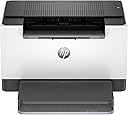
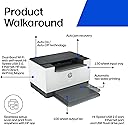
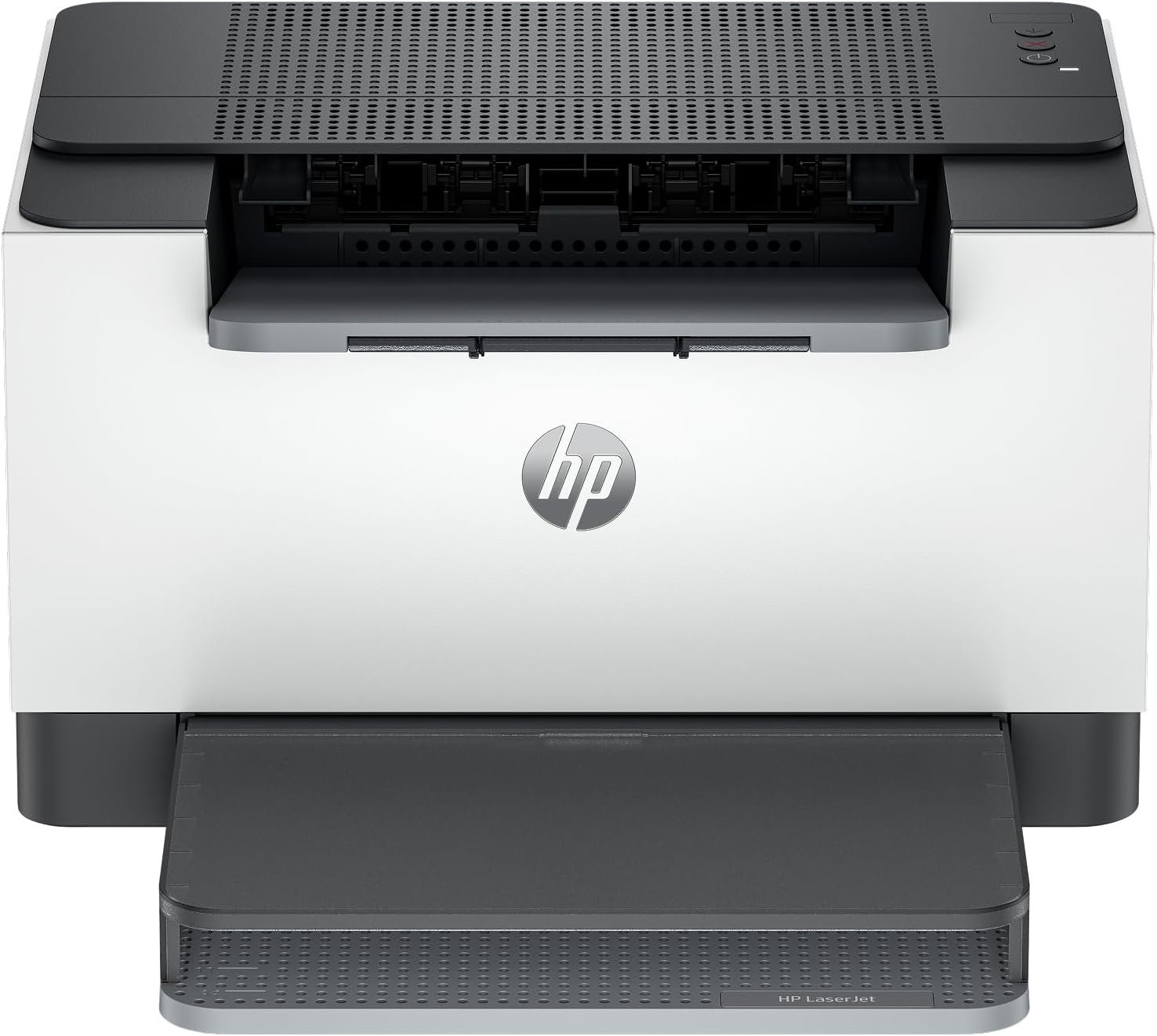
The HP LaserJet M209dw is a compact, monochrome laser printer designed for small teams (1-5 users) that demands speed and reliability. It delivers up to 30 pages per minute with automatic two-sided printing, features dual-band Wi-Fi with self-reset for uninterrupted wireless connectivity, and includes robust security to safeguard your documents. Easy to set up and compatible with mobile printing via the HP Smart app, it’s an ideal productivity booster for modern offices.


| ASIN | B08VF3XRQ8 |
| Additional Printer Functions | Print Only |
| B&W Pages per Minute | 30 pages_per_minute |
| Best Sellers Rank | #3,092 in Office Products ( See Top 100 in Office Products ) #9 in Laser Computer Printers |
| Brand | HP |
| Built-In Media | 6GW62F HP LaserJet Pro M209dw Printer; HP Black LaserJet Toner Cartridge(~700 pages); Dust Cover; Reference Guide, Setup Poster, Warranty Guide & Flyer in some countries; Power cord |
| Color | Gray |
| Color Depth | 1 bits_per_pixel |
| Compatible Devices | Laptops, PC, Smartphones |
| Connectivity Technology | USB, Wireless |
| Control Method | Touch |
| Controller Type | Amazon Alexa |
| Customer Reviews | 4.1 out of 5 stars 1,389 Reviews |
| Display Type | OLED |
| Duplex | Automatic |
| Hardware Interface | Ethernet, USB 2.0 |
| Ink Color | Black |
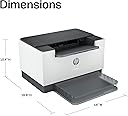
| Item Dimensions D x W x H | 11"D x 13.98"W x 8.07"H |
| Item Type Name | Laser Printer |
| Item Weight | 11.2 pounds |
| Manufacturer | HP |
| Maximum Copies Per Run | 150 |
| Maximum Copy Resolution Black and White | 600 x 600 dpi |
| Maximum Copy Speed Black and White | 30 pages_per_minute |
| Maximum Media Size | 8.5 x 14 inch |
| Maximum Print Resolution Black and White | 600 x 600 dots_per_inch |
| Maximum Sheet Capacity | 150 |
| Model Name | LaserJet M209DW |
| Model Number | 6GW62F#BGJ |
| Model Series | 4000 |
| Number of Ethernet Ports | 1 |
| Number of Trays | 1 |
| Other Special Features of the Product | Auto-Duplex, Dual Band Wi-Fi, Energy Star, Network-Ready |
| Output sheet capacity | 150 |
| Paper Size | 4 x 6 to 8.5 x 14 |
| Print media | Card stock, Envelopes, Labels, Paper (plain) |
| Printer Connectivity Type | USB, Wireless |
| Printer Output Type | Monochrome |
| Printer Type | Laser |
| Printing Technology | Laser |
| Processor Count | 1 |
| Resolution | 600 x 600 |
| Scanner Type | Flatbed |
| Series Number | 4000 |
| Special Feature | Auto-Duplex , Dual Band Wi-Fi, Energy Star, Network-Ready |
| Specific Uses For Product | Office |
| Total Usb Ports | 1 |
| UPC | 194850664281 |
| Unit Count | 1 Count |
| Warranty Description | One-year limited warranty |
| Warranty Type | Manufacturer |
| Wattage | 420 watts |
G**Y
Good Price and Good Product...
This is only B&W printing but that's all I needed -- and this printer has definitely been a good purchase... Works well and was easy to install to my Mac-Mini....
J**A
Pleasantly Suprised !
couldn't have asked for a better experience than I have had with this printer. unboxing to the 1st printing was around 20 min maybe less. Open the box and the printer is in a plastic bag. Lift everything out of the box. Remove printer from bag and start setup. Found my network with no issue and loaded paper and printed the 1st page. There is a piece of paper in the printer that should be pulled out. I didn't do that so it just ran it out when I plugged in the printer. Quality of print is good. It matched right up to my computer and network without any issues. The unit weights enough so it doesn't move around while it prints. I've only had it few it a few days but so far it is better than expected. Time will tell how long it keeps working.
N**.
Every printer should be this easy!
My 15 year old Samsung 2525W printer finally crapped out, so I set out on a quest to find something affordable to replace it with. I stumbled across a deal on the Brother HL-L2325W printer and gave it a shot. This thing tripped my AFCI outlet literally every time I turned it on. I even updated the firmware and tried it in low power mode and no luck. Brother's tech support even encouraged me to return it! Upon googling around I found that monochrome laser printers often have this problem on newer houses due to the AFCI per room code that's common in most jurisdictions. I never had this issue with my Samsung, so I figured I'd try a newer model. Turns out Samsung printers was acquired by HP a few years back. I proceeded to research all the models below about $400 and came across this bad boy. I love the price, the size, the fact that it's duplex and the replacement cartridge won't cost more or close to the cost of the print (which is definitely the case with alot of cheap laser printers). I gave it a shot, placed my order and waited for the arrival. Last night I plugged it up, crossing my fingers it wouldn't trip the breaker. Voila! It didn't. I downloaded the HP app and was able to set everything up in minutes. Super refreshing. To top it all off, I went to Safari on my iPhone and printed a web page from my phone. Pretty darn cool! If you're reading this and you're like me looking for an affordable monochrome laser printer, with wifi/ethernet, with full duplex and affordable replacement cartridges... look no further. Buy this one!
W**R
Disappointed in this printer, and HP's customer service of a sub $200.00 device.
Printer is dead, two months after purchase with possibly 50 sheets printed so far. This is not a high use printer. I went to the website, and performed all the troubleshooting steps. Unplug, plug back in, quick press power button, unplug again, let set for 30 minutes, plug in again, press power button again, swap power cord with another device, repeat steps above, tested outlet for power (obviously), remove power strip, and repeat all steps above. I created an account on HP, begin a chat that lasts for over 20 minutes, describing all that I have done. The solution is they now want to video chat with me, while I do all the steps AGAIN, before they will replace this printer. I have well over an hour of time trying to troubleshoot their device, so I can print. I can't wait for them to issue a RA form that they'll no doubt require I print. This was not an expensive printer, but needless to say I'm disappointed with both the printer and the service to get it working again. I had to reschedule my "video call" for a more convenient time as the Chat will lead you to nothing but more frustration. Will update as I'm able. Following up on 07.21.25. I'm again on chat, re-explaining why I need a new printer, and to give them video proof that the printer does not power on. I tried calling, but disconnected 18 minutes into my hold, because Chat responded within that time. I've now been chatting since for 10 minutes. I have SO much time invested in this printer, from initial setup, troubleshooting, more troubleshooting, and now case numbers for refund/return. Printer is still down, but I do not want to buy a 2nd printer, because my first is down, under warranty. Again...I would stay away from these printers. 2nd follow up. I have completed my chat. it began at 5:38PM, and was concluded at 6:26PM. HP is replacing the printer, but required I go to a link on their website and pay a "collateral guarantee" on my credit card for the replacement printer. If the original is not received within 15 days of delivery of the replacement, they will charge a 2nd printer cost to my credit card. This is after I had to send pictures of the non-working printer, pictures of the serial number, and video of trying to power the printer. A 150.00 printer. Their Customer Service is the only thing coming in behind their printer in my satisfaction. I can't stress this strongly enough. Don't buy another HP. I requested a refund, but was denied, with HP saying the warranty only allows replacement. I'll buy another brand next time.
A**M
Was so happy at first
Well, let's talk about this HP printer – you know, the one my mom got first. She's all about that printing-from-her-phone-and-tablet life, and for her, it's been smooth sailing. Months go by, and it's still chugging along, printing away like a champ. So, naturally, I thought to myself, "Hey, if it works for mom, it'll work for me, right?" Wrong! Gosh doggie, nothing but errors when trying to set it up wirelessly. I tried everything, but it just wasn't having it. But you know what? I'm not one to throw in the towel so easily. I dusted off the ol' Ethernet cable, plugged it in, and voila! It's like stepping back in time to the days of wired computers – but hey, at least it works! Oh and I wanted to print some vellum paper. I was trying to hand feed it and it kept getting jammed. 1 hour goes by and I just throw the stack of ultra thin vellum on the paper tray, turned off the two sided print defailt and it printed page after page flawlessly and never jammed. I didn’t trust the tech. So, if you're looking for a printer that's best for automatic 2 sided printing and prints fast speeds and easy setup (well, maybe not so much for wireless), this HP printer might just be the ticket. Just be prepared to go old school if the wireless setup gives you a run for your money.
G**R
Excellent printer for documents
Prints black only!! Easy to change the long lasting cartridge. Fast!!! Very pleased!
G**N
Good Printer
I bought this to replace a Canon color laser that had started to leak cartridge residue onto the paper and platen. The Canon frequently lost net connectivity. So I bought this since we really don't need color printing. Any photos we want printed we take to a Staples or Walgreens anyways. This printer has worked flawlessly. Never a net problem. High quality BW printing. Have replaced original toner cartridge once with HP product and it continues to work well. Would recommend.
A**T
Great deal!
Got this on Amazon resale for $80 instead of $129 and it was in perfect condition. Still in the original box and packaging. Easy to setup and works great. Fast printing!
A**R
Strong, compact, modern printer!
I got this on sale for around $130. What a great deal! This printer is excellent. It was easy to set up by downloading the HP app on my phone which was so simple to use. It print instantly via wifi. You can register an HP account to enable print from anywhere. It also looks great and is not heavy! I printed two pages and it printed perfectly. No issue with the ink or machine. Make sure to move the paper borders wider so fits standard paper size. My only issue was my experience with delivery and UPS customer service. I paid $7.91 to UPS for a reschedule delivery request because the seller required a signature and I was not home the day of delivery. Amazon credited me for this unexpected fee. UPS ended up never making a second delivery attempt even though I called customer service for 4 days confirming rescheduled delivery request but the agent kept saying to wait and there was an “error” even though package status was stuck as “delivered” at UPS store. UPS customer service agents seemed to be outsourced in India. They all had strong Indian accents. It was impossible to resolve the tracking status with any agent including the UPS agent supervisor. The package never came and tracking status never updated to rescheduled even after 5 business days since first delivery attempt. Amazon customer service was excellent in resolving the issue after I gave up trying to get UPS to help deliver it. Amazon sent me a replacement the next day directly from Amazon with no signature required which I wish they had done in the first place.
D**.
Solid printer with an easy setup
I was able to set this printer up without ever connecting it to a computer. The app walks you through everything and it was flawless. Prints fast, reliably, and I can stick it away in a corner of the house out of the way without issue.
M**N
Buy this one. Not the M209dwe. The "e" makes all the difference.
This is the one you want. Do Not Connect To the Internet!
C**Y
Not too bad other then having to restart it many times during use
So far so good. The only issue I have is it comes up errors A LOT however works well and I just need to restart it a few times but what can you do
J**E
HP LaserJet M209dw – Fast, Compact, and Reliable Monochrome Laser Printer
I’ve been using the HP LaserJet M209dw as a compact black-and-white printer, and it has been excellent for everyday home and small-office use. Print speed is fast, text comes out sharp and professional, and the printer wakes up and starts printing quickly. The compact size is a big plus — it doesn’t take up much space but still feels solid and well built. Setup was straightforward, and wireless printing works reliably once connected. I also appreciate the automatic duplex printing, which saves paper and is something not all compact printers offer. For a monochrome laser printer, it’s quiet and efficient. This printer is strictly black-and-white, so it’s not meant for photos or color documents, but if your main needs are documents, labels, and forms, it does exactly what it’s designed to do with minimal fuss. Overall, a great value for anyone who wants a fast, no-nonsense laser printer without the bulk of a large office machine.
Trustpilot
1 month ago
1 month ago