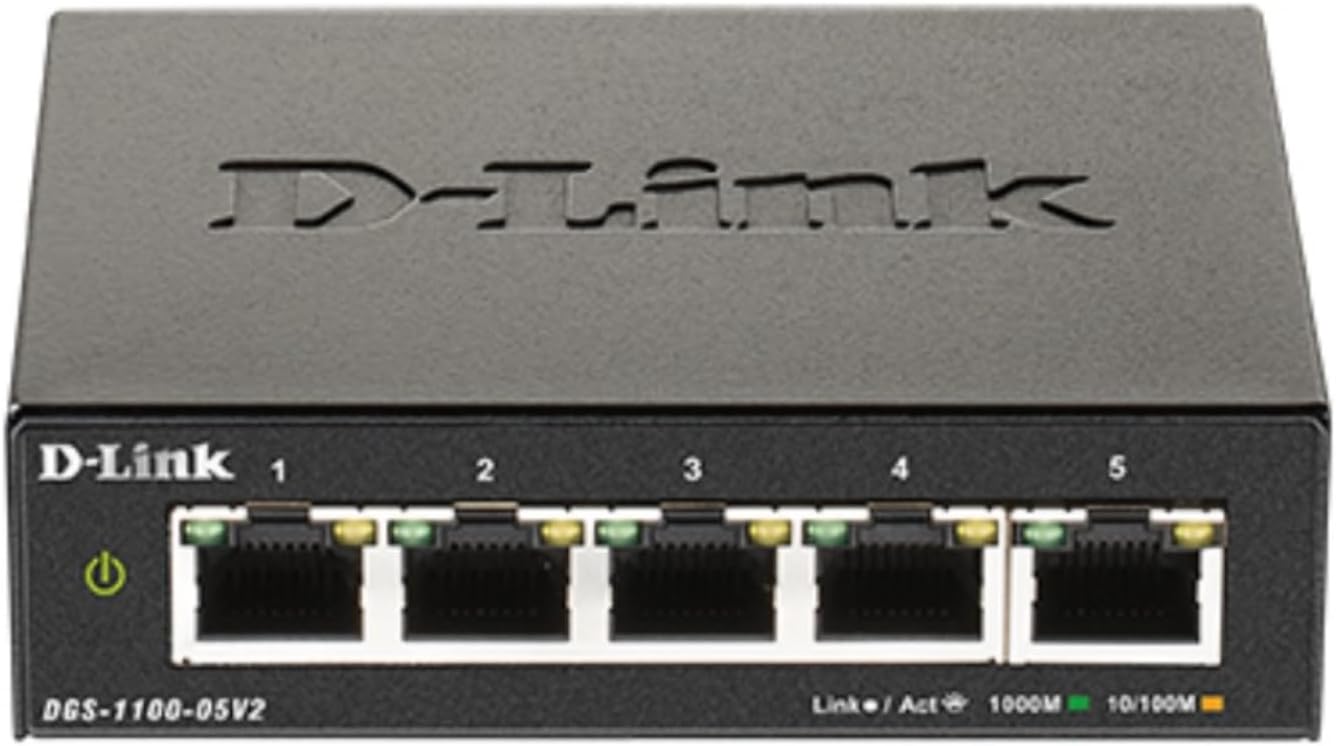


DGS-1100-05V2
Product ID: 268915293
Details
- BrandD-Link
- ColorBlack
- Compatible DevicesDesktop Gaming
- Included ComponentsPower Adapter
- Number of Ports5
⚡5x Gigabit RJ45 ports
🌿Fanless, energy-saving design
🛡️Advanced VLAN & QoS traffic control
Desertcart purchases this item on your behalf and handles shipping, customs, and support to Hungary.
🚀 Elevate your network game with silent power and smart control!
The D-Link DGS-1100-05V2 is a compact, fanless 5-port Gigabit smart managed Ethernet switch designed for small to medium business networks. Featuring advanced traffic management like VLAN, QoS, and IGMP Snooping, it ensures optimized, secure data flow. Its energy-efficient, silent metal chassis supports flexible mounting and comes with lifetime hardware coverage, making it a reliable, budget-friendly choice for professional-grade networking.


| ASIN | B08MV9315K |
| Best Sellers Rank | #137 in Computer Networking Switches |
| Brand | D-Link |
| Built-In Media | Power Adapter, Wall Mount Screws, Installation Guide, Warranty Card |
| Case Material Type | Metal |
| Color | Black |
| Compatible Devices | Desktop, Gaming Console, Laptop, Printer |
| Current Rating | 27 milliamps |
| Customer Reviews | 4.5 out of 5 stars 79 Reviews |
| Data Transfer Rate | 10 gigabits_per_second |
| EU Spare Part Availability Duration | 5 years |
| Global Trade Identification Number | 00790069453281 |
| Interface | RJ45 |
| Item Dimensions L x W x H | 4"L x 3.25"W x 1.1"H |
| Item Type Name | D-Link Ethernet Switch, 5 Port Easy Smart Managed Gigabit Network Internet Desktop or Wall Mount (DGS-1100-05V2) |
| Item Weight | 8 ounces |
| Lower Temperature Rating | 32 °F |
| Manufacturer | D-Link |
| Mfr Part Number | DGS-1100-05V2 |
| Model Number | DGS-1100-05V2 |
| Number of Items | 1 |
| Number of Ports | 5 |
| Platform | Not Machine Specific |
| Product Dimensions | 4"L x 3.25"W x 1.1"H |
| Switch Type | Metal |
| UPC | 790069453281 |
| Unit Count | 1 Count |
| Upper Temperature Rating | 104 °F |
| Voltage | 100 volts |
| Warranty Description | Lifetime Warranty |
R**R
Sturdy Metal Box with Nice Large Mounting Holes!
Initial review here was for the 5-port Smart Managed switch non-POE version. Purchased additional 5 & 8 port POE managed switches; found the 5 port POE switch does not include a power adapter! While the 8 port POE managed switch does include a power adapter rated for 54 volts @ 1.67 amps. As I speculated, the (8 port managed) POE switches use ~52-58 mA power while using no ports and subsequently connecting one non-POE uplink port. Nice metal case with large mounting holes, for wall mounting. Include a ground screw too! Has a web user interface supposedly on 10.90.90.90/255.0.0.0, but since I do not have my network configured for this address, have yet to use it. Albeit, I'd probably leave the settings at default anyways, as I just need a good switch of similar quality to Linksys/Cisco equipment.
W**E
What’s to say, it works
I mean not much to say about this switch. It works and the management interface is functional. And for this price what’s not to like
T**M
Not best option out there
Good: Nice features and design, can be managed through web management (multiple browsers supported) or D-Link Network Assistant. Not so good: Since I don't want to have to change any IP addresses (required when using the web-management method) I need to use the D-Link Network Assistant. Unfortunately, the only way to obtain this DNA utility is apparently through Chrome extension. Not only is it weird that this is only made available through Chrome, IMO signing in to Google to manage my network sort of defeats the purpose of the security for which a managed switch is used in the first place.
N**S
works great
the new modoms only have one plug in for the two computers in my office. this fixed the problem
D**.
GREAT UNIT! HIGHLY RECOMMENDED!
WORKS WELL, AS PRESENTED. HAVE NOT WORKED WITH SMART FEATURES, AS IT IS DOING FINE ON ITS OWN!
S**D
802.1q
small, low power and correctly handles 802.1q vlans.
R**A
Web GUI impossible to access
The default settings defined in the manual make ZERO sense, especially on a L2 switch that has no DHCP/DNS capabilities. The default gateway is actually impossible. IP address is 10.90.90.90 / SB Mask 255.0.0.0 / Default Gateway 0.0.0.0 I actually have the 8 port version on another network. I was able to define a working IP for the http UI through the D-Link network app, but that is no longer available. A factory reset would reduce that to an unmanaged switch as well. These used to be a great value. Decisions by management and a lack of support has stripped this product of any such distinction along with any chance I'd buy any of their products in the future.
R**S
A USB-powerable managed switch at a bargain price
I wanted a small 5-port managed switch initially to monitor network traffic by mirroring the traffic to a monitoring port, and later for use with an OpenBSD-powered Raspberry Pi WireGuard client gateway (see attached pic). The latter uses VLANs to effectively add one or more Ethernet ports to the Raspberry Pi and is easier much higher performance in my experience than using USB Ethernet adaptors. I found WireGuard throughput was limited to 100Mbit/s with an Ethernet adaptor but this rose to 200Mbit/s using VLANs and the D-Link switch. It could be even higher but my Internet connection is limited to 220Mbit/s ! The switch has worked perfectly in both roles and was very easy to set up, the only gotcha being the need to reduce the default bridging VLAN1 to one port only first so as to allow ports to be allocated to the untagged VLANs. I used eth1 as the VLAN trunk link to the RPi, eth2 for the Internet connection and eth3 for the internal network. An added benefit is that the switch is 5V-powered so can be run off a multi-output USB power brick (see attached pic) with the purchase of a separate USB-to-5.5/2.1mm plug (pin +ve) cable.
D**.
It is what it says it is.
Do what it says first time, everytime since installation.
J**A
Great managed switch for the money
For the money you can not go wrong with this managed switch, it even supports SNMP and bolts into Zabbix for monitoring. If I had any wish I'd love if it had a 2.5G or SFP port for uplink ... Power consumption is low 3-4W, it's nice and compact, and the power cable goes out the back. Setup is a little bizarre, the switch is not DHCP enabled (10.90.90.90) out of the box, but this was easily accommodated. And when you make changes and apply them in sub menus, be sure and click save configuration or every time you have a reboot or a power off of the switch you will loose your changes.
J**H
Robusto
Muy robusta construcción funciona al toque
T**E
Happy with the switch.
The device is no longer supported, but there is a final update you can apply. I wanted a managed switch, so I could shape network traffic, works as advertised.
Trustpilot
2 months ago
3 weeks ago