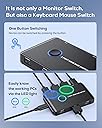
🔄 Master your multi-device hustle with seamless 4K switching!
The ABLEWE 2-Port HDMI KVM Switch empowers professionals to control two computers using one keyboard, mouse, and monitor setup. Supporting stunning 4K@60Hz resolution, it delivers crisp visuals while enabling effortless switching via a single button. Compatible with major operating systems and multiple devices, this plug-and-play switch optimizes workspace efficiency without the clutter or complexity.


| ASIN | B08NVKHRRT |
| Actuator Type | Push Button |
| Best Sellers Rank | #64 in KVM Switches |
| Brand | ABLEWE |
| Brand Name | ABLEWE |
| Circuit Type | 1-way |
| Color | Black |
| Connectivity Protocol | Hdmi |
| Connector Type | Hdmi,usb |
| Contact Material | Plastic |
| Contact Type | Normally Open |
| Control Method | App |
| Controller Type | Push Button |
| Current Rating | 3 Amps |
| Customer Reviews | 3.7 out of 5 stars 6,024 Reviews |
| International Protection Rating | IP67 |
| Item Dimensions | 7.87 x 4.72 x 1.18 inches |
| Manufacturer | ABLEWE |
| Material Type | Polycarbonate |
| Model | KVM-Switches |
| Mounting Type | Plug-In Mount |
| Number of Positions | 2 |
| Operating Voltage | 4.99 Volts |
| Operation Mode | ON-OFF |
| Specification Met | Ip67 |
| Switch Type | Toggle |
| Terminal | Weld |
| Unit Count | 1 Count |
| Wattage | 480 watts |
R**Y
It just works! Buy it!
My Setup Two laptops each with a full-size HDMI port Logitech wireless mouse Steelseries USB keyboard 27" Samsung 4K monitor (shared by KVM) 24" Dell 1080P monitor (dedicated--not shared by KVM) The Dell monitor has two USB ports. So, I plugged the two cables from the Steelseries USB keyboard into it. Then, I ran the USB cable from the monitor to the KVM USB keyboard port. I plugged the small Logitech wireless mouse transmitter into the KVM USB mouse port. Finally, I ran the HDMI and USB cables for PC1 and PC2 to the two laptops. Question Why not buy a KVM that supports two monitors to two computers? I didn't want to spend that much. My second laptop doesn't support two monitors without additional hardware First Impressions The KVM does not take up much desk space. I like that the light in the button changes color depending on which PC I have active--green for one and blue for two. You must use the button to switch between PCs--it doesn't have any other method for switching. I knew this when I purchased it. If you want a KVM with a keyboard shortcut, you'll have to pay a little more to get it. The Ablewe Two Port HDMI KVM Switch does not have any cable management or mounting capabilities--it's designed to reside on your desk. You could probably stick some double-sided tape on it (or use super glue) to mount it on another surface. I have not noticed any heat build-up on the KVM I purchased. So, it's probably safe to use a DIY mounting mechanism (obviously, you do so at your own risk). I don't mind the minimal desk space it takes. When switching from PC1 to PC2 (or PC2 to PC1) it takes about 3 - 5 seconds for it to complete the switch. Not a deal breaker for me--especially at this price point. It does have one annoyance, however (on Windows at least). All the applications on the shared monitor (the 27" Samsung) for PC1 (which does support dual-monitors) move to the Dell (dedicated to PC1) monitor. Based on my previous experience with KVM switches, I knew this might happen. I don't know of any consumer-grade (less than $500) KVMs that would maintain an "active" monitor signal to the inactive PC and prevent this annoyance. Question Does the KVM still work if you power off one of the two computers? Yes. It does. Verdict 5/5 - If you need an inexpensive 2-port HDMI KVM, buy it!
B**N
Got it working with wireless keyboard and mouse
Took me a while to get this working with a wireless keyboard and mouse. In short, you plug in the mouse/keyboard usb receivers in the out ports- the one with only a single hdmi. The input ports, you connect the USB cables to each corresponding PC. No extra power needed to do this- typing on one PC now. Switching between PCs works fairly well. One issue- Initially, I was unable to get the a connected PC HDMI video to work. It would show the screen then go offline, sometimes recovering but mostly not. This secondary PC has USB-C ports and I used one of my own cables (USB C to HDMI) and it works fine. I assume there could be an issue with the included HDMI cable; however, testing with the other PC it worked fine. No idea. This is the only issue I encountered with this device and I was able to resolve using another cable of mine. For the $$, this seems like a good deal.
T**A
AVOID!!!! I have two of these KVMs. BOTH are unreliable and extremely Quirky
I now have two of these, and they really are junk. This KVM is far too quirky for any casual user. Almost amusingly, as a prelude to the chaos to come, I received this message before I received either of the KVMs: Nov 8, 2022 5:08 PM Hi: Thank you for shopping with us. Amazon seller ABLEWE has encountered an unexpected problem with completing your order. --- Message from seller ABLEWE: Dear Sir/Madam, Thanks for choosing ABLEWE KVM Switch. Here we send you some use tips: If you connect mouse/keyboard and monitor at the same time. Please confirm that you have plug both usb cable and hdmi cable from kvm to each laptop. Because the signals transmitted by the Four ports are different. In the case of any problem, please feel free to contact us. Our customer service will be available to solve your problem within 24 hours. Again, thanks for buying. Sincerely, Alice --- There is no customer support as far as I can tell. I did respond to ABLEWE after receiving an email from them about reporting issues. I responded to this message and received only messages that I had “already completed the survey”. I had never even received a survey or any message besides the “ unexpected problem with completing your order” message. So there is exactly ZERO customer support. I bought this to use this primarily with two Apple Mac mini's and sometimes a Samsung Galaxy Windows Notebook. There is nothing wrong with the Mac Minis until they are connected to the KVM. With the ABLEWE KVM both minis struggle to boot with keyboard, mouse and video issues. The Samsung Galaxy Windows notebook behaves oddly as well. The Macs often go into a mode where they detect that they need to update macOS and indeed do proceed with a reinstall which isn’t really a reinstall but something relating to fixing an error… likely in keyboard or mouse configuration. When the KVM does not sense the keyboard properly the Macs often suggest entering a password to unencrypt the disc, which turns off FileVault. Now I simply keep rebooting until they work. My reason for buying the second KVM was that they are cheap and I was hoping that it might be better but it exhibits the exact same issues as well. I have way too much work to get done to screw with these at this time but when I come up for air I will be doing a lot more research before buying. I've used IOGear KVMs for decades, but they invariably need to be replaced with every major macOS update due to sensing video resolution so I didn’t try them again and instead tried the ABLEWE KVM, which is anything but Able. I’ve been playing around with workarounds such as having the Macs never shut off, but stay in sleep mode while the KVM maintains the state with all connected to a UPS. The key to keeping this working is keeping it always on so that the KVM doesn’t lose its cached state. I need to get lots of work done so I'm essentially avoiding shutting anything down. Rebooting can take hours to get it working again. So I’ve bought myself some time to properly research a better KVM. Although I do have this working it is amazingly quirky. I’ve found ways to leave certain components on all of the time to cache settings in the powered KVM, all on a UPS, keeping computers on but in sleep mode. So although these are real junk I’m staying with them for now as I research a bit to get a quality KVM.
M**T
USB ports 3.0 seem to have issues with older 2.0 peripherals.
Perhaps they fall asleep I am unsure. But as Andrew Armstrong stated in his review Useful but doesn't last Reviewed in the United States on July 28, 2023 The device worked well when I first set it up but for me a little over a year later Ordered on August 5, 2022 having issues in october 2023 starts running into the issue of disconnecting the keyboard from the computer. The mouse and keyboard work fine when they are connected directly to the computer and the mouse works while the keyboard is the only thing to stop. HDMI monitors connections no issues... While connected to the KVM the computer starts failing to recognize the a usb device and I am no longer able to type or use the keyboard. Until I switch it to pc 2 then go back to pc 1 or replug the keyboard cabled and not wireless. Seeing Andrews review I will not be buying another but I am disappointed. this has only lasted for a year with no major failures like lack of power of part burn outs. I want to update here that the usb ports might be okay I think ive found a bugish that is not commonly known. I use a logitech g910 cabled keyboard. This eventually stops being connected and i have to bounce the connection from pc 2 to 1 i think the issue is not that the usb ports are bad or anything I think that the usb version needs to be specific. These are 3.0 and supposed to be backwards compatible however theres some issue there likely beyond the scope of the manufacturer so i have bought a kvm with 2.0 usb and at this point have not had a disconnect problem with the kvm. my mouse a logitech g604 never ever had a problem. The keyboard is older and I don't have issues with it being connected directly to the pc but the kvm as described above. So if you have an older keyboard I would try finding a kvm with usb 2.0 connections instead. I am using this one currently. https://www.amazon.com/dp/B0BC12GKLM?th=1 good luck out there.
H**K
Not the best. Buggy and lacks features
It works OK. It does have issues worth noting. First, it does bug out on occasion and requires you to unplug everything for it to reset and plug everything back in. Also, it can cause issues with AMD GPUs and causing black screen which requires a system reset. This is because EDID is not handled properly and the GPU can shut down because it thinks it’s lost connection to the monitor. It’s also not ideal for a PC you game on because it only supports up to 60hz. It does not have DisplayPort. It does not have a remote switch so it awkwardly sits on my desktop which looks messy. It’s just ok and it’s finicky. I am looking for a replacement.
R**E
Product is high quality, Customer Service is A+, some issues...
It's a simple device. Like an A-B switch. Except this switch has rare glitches. It is made very well but it's not quite perfect. I've been working with Customer Service and have finally come to a solution that works for both of us. PROS: - I like the GREEN indicator for one side, or press button and toggles to BLUE. - Also, it has a nice touch button, good size, and confirmed presses as it makes a clicking noise when you press it (as if the color change wasn't enough). - It comes with pretty much everything you need for cables, assuming you had a work computer system already (existing cables for monitors, mouse, keyboards, etc.) - Only wish the common HDMI output to the monitor was on the backside... (but that's for aesthetics). - low profile. Only 1 tier level of plug ins, and the height is only 18cm (body). The button adds a couple more millimeters. (see pic... you'll notice there's plenty of clearance in my situation, to press the button with the switch under the monitor) CONS: The switching will freeze on rare occassion. 1) The color switching/toggling just stops. In other words, the switching fails. No going back or forth. (OR) 2) The mouse and/or keyboard just won't transmit their information through. They are still powered on (mouse still has RF connection, and the LED keyboard (wired) is still getting the power light on. This will occur when trying to switch, but instead of switching, one of the devices just fails working. 3) (as mentioned earlier... which is a preference) the HDMI cable output to the 1 monitor comes out from the front of the box. That's just for easier cable management, but not a major one (see my pic... the center cable coming out the front, which I duct tape the cable down, but it's actually in the dark. The camera boosted the brightness so it's really darker then it is. The other cable coming out the front on the left side is my keyboard, so it is pointing in the correct direction... which is toward me, and my keyboard). To reset this switch to work again, I have to disconnect all the computer side cables (USB and HDMI from video cards), to remove power to this switch. Then it's a power reboot when I plug in. Then the switch will work again. UPDATE: 7/29/2022 So I've been in contact with Customer Support and they are great. That's very helpful and makes knowing that they are improving and trying to be a great company. They are willing to replace the KVM switch, but unfortunately, I've moved overseas and can't get the item shipped to me. On another weird note, it finally started working for a few consecutive days now. I know I probably jinxed myself, but I do like this switch (when it works!), so glad to see that maybe a reboot of it made the correct adjustment to whatever the problem might be. UPDATE: 8/2/2022 So after working with Customer Service (which has been top notch, and that makes a lot of difference), they are making an update. I still recommend this product. Get it now. If you have some issues, then work with Customer Service, or wait for the next model (coming soon). It's worth it. And for this price (even without any discounts), this is a great deal for a KVM kit. (Kit - meaning, it comes with the USB cables and HDMI cables that you would need to fix up your switching needs. Also, cables are long enough if your PCs/Macs are in the same desk area (1 meter length cables.) And it's still working good... so maybe my issue is gone? TBD, as I've only been using it 2-3 times a day.
J**A
USB switching/peripherals might not work, even if you "do everything right".
This setup works well for the HDMI switching, but I got this model (and not just a simple HDMI switcher) for the added USB port switching function. I'm using a basic wired mouse and keyboard with the included USB cables to connect to my Macbooks (one has USB, and one has a USBA to C converter, but I couldn't get the peripherals to work with either). I know my connection setup is correct b/c the HDMI switching works perfectly in this configuration. I'm able to power the device separately so it's not a power issue. I'm not using a dock, just USB into the KVM ports and the included USB/HDMI cables. I know it's not my devices b/c I can plug them into the laptops, docsks, etc. and the devices work just fine. They simply aren't getting recognized when I plug them into the KVM switcher. I've seen that other reviewers have had mixed results with the USB connectivity as well (some people seem to be able to get it to work, others have issues), so thought I would add my experience to the pile.
A**N
Simple and effective; less than ideal port arrangement for cable routing
The switch itself is very simple. Unlike other switches, the cables are not built into it, so you aren't forced to work with a 6 ft or 2 m set of cables dangling off of it. You can use cables with an appropriate length. The button for switching devices is ringed with a light that changes from blue to green to indicate the output. One other positive is that the device passes on the identity of the keyboard and mouse as opposed to other switches that only indicate that it's a keyboard and mouse, which is important if you have software configured for a specific device. For example, Logitech devices can be configured in software to map the buttons to different features. This KVM switch allows for that because the compute can see what the device is. One area of improvement is that the KVM inputs are all on the front of the switch. I use a wireless keyboard and mouse, but the monitor cable has to run be routed around to plug into the front. Not the greatest design, especially if you have a wired keyboard and mouse. A better design would be to place the inputs on the side, or have everything on the back. The switch needs to be accessible and having wires running front and back makes placement difficult as well as keeping it settled on the desktop. It's a fairly compact switch, so design decisions like what I'm proposing could change the form factor a lot, and not necessarily in good ways. Aside from the cable routing issue, the switch is great and works very well.
Trustpilot
3 weeks ago
3 days ago