Desertcart purchases this item on your behalf and handles shipping, customs, and support to Hungary.
🚀 Upgrade your storage game with speed and style!
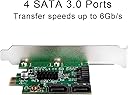
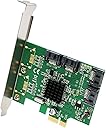
The I/O Crest SI-PEX40064 is a high-performance 4-port SATA III controller card featuring the Marvell 88SE9215 chipset. It supports SATA 3.0 transfer speeds up to 6Gbps, PCIe 2.0 x1 interface compatible with multiple slot sizes, and includes both low profile and full profile brackets for versatile installation. Ideal for professionals needing reliable, expandable internal storage with native command queue support and backward compatibility for SATA I/II drives.


| ASIN | B00AZ9T3OU |
| Best Sellers Rank | #172,768 in Computers ( See Top 100 in Computers ) #76 in RAID Controllers |
| Brand | IO Crest |
| Built-In Media | 4 X Sata Cables (16"), Driver Cd, Low Profile Bracket, Sata Iii (6Gbps) 8-Port Pci-Express Controller Card, User Manual |
| Compatible Devices | Personal Computer |
| Compatible devices | Personal Computer |
| Customer Reviews | 4.4 out of 5 stars 2,082 Reviews |
| Hardware Interface | PCI Express x1 |
| Hardware interface | PCI Express x1 |
| Item Type Name | I/O Crest 4 Port SATA III PCI-e 2.0 x1 Controller Card Marvell 9215 Non-Raid with Low Profile Bracket SI-PEX40064 |
| Item Weight | 0.2 Pounds |
| Item weight | 0.2 Pounds |
| Manufacturer | Syba |
| Mfr Part Number | SI-PEX40064 |
| Model Number | SI-PEX40064 |
| Number of Items | 1 |
| Operating System | other |
| Style | MV 4-Port |
| Style Name | MV 4-Port |
| UPC | 809395440770 |
| Unit Count | 4 Count |
T**.
Juste le top
Si vous voulez du RAID performant, il vous faut une carte contrôleur RAID orientée performance, qu'on reconnaît à son prix et à sa ventilation notamment. Y'en a sur Amazon (LSI, Adaptec), comptez 200 euros. Si, comme moi, vous voulez juste connecter des disques supplémentaires en usages NAS ou standard, cette carte est PARFAITE. Un chip Marvell à la barre, comme sur les cartes-mère haut de gamme, et avec une ventilation passive prévue au cas où il serait bien sollicité. Une reconnaissance parfaite de la carte sans avoir rien à faire. 4 ports, pour voir venir. Idéal pour compenser un achat hâtif d'une petite carte-mère peu chère et avare en ports. Un prix très raisonnable pour une 4 ports. Vous pouvez également brancher des SSD dessus si vous en avez, mais je recommande d'utiliser plutôt les ports présents sur votre CM. La bande passante totale disponible sur la carte est de 500 Mo/s: c'est largement suffisant pour 4 disques mécaniques, qui auront du mal à dépasser les 100-120 mo/s individuellement, et tournent plus usuellement dans les 50-60. Ca ne suffira sans doute pas pour 4 SSD, mais perso je ne les ai pas :P Voilà, donc foncez Je trouve cette carte super dans son rôle, à savoir une connexion ultra-stable de disques supplémentaires et sans contrainte de goulet d'étranglement pour ce pour quoi elle est prévue (4 disques mécaniques qui consomment ensemble 100 mo/s, c'est pas commun). Chip Marvel qui va bien, aucune fausse note, prix raisonnable: bref, le meilleur du made in china.
S**I
Home NAS
Good fit for home nas
A**T
Perfetta
Il controller funziona perfettamente e ha fatto si che il disco ssd sata venga riconosciuto come ahci anche se la mia vecchia scheda madre non supportava quella modalità. In sostanza il controller fa si che la scheda madre, pur contrassegnadolo come ide, si interfacci con l'ssd sata con modalità ahci e velocità di trasferimento nominale sata 3. È aumentata la velocità di lettura scrittura su ssd (che è passata da 1.500, quando il disco era attaccato direttamente alla porta sata della scheda madre, a 2.000) ma soprattuto sono stato attivati la modalità ahci e trim, vantaggiosi per l'ssd anche per evitarne il deterioramento. Windows 10 riconosce automaticamente il controller e installa il driver storahci che gestisce il disco meglio del driver marvell (che si trova nel cd all'interno della scatola). Per far si che la scheda madre faccia il boot bisogna ricordarsi di indicare l'ssd come primo dei dischi collegati. La cosa non è automatica perché la scheda madre vorrebbe mettere per primi gli altri dischi (sata meccanici). Invece bisogna specificare che si vuole fare il boot dal disco ide. Il controller, nell'interfacciarsi con la vecchia scheda madre, indica il disco come ide, ma in realtà, dopo il boot, il disco viene riconosciuto correttamente come sata 3, con il driver storahci e la fubzione trim attivati. Chiaramente la scheda pcie x1 a cui è collegato il controller, ha i suoi limiti, quindi il disco ssd non viaggierà comunque al massimo delle sue possibilità. Però, come ho già detto, i protocolli di gestione adesso sono quelli ahci (che prima di fare il collegamento che ho descritto non potevo attivare perché non previsti dalla motherboard). Consiglio di collegare altri dischi(meccanici) alle porte sata della scheda madre e non al controller, in modo che tutta la banda della scheda pcie x1 resti dedicata al controller e al disco ssd di boot (su cui ho installato tutti i programmi e il sistema operativo). Ho finito con le espansioni possibili, non mi resta in futuro che cambiare scheda madre (e quindi ram e processore). Però il mio vecchio pc (con 8 giga di ram ddr2 e processore phenom) , truccato com'è regge ancora botta e windows 10 si avvia in modo istantaneo
N**D
Wow. What a steal this is....
For my intended purpose this is ridiculous. So cheap for exactly what I was looking for. I have several hard drives and disk drives and ran out of SATA ports to use on my mother board (only has 6). Was looking for a adapter that would make use of my unused pci-e 2.0x1 slots on my board (or even the pci-e 2.0 x8 and x4 slot since I only run 1 video card these other ports just collect dust) but give me more SATA ports. This fit the bill perfectly and for much less than several other brands adapters on the market. Not only do you gain 4 SATA III(6gb/s) rather than most other adapters only give you 2 SATA ports and are not always SATA III. I followed instructions but if you are even slightly schooled on computers and computer parts you could just guess what to do fairly easily. Unhook everything, power cord disconnect and install the card in the pci-e 2.0x1 (or x4 x8 x16) or pci-e 1.0x1 (or x4 x8 x16). With the pci-e 1.0 it will just run at half the speed if you have an ancient board but is still compatible. Also I didn't seem to find anywhere in the description about the SATA cables so I ordered some.... It comes with 2 and they are both SATA III capable. I had no issue with the drivers, didn't even need the disc. windows 7 x64 recognized the device and downloaded them. FOR PEEPS WITH WORRIES ABOUT POSSIBLE COMPATIBILITY PROBLEMS- This is my system setup and install and use went without any issues. (I doubt there should be any unless the pci-e slot you are trying to use is malfunctioning on the Mobo....) --Intel I5-2500K (Sandy) Processor --EVGA Z68 ATX DDR3 2133 Intel - LGA 1155 Motherboards 130-SB-E685-KR --EVGA GeForce GTX760 FTW with ACX Cooler 4GB GDDR5 256Bit Dual-Link DVI-I DVI-D HDMI DP SLI Ready 04G-P4-3768-KR --2x--Kingston Technology HyperX 8 GB (2x4 GB Modules) 1600 MHz DDR3 Dual Channel Kit (PC3 12800) 240-Pin SDRAM KHX1600C9D3K2/8GX --Windows 7 Home Premium SP1 64bit (Full) --Samsung Electronics 840 EVO-Series 250GB 2.5-Inch SATA III Single Unit Version Internal Solid State Drive MZ-7TE250BW --Western Digital 500GB and 1TB Blue HDD (7200rpm) SATA III ---Pioneer Electronics USA 15x SATA Internal BD/DVD/CD Burner with 4 MB Buffer BDR-208DBK --Sony AD-7280S-0B 24x SATA Internal DVD+/-RW Drive (Black) I have swapped all my HDD's, SSD, and Optical drives to this adapter and ALL OF THEM WORK on ALL SATA PORTS. SO to sum up..... This thing is an absolute STEAL if you are trying to make use of some pci-e 2.0 or 1.0x1 slots and would like some more SATA ports :) I actually may buy another one of these in case my motherboard SATAs decide to fry and then I won't have to get a new motherboard. I hope this helps you in your decision, if you have any questions or comments please ask!
J**E
Consigue definitivamente mejorar el rendimiento de discos duros SSD en placas sata 2
Tras muchos cálculos y dudas iniciales, ya he llegado a una conclusión... Un crucial mx100 que no pasaba de 85 Mb/s reales en lectura/escritura simultanea (lo que viene siendo copiar y pegar un archivo en el mismo HD) conectado por sata 2, ha pasado a 120Mb/s con esta tarjetita pci, con picos de hasta 150Mb/s; lo cual, por ese dinero, me parece un puntazo... Suscribo lo que dicen muchos, que SÍ vale la pena conectar por PCI un sata 3 y que si bien es cierto que no llega a un rendimiento de sata 3 nativo de la placa, alcanzas un "sata 2,5" muy aceptable. Los que dicen que no vale la pena pasar de sata 2 a 3 por el cuello de botella del pci x1 no saben lo que dicen. Yo lo uso solo para el SSD de sistema y va como un tirazo... Mi placa antigua ASUS extreme rampage 2 renace de sus cenizas gracias a un ssd con "sata casi3" para dar guerra unos cuantos años más. Por cierto, la tarjeta no me la ha reconocido directamente la placa, hay que instalar la aplicación marvel 91xx driver que viene en el CD, y luego, una vez que te la reconoce, actualizar los drivers como viene en las instrucciones del paquete. Bien por amazon, bien por Syba
Trustpilot
2 weeks ago
1 week ago