Buy anything from 5,000+ international stores. One checkout price. No surprise fees. Join 2M+ shoppers on Desertcart.
Desertcart purchases this item on your behalf and handles shipping, customs, and support to Hungary.
🚀 Power your data center with unstoppable speed and reliability!
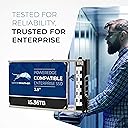
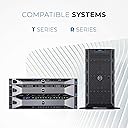
The Water Panther 1.92TB MLC SAS 12Gb/s 2.5" SSD is a high-performance enterprise-grade solid state drive engineered for Dell PowerEdge servers. Featuring a 14th generation hot-plug caddy, it delivers blazing 12Gb/s SAS speeds and robust 24/7 reliability, making it ideal for scale-out data centers. Supported by a 2-year replacement warranty, it ensures seamless integration and dependable uptime for mission-critical workloads.


| ASIN | B0G3BJRHXP |
| Additional Features | Portable |
| Best Sellers Rank | #265 in Internal Solid State Drives |
| Brand | Water Panther |
| Compatible Devices | Servers |
| Connectivity Technology | SAS |
| Customer Reviews | 4.5 out of 5 stars 29 Reviews |
| Data Transfer Rate | 24 Gigabits Per Second |
| Digital Storage Capacity | 15.36 TB |
| Form Factor | 2.5-inch |
| Hard Disk Description | Solid State Hard Drive |
| Hard Disk Form Factor | 2.5 Inches |
| Hard Disk Interface | Serial Attached SCSI |
| Hard-Drive Size | 15360 TB |
| Hardware Connectivity | SAS |
| Installation Type | Internal Hard Drive |
| Manufacturer | Water Panther |
| Model Number | 15.36TBSASSSD |
| Number of Items | 1 |
| Special Feature | Portable |
| Specific Uses For Product | Data Center Storage |
| UPC | 810111143639 |
M**W
Great deal on a solid performing drive
Works great. Actual drive is a Toshiba. Loaded it up in an r730xd and it has been performing great under a very write intensive workload for the last month. Drive looked new and reported 0% wear when I got it. ~$ sudo sg_logs /dev/sdm --page=0x11 TOSHIBA PX04SVQ160 0805 Solid state media page [0x11] Percentage used endurance indicator: 0 %
2**A
Great Drives!
- Amazing drive quality for the price - I hope these are around for a while at the current price point as we like using them. Thank You
G**1
Great seller - product as described.
Good communication with the seller. Product as described. Shipped quickly and packed very well.
T**Y
Product delivered is not as described
TechCity shipped a certified HP drive not dell. Response on questioning the device received. "We understand your concern. Please be informed that Water Panther validates compatibility for their drives in the intended systems shown in the item listings. Even though the drive has an HP certification, it is compatible with Dell systems."
M**S
So far so good
Works fine, but my Dell R540 doesn’t recognize it as an official Dell item.
S**S
Good product, good value
What we needed, for the right price and timely delivery for an urgent need.
J**N
These are refurbished drives and may not be "fully" Dell compatible as advertised
The first set of drives I ordered came just like the picture shows. A big blue Water Panther sticker on one side of the drive. The drives showed up as Dell drives in the Dell Open Server Manager they just had weird serial numbers. The second set of drives I bought, which came in two days before this review, are HGST drives with a small Water Panther sticker on them. While they will work in a Dell server, in Open Server Manager you will get the non-critical alert for the drives not being Dell drives. So this all depends on what your definition of "compatible" is. I'm keeping the drives because they are good drives, but I would say Water Panther is taking regular name-brand drives and repackaging them with their sticker on them. Water Panther has not figured out how to add Dell firmware to brand new drives or anything magical like that. Water Panther is "yet another reseller of refurbished stuff". As long as they are testing the drives before reselling them and weeding out the bad drives, they bring value so I'll probably keep buying drives from them.
C**G
NOT Dell branded, but works.
I really wanted to bring new life to a slower, old server. These WP 480GB SAS 12Gb/s 2.5 SSD's are performing well and meet my expectations for performance. There is no point for the vendor saying these are for Dell PowerEdge Servers though. These ARE NOT Dell branded and OMSA will report the status as Non-Critical with the yellow warning with exclamation point. Does that impact the performance? Nope. But reporting tools will report it. It is more of an annoyance than anything. In order for the drives to NOT show up with a red X or not validated; do this: 1. Upgrade Dell OpenManage Server Administrator to 8.5.0 or above, if already installed go to the next step. 2. Open the stsvc.ini file located in either the C:\Program Files\Dell\SysMgt\sm or the C:\Program Files (x86)\Dell\SysMgt\smfolder depending on if you have installed the 32-bit/64-bit version. 3. There should be the following ;nonDellCertified flag for blocking all non-dell certified alerts. NonDellCertifiedFlag=yes Change this to the following and save the file. ;nonDellCertified flag for blocking all non-dell certified alerts. NonDellCertifiedFlag=no If you do not find this line in the file you will need to add it in the following place and save the file. This is normally when you upgrade from an older version to 8.5.0. It is very important it is added after the [general] lines or the setting won’t be honored. ;General Settings [general] ;Amount, in seconds, to sleep between each attempt to poll the PV20x, PV21x, and PV22x enclosure(s). EnclosurePollingInterval=30 ;nonDellCertified flag for blocking all non-dell certified alerts. NonDellCertifiedFlag=no 4. Once you have modified the INI file you need to restart the DSM SA Data Manager service in services.msc and Dell OMSA should now report this if you refresh the page. [ credit to Ashley H @ Tough Tech Site ] [ Edit May 6, 2024 ] There is an easier way now to turn of the NonDellCertifiedFlag. Just run this command from an elevated command prompt: omconfig storage globalinfo action=setnondellcertifiedmode mode=no BOOM! No more yellow triangles!
Trustpilot
1 month ago
1 month ago