Buy anything from 5,000+ international stores. One checkout price. No surprise fees. Join 2M+ shoppers on Desertcart.
Desertcart purchases this item on your behalf and handles shipping, customs, and support to Hungary.
🚀 Double the TPU, double the AI power — accelerate your edge computing game!
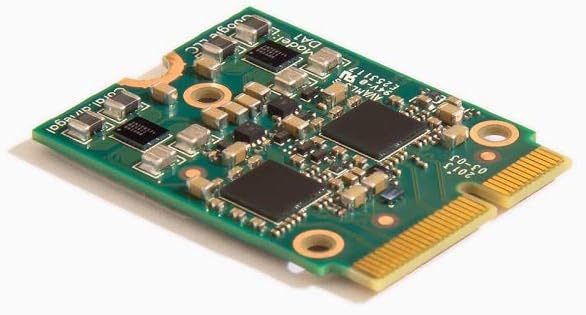
The Coral M.2 Accelerator with Dual Edge TPU is a compact M.2-2230 module featuring two Google-designed Edge TPU ML accelerators. Each TPU delivers 4 TOPS at 2 watts, combining for a total peak performance of 8 TOPS with exceptional power efficiency (2 TOPS per watt). Designed for on-device TensorFlow Lite model acceleration, it reduces latency and enhances data privacy by eliminating cloud dependency. Ideal for desktop boards with compatible PCIe Gen2 x1 E-key slots, this module enables parallel or pipelined AI inference, perfect for professionals seeking cutting-edge, low-power AI acceleration.
| Best Sellers Rank | #2,600 in Single Board Computers (Computers & Accessories) |
| Customer Reviews | 4.0 out of 5 stars 34 Reviews |
A**Y
Works
This is the one that fits in the pciex1 slot that normally contains your wireless NIC (if you have one installed). Great for a desktop board with the empty slot. Not great for a laptop, which is probably using the slot for wireless nic.
K**Y
Know exactly what this device is for before purchasing
Very limited use case digit my HA setup. This can only do simple object/person/vehicle identification. Not a replacement for true AI task. FYI. It does its job well and better then a cpu can.
L**I
2nd time was the charm
The first TPU that was sent was defective. I tried for about 3 hours, could not get it to function. Requested a replacement from Amazon. Received a replacement, and all is working. Sent the original unit back.
A**D
This device will not work with off the shelf consumer hardware.
This device is being sold on the consumer market despite consumer hardware typically not being able to support it. To make full use of this board you need industrial hardware. Don't buy this and think it will work in any off the shelf computers without buying a third-party adapter board. At most you will only get a single TPU working. At this point I can't even recommend a TPU when better NPU options are available at this scale.
C**E
I can't make it work as dual TPU.
I installed the TPU into a OrangePi5+ for using with dockers and frigate. ist has been a couple of weeks, I tested on ubuntu and debian and can't mate OS recognise both TPU. I thinks it is a drivers problem, I can neither confirm nor deny it..
J**J
Hardware/ drivers working win 10
First tpu I've purchased. After install Win10 device manager could see it( no default microsoft drivers), instructions provided on the Coral site were accurate and made the driver installation easy. Still learning about tensor units and training but the hardware seems good.
M**S
Google has abandoned the Coral Edge TPU.
The Google Coral TPU is arguably the best $60 to $80 you can spend for a home security setup—if you can get it to work. While the hardware remains a "gold standard" for local AI processing in software like Frigate NVR, the software support from Google has officially hit a dead end. The Problem: Archival and Kernel Incompatibility As of April 18, 2026, Google has officially archived the gasket-dkms (Google ASIC Software, Kernel Extensions, and Tools) repository on GitHub. This is more than just a lack of new features; it means the official driver is no longer being patched to keep up with modern Linux development. Currently, the official driver does not function on Linux Kernel 6.8 or newer. Since most modern distributions (like the latest Ubuntu, Fedora, or even Debian Sid) are moving well past this version, the Coral will simply fail to initialize upon installation. What This Means for You If you buy this today, you should be prepared for a technical "DIY" setup rather than a plug-and-play experience: The Fork Route: You will likely need to ignore the official Google documentation and use a community-maintained fork. The version by feranick/gasket-driver is currently the most reliable, but even then, you must ensure you compile it using the exact same GCC (GNU Compiler Collection) version that was used to build your specific Linux kernel. Kernel Pinning: If you aren't comfortable compiling drivers from source, you'll be forced to "pin" or hold back your Linux kernel to an older, compatible version (6.1 through 6.2). This is a significant security risk for a home server, as you'll miss out on critical OS kernel updates. Future Uncertainty: Because this is now community-dependent, there is no guarantee that future Linux updates won't break the hardware entirely. Final Verdict The hardware is still 10/10 for power efficiency and speed, but the official software support is 0/10. Recommended for: Advanced Linux users who are comfortable managing DKMS and compiling their own drivers. Avoid if: You want a stable, out-of-the-box experience for your homelab without having to worry about your security system breaking every time you run a system update. Dual Edge TPU Note: If you are buying the Dual Edge TPU model, you need to be aware of a major hardware hurdle. While this card contains two identical TPU cores, each one requires its own independent PCIe bus. Just because it fits in your M.2 slot doesn't mean both cores will show up. You will likely need a special adapter to utilize both TPU cores or need to utilize an M.2 E-key slot that had been implemented to the full electromechanical specification.
C**E
Most of your M2 E slots are going to have a single PCIE lane so won't leverage both TPUs.
Ordering and I'll update later, but be aware that if your M2 E slot only has 1 PCIe lane, you won't be using both coprocessors. I miss when you could reply to reviews, they were saying it may be a drivers issue but looking up the OrangePi5+ they mentioned, that device looks to be a single PCIE lane on the M2 e-key slot.
Trustpilot
2 months ago
1 month ago