Desertcart purchases this item on your behalf and handles shipping, customs, and support to Hungary.
📺 Elevate your viewing game—flexible, sturdy, and ready to impress!
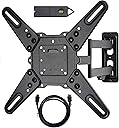
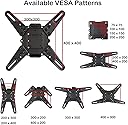
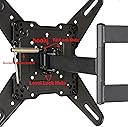
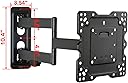
The VideoSecu ML531BE2 is a heavy-duty, full-motion TV wall mount designed for 26-55 inch LED, LCD, and UHD TVs up to 88 lbs. It supports multiple VESA mounting patterns up to 400x400mm and features a 20-inch articulating arm for maximum viewing flexibility. The mount retracts to a slim 2.5 inches from the wall and includes a free magnetic stud finder and 6ft HDMI cable for easy installation.
| ASIN | B000WYVBR0 |
| Best Sellers Rank | #9,192 in Electronics ( See Top 100 in Electronics ) #179 in TV Wall & Ceiling Mounts |
| Brand | VideoSecu |
| Built-In Media | user guide |
| Color | Black |
| Compatible Devices | Television |
| Customer Reviews | 4.7 out of 5 stars 56,986 Reviews |
| Enclosure Material | Alloy Steel |
| Item Type Name | TV wall mount bracket arm |
| Item Weight | 8.8 pounds |
| Manufacturer | VideoSecu |
| Material | Alloy Steel |
| Maximum Tilt Angle | 15 degrees |
| Maximum-Supported Screen Size | 65 inches |
| Mfr Part Number | ML530B |
| Minimum-Supported Screen Size | 26 inches |
| Model Number | ML531BE |
| Mounting Type | Wall Mount |
| Movement Type | Articulating , Â Tilt |
| Number of Items | 1 |
| UPC | 753182739939 |
| Unit Count | 1 Count |
| Warranty Description | 180 DAYS |
B**H
Absolute Perfection!
*UPDATE 11-10-11* Apparently the design and sale of this mount has changed since my original review. It's now easier to install, and comes with an HDMI cable and level. Otherwise, most of my review still stands. I was planning to make my own TV mount because all the affordable ones were so cheaply made. That was until I stumbled on this one for $25. Wow, was I surprised when it arrived! Very nicely double-boxed and packaged extremely well. Then the construction is quality all the way, right down to the chrome-plated nuts, screws and bushings. This mount was manufactured and boxed as if it were a high-dollar item. It only took about 15 minutes to have my 37" LG firmly hanging on the wall. Oh, and I did it all by myself. I can't comment on the mount-to-TV screws because my LG already provided them. And I did use my own 5/16" flat washers on 2 of the lag screws since none were included, but that's just my preference. I highly recommend this mount, I would have been happy to pay double for such quality. Now, as usual, many of the reviews here are misleading: *Dismiss all reviews that talk about adjacent studs, or difficulties getting screws to grab at an angle. This thing BOLTS TO A SINGLE WALL STUD VERY EASILY! Just like what's shown on the instruction sheet, you simply screw 3 of the lag screws down the center of the mount. That's all that's needed, the other holes are just a bonus for more complicated setups. DO NOT PUT 6 OR 7 LAGS INTO A STUD! You will probably shred or weaken it. Crash goes your TV while ripping a chunk of 2x4 through your drywall. *Dismiss the reviews that mention short lag screws. They are 2", that's a depth of almost 1 1/2" into the stud after going through 1/2" drywall and the mount. If you drilled roughly 3/16" to 1/4" diameter pilot holes and didn't over-tighten your lags, it should be fine. I've mounted mine twice now, using the same (provided) lags. *I have no idea where this review came from that complains about an adjustment knob getting in the way. My mount doesn't have any kind of knob on it whatsoever, perhaps they are commenting on a different model. There's a tilt adjustment, but it uses a wrench and doesn't protrude anywhere. The ONLY BAD PART I'VE FOUND is that cheap stamped sheet-metal wrench to tighten the tilt mechanism. No problem, I just used my own 13mm wrench instead. *Yes, the mount can be somewhat stiff. Like another reviewer stated, just lubricate it. I used a few drops of 3-In-1 Oil in the joints. *And bad reviews from people who didn't research or check to see if their TV or monitor is VESA compliant. That also includes the ones who didn't check to see if the mounting plate will block off their inputs. The plate is about 8 1/2" square, it shouldn't be that hard to see if you'll have a conflict. Besides, in the description it says, "Please make sure what mount your TV needs before you place order. If you are not sure, please send us a message. We will check for you." So they are giving a nice product bad reviews because they simply didn't read the description. *Then all the complaints of trying to hold the TV to the mount while installing the screws. If you look at the pictures on Amazon you'll see the center screw hole is a "keyhole". 1. Hold the mount to the wall and mark the 3 hole locations on the wall. On the center keyhole you want to only mark the narrow slot at the top. 2. Drill (3) 3/16" holes. 3. Install center screw into the stud, but leave a small gap between the head and the drywall, you can even use the mount to test whether the slot in the "keyhole" passes behind the head. 4. Lay your TV face-down on a safe place like a mattress or a table with a comforter over it. Place the mount over the back of the TV and install screws. 5. Position the mount so the wall mounting plate is reasonably close to the TV and as close to center as possible, and simply hang it on the wall to the center lag screw through the keyhole. That should help with the weight while you screw the top lag in, then the bottom. Don't tighten anything completely until all 3 screws are in, then make sure it's level or plumb. That's it. This is an inexpensive, very well built product that solves a simple problem. I'll be ordering more for my PC monitors and future customers ASAP.
J**W
Best wall mount I've ever had, and easy to install
I purchased this product on my phone while standing in front of a similar item in WalMart, which was priced at $80. I decided to take a shot, and boy, was it a good move! Item arrived a day earlier than scheduled, which is always a nice surprise. Directions were straight-forward, and tools required were what I consider to be common...my husband and I build/remodel houses, so we have a lot of tools, but I would imagine pretty much everyone has a drill and a ratchet set. I didn't have the recommended 5/32 drill bit, but I used the smallest I had, which was 1/4" (barely smaller than the large screws), and it worked just fine - I just didn't drill as deeply into the stud. There are A LOT of screws/washer/bolts provided. Don't be intimidated by the number of pieces - you won't use the majority of them. The manufacturer included enough to cover a broad spectrum of TV brands, which I think is great, and they are pretty clearly labeled in the instructions and on the bags. I needed three screws and washers for the wall mount, 8 nuts and bolts for the bracket extensions, and four bolts and washers to secure it to the TV. Not once did I use the wrong size by accident. It's very simple, and just tossed the rest of the pieces I didn't use. A lot of reviews mention the quality of the screws provided. I found them to be of similar quality to those I've used on store-bought mounts in the past, and had no problems installing the mount on the wall. They tightened up nicely and I had no concerns about them breaking, or their ability to hold up my 42" TV. The little level provided isn't quite as accurate as some I already own (the bubble is smaller), so I used my own, but if it was the only option it would definitely suffice. The most time consuming part of the install was determining how to orient the bracket on the back of the TV with the extensions...the measurements in the instructions are in mm, so I did a quick conversion (thanks Google), to get me in the ballpark, and then tried a few different ways of lining up the holes, but once I got it, it was a piece of cake. It probably took over 5 minutes, but most of that was because I had the unsolicited help of my two-year old, and she insisted that she was a great helper :-) As soon as the bracket was secured to the back of the TV (hand-tightened with a Phillips-head screwdriver), I was able to mount the TV on to the bracket with no help. It latched right on and I installed the last two screws to keep it in place, but I didn't have to hold the weight while I did it. Just used my other hand to steady it, but again, no concerns about it falling. On completion of the install, I immediately began testing out the different ways to adjust the TV on the mount, and I was thrilled. Of all the mounts we have purchased for MUCH more money than this, this one had the best range of motion. Side to side, tilting up and down, tilting left to right so the TV isn't crooked when you swing it from one side to the other. It was awesome. I started with it pointing toward the couch, but when I needed to do some dishes, I swung it the other way and gave it a little tilt to level it out again - it was a piece of cake. Screws are tight and the whole thing is stable. You really can't beat it regardless, but the price makes this a no-brainer. Definitely worth a few extra days of propping the TV up on our chaise lounge while we waited for this to get here, to save over $50 and have it work as well as it does. You also can't top the simplicity of the install. I'm pretty good with tools, but I didn't need to be for this...my husband said he would help me when he got home, but the TV was already hanging on the wall when he got there. If I ever need to wall-mount another TV, I will absolutely be clicking "Buy Again".
J**R
Couldn't be happier with this mount.
Bought a new 32" LCD TV, and wanted to try a wall mount to save space. I'm not a natural with home-improvement stuff as a rule. Plus, the low price of this mount made me wonder if this was going to be a "you get what you pay for" situation. Those two factors gave me horrible visions of my new TV crashing to the floor. After I'd read through the mostly positive reviews (and a few negative ones from disgruntled customers who I suspect simply experienced a failure at basic reading comprehension with this product), I decided to give this mount a chance. It's solid and heavy-duty - there's nothing cheap or flimsy about it. I took my time and had it installed in about an hour. You'll definitely need to locate a beam in the wall, but that's easy enough with a stud sensor (less than twenty bucks if you don't have one, or can't borrow one from a friend). The installation process went something like this: 1. Locate a beam. 2. Measure and mark where you want the mount to hang. 3. Drill three pilot holes. 4. Attach the mount with three lag bolts. 5. Attach the TV. 6. Enjoy the TV. Attaching the TV was a two-person job, but it took all of five minutes with me holding up the TV and my wife attaching the 4 screws. One additional feature I liked was that once the TV's attached, you can adjust it a few degrees clockwise/counterclockwise if you didn't get the mount attached perfectly level on the wall. Just loosen, adjust, tighten. Many reviewers criticized the stiffness of the mount's articulation. It was definitely very stiff out of the box (that's what she said). But you simply loosen the hinge-bolts *slightly* per the directions - the TV still hangs without sagging. I'm sure you can add a drop or two of light oil (like for paper shredders or sewing machines) to the joints and re-tighten. The articulation *should* be a bit stiff, so that after you move it, it stays in place. Here's a tip for anyone who wrote negative reviews because the mount blocked their audio/video inputs: look at the numerous photos and diagrams of this mount online, then take 10 seconds to look at the back of your TV. Will the mounting-plate cover your inputs? If yes, then don't order this mount. Or just email customer service with your TV model & they'll tell you. It's not rocket surgery. Long story short, this was one of those rare occasions when I not only got a great deal, but also a product that did exactly what I needed, and exceeded my expectations.
T**L
Why pay more?
Shopping for an articulating wall mount can be challenging. Price and quality levels vary wildly. For a minimal price, this did the trick for me. I used it to hang a Samsung JS 8500 over drywall and wood studs. The center of the wall mount is 3" off center from the TV mount plate and the arms can be articulated either left or right. I got extremely lucky in that there was a stud in exactly the right location. If not, I was prepared to use my Fein saw to remove a section of drywall and install a 1/2" plywood panel to attach the mount. It was reasonably easy to attach the mount to the wall and to the TV. On my TV, one mount arm ran directly across the power plug recess. I threaded the cord through the slot to avoid a tight bend. The video input recess is well clear of the mount arms and center plate. The action was quite stiff so I loosened the locking nuts at each end of the articulating arms and sprayed lube on all 3 pivot points. I would have given this 5 stars except for a few shortcomings. The TV goes out of level when being articulated. I'm not sure if it's moving at the wall or at the mount plate. I am hesitant to tighten the fasteners any more. The two fasteners that snug the mount for tilt adjustment are problematic. They're made to be tightened by hand (like the handle on a vise) but they can interfere with the movement of the TV or be loosened when stowing the TV. I removed both and replaced them with simple nuts, tightened with a socket and ratchet. The last nitpick is that I was missing the 6mm washers needed to space out the TV attachment screws but these are easily sourced. The mount comes in a surprisingly small carton and the package did include an HDMI cable and a handy little level. I initially scoffed at the level because I have plenty of "real" levels but they would be overkill for the job. With the arm stowed to one side, there was plenty of room on the opposite side to mount the DirecTV genie, power supply and Samsung input box on the wall. If I needed another mount I would buy one like this without hesitation.
C**Y
LIked it so much I ordered another one.
I'd never hung a TV before, but the one thing I knew was that I needed a hanging system that could fully adjust in all different directions, since I was hanging a flat screen TV facing a wall full of windows in a room where glare has always been a problem. This was the ideal solution to my situation, and the installation was surprisingly easy. I liked it so much I ended up ordering a second one for the TV in our bedroom. You can do this. Really, you can. I'm a 48 year old woman who works in an office and I did it by myself in less than an hour, beginning to end. [This is not a race, so don't try to rush -- the point is, you can do it and it will turn out well.] But there are a couple of important things you need to know: 1) You will need a drill with a 7/32" drill bit. There's no getting around that. 2) You will also need a socket wrench. The correct size of socket was in my basic basic basic $6 socket set. If you have a socket wrench, you'll have the right size socket -- just make sure you have one. 3) You really should have a stud finder if you're installing this on drywall. If you're skilled at tapping the wall and hearing where a stud is, God bless you. I can't do it -- at least not well enough to be confident I've hit it right and my TV isn't going to go crashing down to the floor because I screwed it into hollow drywall. Just get the stud finder. If you have those three items in hand when you start this project, it will go exceedingly well and you'll be finished in a flash. I suspect that if you don't have those three items in hand, this project will go really badly and your kids will learn words you wish they hadn't. ;-0 Follow the instructions. They're pretty clear, even though they were clearly written by someone whose first language is not English. I'm not criticizing (I don't speak another language and they do, so they're way ahead of me). There are some small grammar issues that made me chuckle, but the illustrations are very clear (and really, the written instructions are pretty darn good overall). All of the hardware you will need is included. You will receive a LOT of different sizes of bolts to attach the mounting plate to the back of your TV. The TV industry has apparently not standardized the size of bolts for holding TVs to wall mounts, so you're going to get a bunch of them and one set will work. The rest are extra. [If you're like me, these go in a jar "in case I ever need them" and then are never needed. Sound familiar?] ;-) Just two other hints I thought might help someone installing this. There is a different terminology used in the instructions verses the labels on the bags of parts. What the instructions call a "lag bolt" is in the sleeve marked "ST8X50 Self-tap screw." They could just call them, "The Big Screws" and make it easy for everyone. The point is that the instructions call it one thing and the parts are labeled something else, so if you're inexperienced, just know that they're referring to the big screws rather than any of the bolts that attach the mounting plate to the TV. One other thing I wish the instructions had said: After you put the mounting plate on the back of your TV, *take the nut off the plate BEFORE you hang the TV on the wall mount.* I didn't do this and ended up having to take my TV back down, unscrew the nut, and then re-hang it. It's wasn't a horrible problem, but I was mounting the TV pretty high, so this involved lugging a clumsy TV up and down a step latter more than was necessary. You need to have that nut off the TV when you hang it, since you'll use that nut to secure the TV to the wall plate. Finally, one other comment: When you take the parts out of the box, the joints in the wall arm seem really stiff and hard to move. Don't be put off. The adjustments are easy once the TV is hung, and you will be able to move the arm more easily than it seems right out of the box. Have faith. For both of the mounting sets I purchased, they seemed so stiff right out of the box I thought they would be impossible to move once the TV was on them, but that's not a problem at all. In short, this is a great wall mount for a very reasonable price. If I can hang it, you can too! :-)
W**W
Does the job, well and cheap!
I purchased this to mount my 48" Vizio LCD TV. The TV weighs 25 lbs. The VideoSecu was the cheapest option with mostly good and only a few poor reviews so I figured what's there to loose. I installed it and the TV without help in 15 minutes. It angulates, swivels and tilts as advertised. I love it! It's not too loose, not too tight, just right. No drifting. No crooked edges. Would recommend! Details: It arrived in 2 days. Package included all the hardware needed for mounting (including magnetic! level and extra long HDMI cord). I supplied Philips head screwdriver, stud finder. 7/32" drill bit, a drill and a socket wrench. The package comes with screws for many types of TVs. The vizo took the M6x50 screws and washers without the need for mounting plate extensions. First take the TV plate of the arm and then mount to the back of the TV. The package includes spacers in case the back of the TV is curved. The manual describes all this very well. The wall installation was straight forward: At first I was looking for a drill template but then found it unnecessary: Drill the top hole first and mount the bracket but no too tight. Let the wall plate hang straight down and attach the magnetic level. Then mark the bottom hole, drill and mount so that the hole wall plate sits straight. Then drill and mount second screw on the top. Done! The manual does not point out how to determine the height of the top hole from the floor ... no biggie, a little arithmetic and it's done. But it would have been a nice touch to offer some guidance. The manual also does not point out how far the TV will be offset to the left or the right once installed... note: it's not centered in front the bracket, its left or right by about 3" when flat against the wall. But since most people won't keep it there its probably not a big deal. Because the wall mount comes out 20" I was easily able to hang the TV alone standing below and behind it. The TV plate slipped onto the hook and then hung fine by itself. I re-inserted the two set screws and it was finished. I ran the cables through the cable guide and ended up using some cable ties to make it look neat. So overall the install was simple and quick. Quicker than previous mounts. This mount would be a great choice for all my future installs, even if the application does not call for swivel or angulation ... but ... as other reviewers have already mentioned: You are bound to a stud in the wall. Thus left to right adjustment is not really possible unless you have a concrete wall or are willing to first put a thick piece of wood on the wall. Overall I am very happy with this purchase.
J**A
Great value!!! TVs look great on the wall!
I have mounted three TVs to the wall so far--and I love this mount. The viewing angle adjusts easily (you can angle it down), and you can pivot the TV to either side of the room easily. I will share some suggestions regarding the installation. First of all, I started to mount this directly to a stud on top of the drywall. As I tightened down the screws, I started to crush the drywall, which isn't really meant to take too much pressure. I didn't have this problem with other, larger,more expensive mounts that spread the weight and pressure over a wider area. So, I installed the mount to a stud with a price of oak between the mount and the wall. Very sturdy. I should also note that the single-stud installation may limit your TV placement-you must mount it to a stud, so you can only center the TV on a stud. Even though they should be 16" apart, you might be disappointed if you can't mount it exactly where you had planned to mount it. However, I like the clean, simple look of the single stud mount. On my larger TV mount, I had more flexibility because it was 24" wide--I could pick my perfect spot, and at least one stud would be I the right place. I mounted my 120lb plasma (purchased in 2006...yes, they were heavy and expensive) was mounted on this type of mount. The mount included a HDMI cable, which is a great bonus. The mount included an assortment of hardware (about 10 different sizes of screws), so you can install virtually any TV with a VESA mount up to 400 mm. My 42" LG used the 100 mm VESA mount, but this mount will handle up to 400 mm. Actually mounting the TV was easy because you install the bracket on the back of your TV, then lift it up the the bracket. Once it's hanging there, you finish the installation by securing the last screw (or two....I installed it a few weeks ago, so I don't remember now). I have one final suggestion, for what it's worth: don't mount your TV too high. People like the idea of placing it over the fireplace--but, it will be like sitting in the front row at the movies. You really want it close to eye level when you are seated. Even if you are not too handy, you shouldn't have a problem. I recommend a peice of hardwood, and take your time to make sure it's level. Even if you are off a little--no big deal as you can rotate the TV. And, don't forget to make sure your cables can reach the TV! I wrapped my cables using Velcro ties (also from Amazon)...a pack of 100 was $5 as an add-on item. I'm writing this review on the iPhone app, so I can't find the link. Eventually, I may run the cables through the wall, but neatly wrapped cables look ok. Overall, very happy--and this was much less than the stuff on the shelf at WalMart.
M**.
Best Review you will ever read about this product.
at first i was going to give this thing 4 stars but i couldn't think of a good enough reason to subtract a star so i stand strong with my review of 5 stars. allow me to give you a break down of why i think this product deserves 5 stars, along with some tips and pointers. 1 - its under $30.00. what Tv swivel mount do you know of thats this cheap? 2 - its made out of metal. it feels like a mixture of steel and aluminum. quality build. 3 - the bubble leveler: this is why i was going to subtract a star. i installed this by myself for the first tv which was a brand new 55" LG tv. it was hard to hold the mount and bubble level it at the same time to mark the wholes. all the mounts i installed prior had built in bubble levelers but this one didn't. then i realized that i shouldn't subtract a star just because i'm spoiled. 4 - you should install the mount before you put the tv on it. most likely your tv ways alot! you don't want to be trying to hold this mount still with the weight of the t.v moving it in all directions. 5 - mounting the tv is tough if you don't have another person helping you. this is where i was going to subtract another star. a 55" is the max size this thing will mount. the screws are hard to get in because the mount is on the wall and you can't take the face of the mount off to mount the t.v on it. instead you have to have someone hold it up, line up the holes, and then thread them evenly. this was the mounts biggest setback to me. 6 - it comes with a quality HDMI cable! which is a big plus because HDMI cables aren't cheap. 7 - i purchased two of these mounts. the first one i installed in my finished basement, i installed a 55" brand new LG tv ( which weight about 40 pounds). the second mount i used in my master bedroom. i put a 55" insignia on it. the insignia is about 2 years old and weighs like 80 pounds! so needless to say i was extremely concerned that this cheap mount wouldn't be able to hold it since i was at the cusp of its maximum load. boy was i wrong! this thing did the trick! it's holding strong with no issues. lastly - YOU MUST FIND A STUD! UNLESS OF COURSE YOU WANT YOUR TV TO END UP BROKEN ON THE FLOOR. what is a stud? a stud is a piece of would thats about 2 inches wide and sits behind your wall. it goes from the top of the wall to the bottom and will make sure your tv doesn't end up on the floor because the screws that come with this product drill directly into it. i hope this review helps someone. i wish someone would have gone into this much detail before i purchased it, i think it would have helped me out alot!
A**H
Excellent
Good piece of Kit
J**E
Good price
Good product, good price, good delivery.
V**S
Good Value for the price
No Issues, works great with my 32" TV
K**Z
No hardware included.
Didn’t come with any hardware at all. Seen a lot of people complaining about the quality of their hardware but not anything about not receiving it in general. Product is good otherwise but yeah really a sharp jab with the hardware issue. In the long haul I ended up getting better hardware anyways so it worked out haha
R**L
Buen producto
Buen producto, sin embargo no incluye los taquetes de expansión y eso complica un poco la instalación.
Trustpilot
2 months ago
2 days ago