Buy anything from 5,000+ international stores. One checkout price. No surprise fees. Join 2M+ shoppers on Desertcart.
Desertcart purchases this item on your behalf and handles shipping, customs, and support to Hungary.
🚀 Elevate your workspace with the ultimate 8-in-1 power hub—because your gear deserves the best.
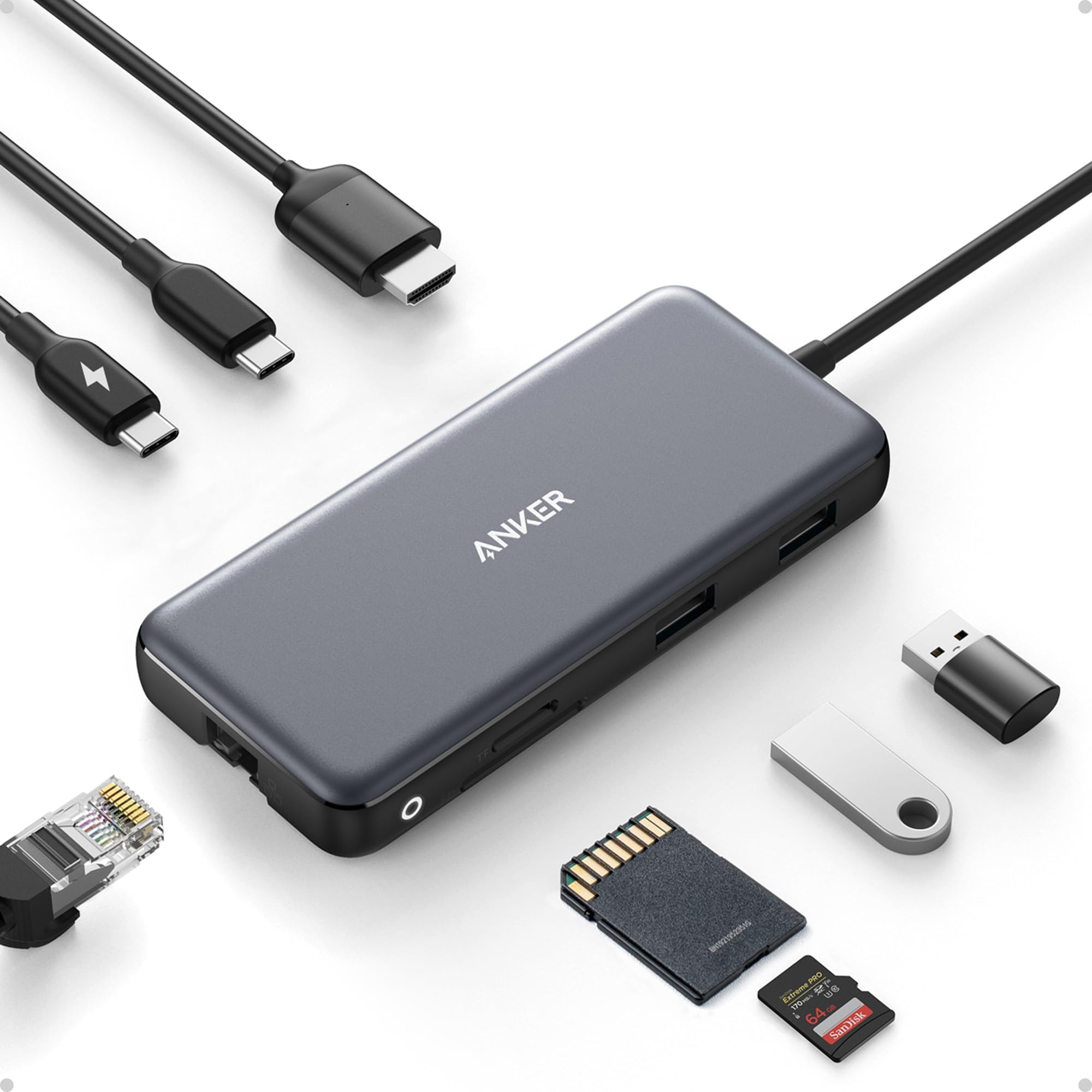
The Anker 8-in-1 USB-C Hub is a premium multiport adapter designed for professionals on the go. It delivers crystal-clear 4K@60Hz HDMI output, ultra-fast 10Gbps data transfer, and robust 85W power delivery pass-through. With Ethernet, microSD/SD card slots, and multiple USB ports, it seamlessly expands your MacBook, XPS, or iPad connectivity in a sleek, durable aluminum chassis. Perfect for multitasking millennials who demand speed, style, and reliability in one compact device.


| ASIN | B087QZVQJX |
| Additional Features | Fast Data Transfer, HDMI™️, Heat Resistant, Portable, Powered |
| Best Sellers Rank | #18 in USB Hubs |
| Brand | Anker |
| Color | Gray |
| Compatible Devices | Laptops, Macbook Air, Smartphones, Tablets |
| Customer Reviews | 4.3 out of 5 stars 9,283 Reviews |
| Data Transfer Rate | 10 Gigabits Per Second |
| Enclosure Material | Aluminum |
| Hardware Interface | Ethernet , HDMI , MicroSD, USB, USB Type C |
| Item Dimensions L x W x H | 4.76"L x 2.17"W x 0.6"H |
| Item Weight | 4.48 ounces |
| Manufacturer | Anker |
| Mfr Part Number | A83830A1 |
| Minimum Required Operating System Version | Mac OS 12 Monterey |
| Model Number | A83830A1 |
| Number of Ports | 8 |
| Operating System | iPadOS |
| Special Feature | Fast Data Transfer, HDMI™️, Heat Resistant, Portable, Powered |
| Total USB Ports | 3 |
| Total Usb Ports | 3 |
| UPC | 194644032999 |
| Unit Count | 1.0 Count |
| Warranty Description | 18 months |
A**N
Great 10gbps USB-C Hub, worked with Anker support through compat issues with PD4 iteration 1
Original Review (updates below): ----- The moment I noticed this thing on Amazon, I bought it and it literally just arrived. Finally, 4K60 over just USB-C with other ports (including making up to 10Gbps available to them) for a reasonable price. Unfortunately, the first two things I've done with it were both disappointing. I'll cut to the chase, the power delivery pass through isn't working with one of their own chargers. The first device I tried connecting this with is my Anker PD4 with one USB-C cable as the only thing plugged into it so I can test the truly up to 100W (-15 for its own power) claims. I've tried connecting it with Apple's 2m USB-C charge cable (100w capable) and an equivalent CableMatters cable that also supports 100W. When plugged directly into my laptop, both of these cables immediately start charging it and show up as 100W power sources. When this Anker hub is plugged in and either of them is connected to the power delivery port on the side of it, the laptop does not charge (laptop is a 16" Macbook Pro, I've tried multiple ports just for the heck of it). My second complaint is that when absolutely nothing is plugged into it, it becomes fairly warm to the touch. Why, when it's doing nothing, is it hot? I'm clearly not running data or even power through it so I have low hopes for it under load. The fact that it doesn't work in exactly the scenario they want it to most (a MacBook Pro with one of their own chargers) seems like a pretty big fail. I've got lots of USB-C things though so I thought I'd grab a couple and try those. Using an Apple 96W USB-C charger, the device does pass through power delivery properly. It shows up as providing 79W to the laptop (siphoning off 17W in this instance). I also have a 56W Aukey charger that splits power between a USB-A port and a USB-C port that can provide 45W of power delivery. When plugged into that charger it does appear to work as well and appears in macOS as a 30W power source. Maybe the problem is the Anker PD4? But it works fine providing power to the laptop directly. Would love to hear from Anker about these two products working together and what I should actually expect. Having it be unreliable for power delivery isn't great, but power and heat aside (it is getting a little bit warmer now that it's providing power from the Apple power adapter, but still definitely holdable), the hardware looks and feels good and the cable feels durable. Worth also noting that there's a white LED ring on the side of it that appears to be always on when it's plugged in. Don't know why it needs an LED. ----- Update, June 22, 2020: I've done some more testing and Anker has reached out to me to investigate what might be the issue. I can say that the hub works as I would expect from a quick test with my iPad Pro 11" with the above functioning chargers. It was able to pass through power with the 96W Apple Charger on the other end to both the iPad port as well as a Magic Keyboard port. The ethernet adapter showed up in iOS settings and an external drive was functional. When connected via the Magic Keyboard, which is a power only connection, as expected it provided only power. Still no power passthrough of any kind when connected to the PD4. ----- Update July 1, 2020: I've written back and forth with Anker and they've sent me a replacement hub. It also doesn't work with the PD4. I've tried multiple USB-C cables but they have also shipped a cable to test with it. For now I'm increasing the review from 2 to 3 stars because I am more and more suspicious about the PD4 and less about this hub. They claim that they have tested the setup I have separately without issue, and I've sent video showing the problems I've encountered, so the troubleshooting is ongoing. Have had a chance to use Ethernet on it without issue. Still need to try to test out its throughput when trying to use a 10Gbps USB-C enclosure and a 4K60 monitor at the same time (+ ethernet). More updates to come. ----- Update July 10, 2020: I've continued to talk with Anker support and they shipped me a replacement PD4. The one I had was labeled as "Iteration 1" on its barcode, the one I got back was labeled "Iteration 2". I tested it out and it works perfectly with this hub, passing through the correct amount of power to multiple Macbook Pros and fast charging an iPad Pro. Clearly the fault doesn't lie with this hub and is instead an issue with the first iteration PD4, so I'm updating my review accordingly. Working with Anker support was great. I've also been able to test USB-C throughput (without driving a display as well so far) and it properly utilizes 10Gbps. I've attached some extra images showing various devices connected to it (keyboard dongle, SD card, USB-C 10Gbps external SSD enclosure, USB sound card, ethernet).
J**A
Excellent Quality and Reliable Performance from Anker’s 8-in-1 USB-C Hub
I’m really impressed with this Anker USB-C Hub with Ethernet (8-in-1). The build quality feels premium, setup was completely plug-and-play, and all ports work flawlessly with my laptop. The Ethernet connection is stable and fast, which has been perfect for work calls and large file transfers. I also love how compact and portable it is while still offering plenty of connectivity options. HDMI output looks great, USB ports transfer quickly, and the SD card reader is very convenient for photo and video work. Anker continues to deliver reliable products, and this hub is no exception. Highly recommended if you need a dependable all-in-one USB-C hub for productivity or travel.
T**Y
Works great (quick test)
Just got this and tested and works great I attached to my MacBook with Ethernet and had a solid connection I tested my steam deck by plugging in Ethernet then adding HDMI then adding power and everything worked as it was plugged in I tested my Nintendo switch even though it clearly states it's not supported and it did not work at all. Even the power pass through did nothing. This is not even remotely a problem since it was advertised as such but I figured it was with a try and worth noting
K**H
Despite some caveats; this is a versatile hub
The Anker 555 8-in-1 USB-C Hub is a good buy if you’re looking for a hub from a reputable brand. I use it with an M1 Macbook Air, and it has been reliable so far. This hub has the following ports: 1 USB-C data port, 1 USB-C Power Delivery Port, 2 USB-A data ports, 1 HDMI port, an Ethernet port, and a microSD/SD card reader. Charging, PD (Power Delivery): To keep my Macbook charging, I connect a PD (Power Delivery) capable cable to the USB-C port meant for PD. (The other USB-C Port on this hub is meant only for data.) Once connected, the hub will eventually become warm to the touch, but this hasn’t caused any problems so far. Video Performance - no problems in 1440p I can connect my 1440p 144hz monitor to this hub’s HDMI port and my Macbook Air has no problem outputting a refresh speed of 144hz, as well the lower refresh rates of 120hz and 60hz. (I do not have a 4k monitor, so I could not test that.) USB-A Ports - works flawlessly I’ve tried keyboards, USB Drives, and even gaming Mice. All of these devices work as expected when connected to the USB-A Ports. Ethernet - Excellent speed I've connect this hub using an Ethernet cable to Gigabit speed Internet. The speed is just as fast as other computers on the network, and there is no slowdown at all, even with most of the ports on the hub being used. Gaming Keyboards with USB-C connectors - some issues. Some peripherals such as keyboards with USB-C connectors may not work on the USB-C ports on this hub. I tried using a Glorious GMMK Mechanical Keyboard and it did not work with this hub’s USB-C ports. (Of course you could try to simply use a USB-C to USB-A adaptor and then connect via the other USB ports on the hub instead.) Extension Cable - Use a Thunderbolt 4 cable Although this is totally optional, I like to use a small, 6-inch USB-C Extension cable to allow this hub to have more slack away from my laptop when connected. To allow this to work, I had to use a Thunderbolt 4 extension cable. I've tried other cables such as a Thunderbolt 3 extension cable. However, some of the attached devices on the hub were not recognized. Only the the Thunderbolt 4 extension cable allowed all my attached devices to be recognized. Other devices I have successfully connected an external SSD via the USB-C data port on this hub. I also regularly use an external DAC using the USB-A ports connecting to an IFI HIP DAC. Both of these devices work perfectly with this hub. Data transfer speed is rated at 10Gbs, though I haven't actually confirmed that. It works well enough for my purposes of transferring text documents and the occasional batch of vacation photos to my external SSD. Conclusion This hub from Anker is rated at 10Gbs which is plenty for me. But if you regularly transfer large amounts of data (like for video editing), I would instead recommend a powered docking station such as those from CalDigit. But for me, this portable hub does everything I need, and for much less money.
S**T
Almost perfect, could use one more USB-C Gen 2 port and a metal case instead of plastic.
Never really had any problems with Anker gear, I've come to trust the brand name. This little hub is almost perfect for use with my 2019 MacBook Pro, but where Anker really dropped the ball is by not adding one more USB-C port. I mean, there's two, but if one is dedicated to power devices only that doesn't really leave much room for expansion by only giving you one extra, I mean they were thoughtful enough to give you two USB-A ports. I do like that the USB-C and two USB-A ports are version 3.2 Gen 2 rated for up to 10Gbps transfer speeds versus Gen 1 at 5Gbps. The plastic casing does get hot, not sure if aluminum metal would be any better, but it would feel nicer, plastic just feels cheap. Also, a dark case with dark letter printing doesn't work because you can't see the writing, should have used lighter letter coloring. Otherwise, solid performer. I'll keep it along with my other one because having two hubs with a laptop is convenient so I don't have to always haul a hub around from place to place. PROS: • 1 USB-C port version 3.2 Gen 2 rated up to 10Gbps. • 2 USB-A ports version 3.2 Gen 2 rated up to 10Gbps. • Also includes, HDMI, Ethernet, SD and micro SD card ports. CONS: • Plastic casing, gets hot. • Should have one more USB-C port. • Port description lettering is too dark, gets lost against dark case color, should have used white or silver lettering instead. • No audio port.
C**R
Does everything, super portable, robust construction
This is a super useful hub. I also used the Anker 341 7-in-1 hub for years, and it was very reliable for every feature, and the 555 8-in-1 looks to be of the same quality. The ethernet adapter is a great addition, and it works right away at 1G speeds on Linux 6.18 and even Android 16. I upgraded from the 341 to use this to connect to and configure devices from my desktop without having to drop my normal ethernet connection, and it is fantastic for that. It's a real swiss army hub, perfect travel size, and incredibly handy.
C**S
Great as long as you know its limitations; runs warm; monitor settings may need to be changed
I reluctantly gave up MagSafe and joined the USB-C future when my employer issued me a new 2019 16" MacBook Pro. Searching for a way to connect my various peripherals I settled on this hub as a reasonable way to connect a 4K display, pass power from the laptop charger (albeit not the full 96W; macOS reports 79W after hub losses—good enough most of the time), connect 1GigE, and provide a few spare USB ports and occasionally-used SD card slots. I've learned a few things: A port that looks like USB-C does not pass video unless it is a "Thunderbolt" port (look for the lightning bolt logo, apparently); connecting a USB-C-to-mini-DisplayPort adapter to the USB-C port on this hub did not allow my monitor to work. Lesson learned. The HDMI port did work, and did pass 4K@60Hz, but only after I adjusted my monitor settings. At first I was convinced either my HDMI cable or this hub were defective, because macOS would only allow me to select 4K@30Hz. I have an LG 4K display, and from reading forums, one must enable 60Hz in the on-screen display menu before the monitor will tell the computer it is capable of displaying 60Hz video. For my monitor, that meant changing "Ratio" in "Quick Settings" to "Original" (it defaulted to "Wide", with a separate configuration for each port), as well as turning on "HDMI ULTRA HD Deep Color" from "Picture" -> "Picture Adjust." After I changed those two settings, 60Hz was not available until I unplugged the HDMI cable from the hub and plugged it in again. After that I had buttery smooth 4K video at 60Hz. The hub works as advertised, at least for my configuration. The 1GigE port works well, and is equivalent to a direct USB-C to Ethernet adapter I tried. It does run warm to the touch as other reviewers have reported. That's not problematic, but I'd prefer it pass the missing 17W to the laptop rather than dissipate it as heat. Time will tell how well the hub holds up, but for now I'm happy. In summary: if you have a new Mac this hub will likely work for you, though you may need to adjust your monitor settings.
A**R
Older flash drives might not work.
Port labels are too faint to read easily and the PD out port isn't labelled (I suppose they thought it was obvious since it has a fixed cable). The USB ports are speedy except it won't recognize any of my several SanDisk Cruzer Glides. Others flash drives work okay. Works great as an iPhone USB C to TV HDMI converter.
J**N
Produto ok!
Produto atendendo conforme prometido.
S**N
ottimo prodotto
prodotto di qualità , come descrizione su Amazon. Consigliato sopratutto per dispositivi mobili ( portatile , ipad , tablet Android).Deve pero essere prima inserito nel ipad ( spento ) poi vine riconosciuto all ascensione del dispositivo.Altrimenti entra in conflito con la batteria del Ipad e il hub non lavora bene o non lavora proprio .Con altre parole si crea un conflito dei protocoli di carica tra i due dispositivi. Per questa si deve seguire questa regola .A me a funzionato in questo modo.
R**Y
Perfekter Testlauf
Bisher nur ein Testlauf, läuft aber perfekt.
A**C
Fonctionne parfaitement
C'est le troisième que j'achète sur amazon. Les 2 autres fonctionnaient partiellement. Ici le port USB c consacré aux données fonctionne. De plus, j'ai pu brancher une micro SD et une SD, toutes 2 de 500 Go.
M**I
Efficient
Good product
Trustpilot
1 month ago
1 month ago