Buy anything from 5,000+ international stores. One checkout price. No surprise fees. Join 2M+ shoppers on Desertcart.
Desertcart purchases this item on your behalf and handles shipping, customs, and support to Hungary.
🚀 Elevate your workflow with the sleek, wireless M535 — productivity that moves with you!
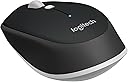
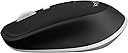
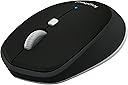
The Logitech M535 Bluetooth Mouse is a compact, ambidextrous wireless mouse designed for professionals who demand portability and precision. Featuring a 6-month battery life, seamless Bluetooth connectivity, and a comfortable rubberized grip, it’s built to enhance productivity anywhere while keeping USB ports free. Though discontinued, its durable design and smooth optical tracking have earned it a loyal following among millennial managers seeking reliable, stylish tech companions.
| ASIN | B0148NPIQK |
| Additional Features | Wireless |
| Antenna Location | Office |
| Are Batteries Included | Yes |
| Are Batteries Required | Yes |
| Battery Average Life | 6 months |
| Best Sellers Rank | #763 in Computer Mice |
| Brand | Logitech |
| Built-In Media | Includes 1 AAA battery and user information |
| Button Quantity | 3 |
| Color | Black |
| Compatible Devices | Tablet |
| Connectivity Technology | Bluetooth |
| Customer Reviews | 4.6 out of 5 stars 6,954 Reviews |
| Embellishment Feature | LED |
| Enclosure Material | Metal,Rubber |
| Global Trade Identification Number | 00097855113726, 10097855113723 |
| Hand Orientation | Ambidextrous |
| Hardware Platform | Tablet |
| Item Dimensions L x W | 3"L x 2"W |
| Item Type Name | Mouse |
| Item Weight | 4 ounces |
| Manufacturer | Logitech |
| Mfr Part Number | 910-004432 |
| Model Name | M535 Bluetooth Mouse |
| Model Number | 910-004432 |
| Movement Detection | Optical |
| Movement Detection Technology | Optical |
| Number of Batteries | 2 A batteries required. (included) |
| Number of Buttons | 3 |
| Operating System | Chrome OS |
| Power Source | Battery Powered |
| Range | feet |
| Special Feature | Wireless |
| Style Name | Mouse |
| UPC | 734911501676 734911110229 097855113726 |
| Unit Count | 1.0 Count |
| Warranty Description | 1 Year |
A**4
Another Excellent Logitech Bluetooth Mouse!
I bought this mouse on impulse. I have an M557 paired to my laptop that has been serving me well for a few years now, but I like the design of Logitech's new mice (I have an M330 Silent that I use with my desktop that I absolutely love and if they release a "Silent" version of this mouse, I'm getting it!). I had no issues pairing the M535 with my Asus laptop and all functions/features respond well. This mouse is configured by the new Logitech Options software which feels a lot more simplified than the original SetPoint software. The button configuration is good as is, but I like to have the center mouse button pull up the Start Menu, so that was the only change. The sensor is accurate and properly responsive. I prefer a quicker mouse pointer, so a small increase there and I'm golden. It's definitely a travel size mouse, about the same size as the M557 only differing in the shape and texture. The matte finish on the buttons and rubberized surround give it a great in-hand feel. Like most Logitech mice it tracks smoothly (especially on my gaming mouse pad which is geared toward low friction). It is certainly lighter than the M557, as it only seats a single AA battery as opposed to the pair used by the M557. This is a subjective characteristic though, as users will differ in their preference regarding weight. On the subject of connectivity, I think I've already sorted all of that out with the M557. I used to experience dropped connections, but after searching onilne, I found a remedy focusing on the OS's networking and Bluetooth settings, preventing power and connections to be disabled (for battery savings and performance). With that in mind, the M535 has performed well and has never missed a movement or click. The main reason I opt for Bluetooth mice on my laptop, as many do, is to keep the USB ports free. This mouse, like the one before it, serves this purpose exactly. For anyone interested, make sure that your laptop/desktop is Bluetooth capable, otherwise you'll end up having to buy a separate Bluetooth dongle to connect the mouse, thus defeating the purpose of keeping the ports free. If this is the case, look into the M335, it's the same mouse using Logitech's wireless nano USB receiver.
N**P
Impressive mouse
I've had this mouse since 2019 and still use it. It's definitely stood the test of durability. The battery life on it is pretty impressive as well. I think that I switch it out every year. It's a nice small size that is portable and easily connects with my MacBook. As you can see in the photos, the side material has come off a bit but the mouse is still functional. Highlights - Portable - works with MacBook - long battery life - durable Overall, it's a solid mouse for the price and so far it's lasted 6 years... Can't beat that.
M**L
Does everything right, even the little things!
It's a Bluetooth mouse. It works flawlessly with my MacBook Pro (late 2016). But more than that: despite being clamshell packaging it has "EZ-open" tabs so make unpackaging easy and knife-free -- why aren't *all* clamshell packages like this? It needs a battery... it comes with a battery! Despite being comparatively inexpensive, it has a really nice slightly rubberized texture where you hold it that feels expensive. And despite being AA-powered, it uses only *1* battery instead of 2 so it's not too heavy! And it has a nice "light" click -- one of the main reasons I don't like Apple's mouse which requires a lot more pressure, which aggravates my carpal-tunnel. I saw some people complain this isn't "compact" enough and is closer to full-size. I disagree -- this is nicely compact for me, significantly shorter (length) and shorter (height) than a normal mouse, but without being tiny. All in all, pretty much a flawless mouse if you're looking for one that's small, light, and minimalist.
K**.
Decent mouse; would buy again.
Bought a second Logitech M535 after spilling coffee all over the first one. After I ordered the new one, I took the old one apart (it had sat to dry for a couple days at this point) and took a can of air to the PCB, specifically blowing the liquid out from between the PCB and the buttons. Once whatever liquid was gone that had been shorting out the buttons the mouse worked fine. As far as usability and comfort, this mouse isn't too bad. I have large hands and this is about the smallest mouse I would find comfortable. The scroll wheel is much more responsive than my old MS BT mouse and the glide pads are nice and smooth on just about any surface. My old MS BT mouse wouldn't work at all on our white table, but this one doesn't have an issue with the semi-gloss white surface. I don't really use the tilt functions on the mouse wheel or the Navigation button (the square button in the center), so can't give much feedback on those. We tried pairing the new M535 to my wife's laptop and it wouldn't pair. Discovered in the process that she is still running Windows 8.1?! The older (just over 12 months old) M535 paired just fine with Windows 8.1, so something must have changed since these first came out. I had to try a couple times to get the new mouse to pair with my Windows 10 laptop, but once it is connected it doesn't lose connection. Connectivity issues are the only reason I can find to knock off any stars on this product. Battery life seems decent. I might have changed the battery (it uses one AA) 3 times at most in the last year, but then, I do turn it off every time I am done using it.
J**.
Satisfactorily fulfilled my requirements.
Was debating between this or Logitech Bluetooth Mouse M557 for PC, Mac and Windows 8 Tablets (910-0 03971) and I'm happy with my choice. This is a newer model and I definitely think it looks better. More ergonomic, new slick wordmark, matte black finish. I needed a Bluetooth mouse for my Surface Pro 3 so the single USB port would be available for other peripherals. I've had many Logitech mice in the past and I've never been disappointed. This is no exception. Paired quickly and easily. Tracks well on many different surfaces (can't be too reflective). Connects immediately when turning on computer/mouse. Does take a little wiggle to wake up after sitting for a bit, but that hasn't been an issue for me. Other Logitech mice I currently use: MX Master, M705 Marathon Mouse. The M535 is more compact than the M705 and slightly less precise than either. It's very obviously flatter than the M705. I have medium-large hands and it's no problem. However, I've noticed different mouse movement styles among others so I think I should mention that when mousing, my wrist rests stationary on a pad and movement is done with my fingers and wrist with somewhat high-sensitivity. On-screen, far left to far right is only about a 1-inch movement on a desk/mousepad. A month in, battery is still good. We'll see how much longer it lasts. Will update when battery dies. If I remember to. Probably.
B**T
Getting closer!
I have been in a search for a reliable compact wireless travel mouse for some time I have bought several name brand small ones and all have had some problem or another that made them useless to me. The main problems have been severe USB lag, and battery life. I bought this one to try a blue tooth version. I was surprised at the results. It paired immediately and just started working . No lag at all. It uses a AA battery instead of AAA. So far, I haven't had to change it. It has an automatic battery save mode when not in use. It is a little larger than I personally like, but So far it has met all of my expectations. It is comfortable to use, very precise tracking, and positive key clicks I am quite happy with this device and hope that it is th end of my search!!
A**.
Cool Little Compact Mouse
This is a neat little mouse and I absolutely love it. If you ever need a compact yet still highly comfortable mouse for it's size, this is the mouse you want. Being Bluetooth, it works with any Bluetooth compatible device. I have used this in conjunction with a Bluetooth keyboard to turn my Galaxy Tab into a mini computer at times. Not requiring one of those USB receivers is also just such a huge plus, as I now don't lose a USB slot on my laptop and as stated before, it can be used on non-USB compatible devices such as tablets. For such a small mouse I was expecting it to strain my wrist or otherwise be uncomfortable to use extensively, but this was perfectly fine to use. Battery life is not bad either, though it would have been even more amazing if it was a rechargeable mouse instead of an AAA battery one. I also take this mouse with me when I'm out working on my Chromebook, and it just makes using the laptop so much easier. A mouse is still significantly superior to the touch pad, no matter how good the touch pad on the laptop actually is.
A**T
Tricky at first to pair with MacBook, but great once that problem is solved!
The one issue I have with MacBook Pro's within the last 5-6 years made are the fact that they no longer have 4 USB ports, but just 2. I find this silly. So when my track pad started acting all wonky, I was forced to use a mouse. Now seeing as one of my USB ports is indefinitely used by my external hard drive, that leave me with just one USB to plug in my mouse, wired or wireless. This wont work when I need to plug in any number of things to my computer. My iPod being one of them. Yes, I could have bought a USB extender, and maybe eventually will, but not today - today I needed a mouse that wouldn't take up my only USB port. This works beautifully. It took a little bit of work to get it to pair with my MacBook Pro. I had to download some Logitech software from their website and restart my computer for it to even recognize that device. After that, it started working like any mouse. Smooth with no hiccups. It goes to sleep when not being used after awhile. Now I'm curious to know if the battery life will live up to the 10 months like advertised.
F**O
Excelente ratón portátil
Es un ratón perfecto para llevar junto con una computadora portátil debido a su tamaño y que no necesita un receptor, tiene una excelente calidad y con el software de Logitech se puede configurar los botones a la perfección. A favor: -Al no utilizar un receptor conectado a la computadora no hay que preocuparse por tener disponible un usb o por el poder perder el mismo. -Material que se siente de calidad y de acuerdo con el precio. -Tiene un tamaño lo suficientemente pequeño como para poder ser portátil y de buen tamaño para ser utilizado, si tienes manos grandes puede ser un poco pequeño para utilizarlo como ratón de uso diario pero como ratón de viaje o para trabajo fuera de casa está excelente. -Botones configurables mediante el software de logitech -Utilizable en Android sin problema alguno. Neutro -Este modelo solo soporta un dispositivo emparejado a la vez por lo que cada que cambias de dispositivo es necesario el emparejar de nuevo. En contra: -El led Azul unicamente indica cuando está encendido y sin emparejar o en modo de emparejamiento pero no hay indicador alguno de cuando está encendido por lo que si te olvidas de apagarlo al guardarlo, cualquier apretón o movimiento lo enciende gastando algo de batería, es cuestión solo de recordar.
S**I
Encantado
Después de mirar varias reviews me decidí por este modelo el M535, para combinarlo con el teclado de Logitech que había comprado también (más o menos a juego). El precio me salió genial porque la misma versión en azul y/o blanco es bastante más cara. De tamaño es un poco más pequeño que un logitech M100, para mí perfecto porque ocupa algo menos de espacio pero no es de tipo "mini" de los de viaje... El funcionamiento es inmediato, se sincroniza rápidamente y hasta el momento no he sufrido desconexiones ni nada por el estilo. Había leído por ahí problemas en relación con fallos en el "doble clic", la verdad es que a mí me funciona perfecto en ese sentido. Detalles que me han gustado: - No emite luz, es decir cuando lo levantas o está encima de la mesa, el sensor no emite ningún tipo de luz lo cual es de agradecer en el caso que trabajes de noche con poca luz. - No hace prácticamente ruido la rueda de desplazamiento (y va fina...), haciendo un uso normal. - El botón superior es "configurable", por defecto en Windows 10 me abre las aplicaciones abiertas para poder seleccionar sin tocar el teclado, pero puedes ponerle otras funciones con el SW de Logitech. - Funciona perfectamente sobre todas las mesas en las que lo he usado hasta el momento: mi escritorio de bambú natural, madera de color claro (marrón, gris, blanco), etc. Sin alfombrilla de ningún tipo, ni nada por el estilo. En definitiva, totalmente recomendable.
F**E
Silencieuse
Égal aux produits de cette marque. Reconnue par la SURFACE GO au 1er coup. Bien que la souris MICROSOFT...
R**.
Se coupe sans arrêt
Ne fonctionne pas correctement elle se coupe sans arrêt et je doit la couper puis la rallumer
J**S
Evita o uso de uma porta USB
Evita o uso de uma porta USB, depois da primeira configuração já permite o uso direto assim que se inicia, padrão Logitech de qualidade, o uso de apenas uma bateria AA ja qualifica ser um bom projeto, durabilidade da bateria é daquelas que até se esquece que tem, alias tipico dos mouses da Logi. Robusto fisicamente mas de excelente ergonomia, mesmo sendo Bluetooth não apresenta atrasos, porem não é proprio para gamer,
Trustpilot
5 days ago
2 days ago