🖤 Cool, Compact, and Commanding — Your Build’s New Best Friend
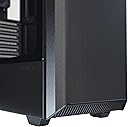
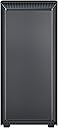
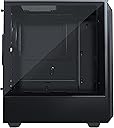
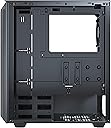
The Phanteks Eclipse P300A is a compact ATX mid-tower case engineered for superior airflow with its ultra-fine full-metal mesh front panel. It supports standard ATX motherboards, up to 280mm radiators, and includes a tempered glass side panel to showcase your build. Equipped with front USB 3.0 ports, audio jacks, and easy-access storage bays, it balances high-performance cooling and practical design in a sleek, professional chassis favored by gamers and creators alike.



| ASIN | B083LYL7V5 |
| Antenna Location | Business |
| Best Sellers Rank | #4,533 in Computer Cases |
| Brand | Phanteks |
| Case Type | Mid Tower |
| Color | Black |
| Compatible Devices | CPU |
| Cooling Method | Air |
| Customer Reviews | 4.7 out of 5 stars 1,982 Reviews |
| Enclosure Material | Metal, Tempered Glass |
| Fan Size | 12 centimeters |
| Global Trade Identification Number | 00886523301882 |
| Hard Disk Form Factor | 3.5 inches |
| Internal Bays Quantity | 4 |
| Item Dimensions D x W x H | 15.75"D x 7.87"W x 17.91"H |
| Item Weight | 6 kg |
| Manufacturer | Phanteks |
| Material | Metal, Tempered Glass |
| Mfr Part Number | PH-EC300ATG_BK01 |
| Model Name | Eclipse P300A |
| Model Number | PH-EC300ATG_BK01 |
| Motherboard Compatability | ATX |
| Number of Items | 1 |
| Other Special Features of the Product | Ultra-fine Performance Mesh |
| Recommended Uses For Product | Business |
| Supported Motherboard | ATX |
| Total USB 2.0 Ports | 2 |
| Total USB 3.0 Ports | 2 |
| Total Usb Ports | 2 |
| UPC | 886523301882 |
| Warranty Description | 2 years manufacturer |
J**H
Great, compact, airflow focused case with a few small quirks
The p300a is a great, airflow focused, compact ATX case! I found the front mesh, tempered glass panel, buttons, etc. all to be very good quality and the case looks great. The build was fairly smooth with a few small quirks: 1) I had to remove the rear exhaust fan to seat the motherboard properly in place. The fan is almost directly on top of the rear I/O and my motherboard has a heatsink and small 40mm right there as well. Once the motherboard is fully installed, then the fan could be reinstalled without any issues. 2) The power supply space is a little tight. My power supply is 150mm long. I had to partially uninstall the HDD cage and rotate it out of the way to get the power supply in place. 3) There is one "mystery" wire that I found running from the top/front I/O to behind the hard drive cage. I thought this was a relic from the RGB controller of the standard p300 case and was tempted to cut it out of the case, but did not. Once the build was finished and powered on, I saw that there is a small, white LED light strip just under the bottom edge of the tempered glass panel. This cable supplies power to that light. 4) The front has fan mounts spaced for 120 or 140mm fans. I already had 140mm fans from my previous case. They installed fine, however, the actual cutouts for the fan blades are sized for 120mm fans and roughly 20% of the blade area for my 140mm fans was blocked. I cut the openings larger using a Dremel. This was absolutely not necessary, but made me feel better about the setup. I bought this case to replace a massive (by comparison) fractal define r4, and couldn't be happier. Much better airflow, and the system is quieter than it was in the fractal case since better airflow means the fans don't have to run as fast to cool the system.
D**A
Pretty cool case.
I purchased mine at an inflated price (99usd) and I still love it. Its got great airflow and a beautiful design. I like having the half window too, who needs to stare at their drive bays and PSU? The compact design means its one of the smallest full ATX cases on the market. The case feels solid when fully put together, good luck finding another case at this price range (60usd normally) with the same level of quality. Cons: The front does not fit 140mm fans correctly. Their airflow is partly obscured by metal. 120mm is what it's made for. The top fan slot is barely high enough to clear the motherboard. Most motherboards will have the CPU power plugged in there so you might have to push down on the cables to get anything to fit. The thumb screws on the panels are slightly annoying but not as bad as others say. The drive bays have almost no access to fresh air. Just a tiny hole where they plug in from the front. I'm afraid to look at my HDD temps.
M**O
My Favorite sub $70 Case
The Phanteks P300A is a fantastic case. I built a $600 PC for a friend, and I got this case. Everything was easy to install. The airflow is really good. The case comes with a removable PSU dust filter - I know it works well because it's the same one that's in my P500A, that I've had for my PC for over a year and have cleaned twice. It also comes with a super handy cable management "crater," which provides quite a lot of free space to manage, along with some Velcro straps. The Hard drive cages were easily removable as well. Phanteks makes really excellent cases for almost any kind of build.
A**R
Great price, great value, a couple weird nitpicks.
This is fantastic value for how much you're paying. Pros: - Great build quality, feels premium - Size is smaller than most ATX cases, but doesn't feel too small - Preinstalled motherboard standoffs, nice to have. Saves time, makes installation easy - Lots of options for drive installation, easy to use and makes installation go very smoothly. - Good airflow with mesh front panel, nothing feels closed off or choked for air anywhere. Feels very open. Cons: - VERY cramped holes next to the motherboard tray. Not a big issue with smaller cables, but this requires you to weave the 24-pin motherboard power cable at an angle with the cable all the way up the back to properly plug in the cable, otherwise there's not enough room to plug it in. Took me a while to figure it out. - No instructions on how to uninstall and reinstall the pcie expansion slot bracket. For experienced builders this likely won't be an issue, but for me who is building for the first time with this case, it proved to be very confusing how to get it back on. This is likely me being dumb though, so take it with a grain of salt. Overall very happy with this purchase. Fantastic price for a fantastic quality product.
L**L
A functional case, competitively priced, with trade-offs
+Low price for a tempered glass windowed case +Standard parts fit in a standard fashion +Black color goes with everything +Convenient built-in cable ties and time-saving pre-tied front panel wires +Lack of sharp steel razor edges, sometimes found in low-price cases •Tempered glass is very slightly tinted. Reduces the ferocity of those eye-searing gamer RGB LEDs, but can make it a bit dark in there. •Side panel thumbscrews have a retaining system. You won’t lose them, but they’re slightly more fiddly than the standard bare hole and flat bracket. -PSU and cables are a very tight fit. Easier if you don’t have 3.5” hard drives, because then you can remove the drive bay in the front of the basement. -Low cost is achieved by not supplying extra fans, SSD brackets, and by having minimum front panel connectivity options. If you need them, you will spend all the money you would have saved. -Gap between the motherboard tray and the backside panel is very slim. Some wires may be pinched here, especially if you have two 2.5” SSDs powered by one cable from the PSU. But, as above, if you want to run 2 SSDs, you should look at a slightly more expensive case. -This case is not optimized for airflow, so your parts may get warmer than you would like. Make sure to update firmware and get those fan curves operating. Overall: a functional case, with some trade-offs to achieve a competitive price. If you have a short parts list, or are planning to run M.2 SSDs almost exclusively, or if you have spare case fans, this is a great choice.
K**N
Great Case!
I've been eyeballing this case for a while now, especially for this price point I find it a great case. The sleek black design of the case looks nice. The material used is very sturdy and pretty heavy. The amount of space to cable manage in this case is good. The only issue is when it comes to the Psu and HDD since there is not much space to work with, so a semi or fully modular Psu will work best with this case. Overall, I would highly recommend to anyone who is looking for a case around this price point.
K**T
The Cost to Quality Fallacy
The cost to quality fallacy gets musicians and tech nerds the most. I love how one reviewer says, "this is a good entry level case for moderate gaming". Huh? Moderate gaming? Temperature is the metric that means the most to me... you know, performance? I do intense gaming with a Ryzen 5900X and RX 6750 XT. AAA games at max settings w Ray Tracing for hours on end at 1280. I can also render to my heart's content, including Blender and StudioOne projects. I've got 4 Blender projects rendering right now on the computer I am typing this review on, and HWINFO has both the CPU and GPU at 60C. For fans I have 3 Corsair 120ML Pro and 1 Corsair 140ML pro. The CPU is cooled with a Skythe Fuma 2. Bottom line, temps are never a problem. As for other features, I like that it is relatively small for an ATX case. The side panel is made of heavy high quality glass that sits in solidly. Cable management it fine. The controls and USB interfaces are fine. Drive space is fine and easy to access from the back or by removing the front panel. The front panel is easy to remove but still sturdy when in place. PSU storage is fine with an easy to remove and clean dust filter on the bottom. No frills is the path to bang for the buck. The thing that many more expensive cases get wrong is simply restricting air flow. That's all. No magic. This case's mesh front does great at letting the air in. If I had to search for one nit-picky gripe, there is a weird little white LED light strip thing at the bottom that doesn't line up well and is distracting to the aesthetic, but I just unplugged it and you can't notice it was ever there. But it was a strange design choice.
H**W
Good quality, sleek looking case
This is a really good quality case for the price point. The only thing I will note is that it is on the smaller side of mid-size, so if you are getting a fairly big GPU be aware it's going to take some doing. I had to remove several PCI slots and lay the case down on it's back to fit my Red Devil Radeon 5700xt inside without bumping everything else around. I do wish cable management was a little bit more robust, but this is also my first PC build so it could be a user issue. Also, I see people complaining it didn't come with an IO shield but that comes with the motherboard? So don't worry about that.
J**N
Antiguo- Pero por 70 dolares es una MUY Buena Opcion AIRFLOW
Esta de mas decir que este case no busca estetica, si quieres algo MUY bonito ve a por la serie 300D de corsair que esta al mismo precio en 2021. Sin embargo, su calidad de construccion esta muy bien, se siente mas caro de lo que es. El unico detalle en cuanto al diseño del case seria que el espacio de la fuente de alimentacion es muy reducido para una ATX, por lo que batallaras un poco al introducirla en el case. El PRINCIPAL objetivo de este case es mantener FRIOS los componentes de tu PC, acompañado por dos o inclusive un solo ventilador, puede alcanzar el rendimiento de los modelos Airflow mas caros del mercado. Si tu plan es tener un dicipador de stock y encima escojiste una placa con una calidad de VRM custionable o que alcanza muy altas temperaturas este es tu case. Si te interesa meter una AIO Liquida en el recomiendo checar la compatibilidad antes de comprar, ya que las tolerancias son muy justas.
Z**Y
Einfacher EInbau und klasse Features für Kabel-Management.
Das schon etwas ältere Gehäuse ist selbst heute noch klasse. Die zwei besten Features des Gehäuses sind das Mesh-Frontpanel, was einen super Airflow verspricht und die vielen Features für Kabel-Management. Es gibt sogar extra Löcher im Gehäuse für Micro-ATX Motherboards, was man nicht oft sieht. Das größte Makel des Gehäuses sind die fehlenden Lüfter vorne, die man sich unbedingt dazu kaufen sollte, um das volle Potential des Gehäuses auszuschöpfen. Für den Preis kann man sich allerdings nicht wirklich beschweren, finde ich. Allgemein ein sehr gutes Gehäuse für den Preis und tolle Kühlungsleistung mit genug USB Steckplätzen oben.
B**M
Great compact ATX case
I live in a small flat so needed a compact case for a full ATX Build. Following the excellent reviews the Phanteks P400A received, Phanteks updated their smaller and cheaper P300 with the same mesh panel. The result is an excellent value for money case with full ATX compatibility in a small(ish) form factor, with great cooling potential. You can read the full description of the features online but some things to note below: - the case only comes with a single 120mm Phanteks fan. I strongly advise you to add at least two additional intake fans at the front (140mm fans can be fitted but 120mm will be fine as well). - cable management is pretty good. There are three included velcro straps in the case, lots of cable tieing points and Phanteks include a good assortment of screws and cable ties with the case. - the case features a reset button - a plus for me This said, there are some minuses as well given that this is, after all, a budget case. The front panel on mine has slightly uneven gaps where it meets the steel frame on either side which suggests QC isn't a huge priority for this line of (budget) cases. The steel is quite thin and the HDD caddies are a bit flimsy. My previous case was definitely built better and out of better materials even though it was slightly cheaper. Overall, I am happy with my purchase. I have attached some photos and a video showing my complete build (R5 2600 OCed to 4GHz, RX5700XT OCed to 2000MHz core, 16GB ram a couple of NVMe SSDs and 2x2.5inch HDDs)
C**W
Good quality for the price
I like the flexible magnetic fan filters. Comes with Velcro cable ties. Good quality case for the price.
G**H
Amazing case for the price!!
This is an excellent case for minimal builds where you don't need a lot drives. There are enough fan slots at just the right locations. I specifically was looking for a case with great air flow, yet not too many holes around the fans (outside the fan frame) to prevent cycling air from around the fan rather than through the case. With 1x 120mm on the rear, 1x 140mm top, and 2 140mm intake on the front, this case has some nice cooling. I did modify the front fan mount brackets so there was less blockage of the 140mm airflow. I never plan on using 120mm there so there was no reason to not make that modification. This was the first case I've ever used where I didn't need to engineer more than just that in 22 years time of custom building computers. Even my Lian Li Lancool II Mesh required far more modding (mainly the top), but that's another story. Pros: It looks stylish with a tempered glass window. There is excellent airflow with proper fans placement. It can accommodate a full ATX motherboard without issue. E-ATX might have a bit of a problem with the cable bracket, but who uses that size motherboard now? There is decent cable management in place. The case has a power supply shroud. The top of the case is removable, which does help for installation. That came as a surprise! All of the pros above at such a low price (currently $60 CAD)! Now the cons: The case didn't come with the SSD mounting bracket (supposed to have 1), BUT that was remedied free of charge and relatively quickly by Phanteks support...so I'd say that turned into a pro! The case is made of weak metal, and the paint chips a bit too easily. The weak metal actually turned into a pro for the part I had to modify, and it's not flimsy enough to really worry about. For the price point it's to be expected. In fact, the material is better than what I expected for the price. The included fan is junk...as usual and once again expected. I almost always replace the sleeve bearing fans for some of higher quality anyway. This case might be too small for some wanting to install HDDs, especially with a long power supply. It would be a tight fit to attach cables to the HDDs. If that's your plan, then just spend a bit more and get the P400A. It's pretty much the same as the P300A only bigger, so more room to work with things like HDDs. The cable management bracket made for a tight squeeze for the main power cable. It'd be nice if Phanteks adjusted the gap to be about 1/4" larger on the upper half. The power supply can't be mounted facing up without further modification. Not a bit deal to me, but some might find that annoying. Summary: The P300A is probably one of the best cases you can buy if you don't plan on installing HDDs. I know my "cons" list doesn't do the case justice. Most of that list really is nitpicking since there are many other cases out there that aren't nearly as well designed and cost a lot more. When ordering this case, do plan on adding fans to the list. While that increases the cost, you should already plan on that anyway. This was the first case I've bought made by Phanteks. I wouldn't hesitate to buy from them again. Their customer support was flawless in execution to remedy the missing part. Some might argue the part shouldn't have been missing to begin with, but these things happen sometimes. With the ability to buy computer parts that go together in a more compact manner, I can't help but award this case a 5 star rating. I hope they take reviews like this one and make improvements for the next version. They're getting closer to perfection.
Trustpilot
2 weeks ago
3 weeks ago