


Desertcart purchases this item on your behalf and handles shipping, customs, and support to Hungary.
🔍 Diagnose smarter, drive safer—your car’s new best friend!
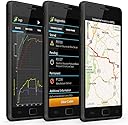
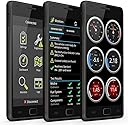
The OBDLink LX Bluetooth 3.0 OBD2 Adapter transforms your Android phone or Windows PC into a professional-grade automotive diagnostic tool. Featuring hackerproof wireless security, broad vehicle compatibility for all 1996+ US cars and light trucks, and seamless integration with popular apps like Torque and MotoScan, it delivers fast, accurate diagnostics in a compact, easy-to-use package backed by a 3-year warranty.




| ASIN | B00H9S71LW |
| Best Sellers Rank | #11,166 in Automotive ( See Top 100 in Automotive ) #77 in Code Readers & Scan Tools |
| Brand | OBDLink |
| Brand Name | OBDLink |
| Customer Reviews | 4.5 out of 5 stars 7,781 Reviews |
| Global Trade Identification Number | 00897155000142 |
| Included Components | Compliance insert, Quick Start Guide, Scanner, Warranty Card |
| Item Dimensions L x W x H | 1.97"L x 1.77"W x 0.91"H |
| Item Type Name | ScanTool LX Bluetooth: Professional Grade OBD-II Automotive Scan Tool for Windows and Android – DIY Car and Truck Data and Diagnostics |
| Item Weight | 1.1 ounces |
| Language | English |
| Manufacturer | OBD Solutions |
| Manufacturer Part Number | 427201 |
| Manufacturer Warranty Description | 3 year repair-or-replace manufacturer warranty |
| Model Number | LX101 |
| Number of Items | 1 |
| Operating System | Android and Windows |
| Power Source | 12V DC (Vehicle Power) |
| Product Dimensions | 1.97"L x 1.77"W x 0.91"H |
| UPC | 897155000142 |
R**B
The Ultimate Two-Wheel and Four-Wheel diagnostic tool! Especially for Android & Windows DIYers!
As a DIYer who handles my own vehicle maintenance, the OBDLink LX Bluetooth has easily become one of the most valuable additions to my garage toolkit. It completely changes the game by eliminating the clunky cables and slow data rates found in cheaper generic scanners. Blazing-Fast Communication: The Bluetooth speed is incredible. It pushes data out faster than other brands I've used, like BlueDriver. When monitoring live engine parameters, there is zero lag on virtual gauges, resulting in fluid, real-time tracking. Comprehensive Code Reading: It provides deep, accurate readings for check engine lights and generic diagnostic trouble codes (DTCs). It lets me research mechanical issues on the spot before resetting the lights, eliminating stressful guesswork. Car & Motorcycle Compatibility: It connects seamlessly to all 1996 and newer cars and light trucks sold in the U.S. Better yet, it offers fantastic coverage for motorcycles, working flawlessly with bike software like MotoScan to diagnose two-wheeled rides. Set-It-and-Forget-It Battery Saver: The proprietary BatterySaver technology automatically enters a low-power sleep mode when the engine shuts down. It wakes up instantly when the vehicle starts. You can safely leave it plugged into the OBD-II port permanently without draining your car battery. Software Flexibility: The free official app reads basic codes perfectly. If you need advanced, OEM-specific data (like ABS or SRS airbag codes), you can purchase add-ons directly through the app. However, because it supports the ELM327 command set, you can also bypass paid add-ons entirely by pairing it with third-party apps like Torque Pro, which unlock advanced modules and custom dashboards for no extra hardware cost. ⚠️ Important Buyer Note for Apple Users: Android and Windows users will enjoy a perfect, seamless experience. However, iOS users should be cautious. This LX model uses traditional Bluetooth, which means it has spotty to non-existent compatibility with iPhones and iPads. If you primarily use Apple devices, you should buy the OBDLink MX+ model instead. Bottom Line: For Android and Windows users, this is the best OBD2 adapter on the market. It is fast, highly reliable, and pays for itself after a single diagnostic scan. Highly recommended!
P**K
Fiat car, AlfaOBD app
Our Fiat 500e would not go into drive mode after we changed a dead 12v battery. We used this reader with the demo version of AlfaOBD to reset some error codes from the HV battery system. Worked great. Car runs again. A few tips and highlights: 1) Reader wouldn't pair through the app, but paired just fine through the phone's bluetooth settings. 2) Clearing the initial codes resulted in a different error code (turtle mode), but that disappeared after charging.
A**C
Reliable, great compatibility and good value
Compatible with every app I've tried and recognizes all the codes on my car. It fits OK, it's too long to fit under my dash with the cover on but it's a small car. Easy to use, but responsiveness could be better. I use it on an old car, so maybe that's why it is slower. I like that it turns off automatically when the car has been off for some time. Definitely good value.
M**E
Works very well after some initial pairing issues. Price was right. Beware of Torque app.
Works very well. Price was right. Got mine for roughly $50 to replace a 1st generation Automatic that would never pair with my phone. Initially had nothing but inexplicable "incorrect passcode or PIN" errors trying to pair this one. Also saw the intermittent popup asking to confirm some random PIN code. Was very irritating, but I'd seen such behavior before on Android, which has flaky Bluetooth in my experience. Turned off the car kit to cut down on interference (unscientific, but seemed like common sense), rebooted the phone (always worth a shot). Pressed the pair button on the adapter (something the Automatic was lacking), tapped the entry for the adapter to pair and suddenly it jumped from Available to Paired. Phew! Note that I had also tried pairing it with a different phone (same model and OS version) and it worked the first time. No telling what could be hosed up with BT on the primary phone, but it doesn't have any trouble connecting to other BT devices. Or maybe I just got lucky on the other phone. The app worked the first time, warning that I needed to turn on the ignition to see the "ECU". Torque Pro app also works well with this adapter, which is why I bought it in the first place. Knew I didn't want anything more to do with the Automatic app. Moment of truth came with getting back in the car after passing initial tests. Sure enough, Torque connected right back up to the adapter and displayed real time information from the engine. One note on using this with Torque: make sure to exit the app on return or it seems it will perpetually try to re-connect to the adapter. Seems to fiddle with BT at various intervals, causing at least some other devices to disconnect and re-connect. Odd as Torque is configured to leave BT alone. But then there's some odd warning about HTC/Samsung devices in its settings, so who knows? Can't blame that on the adapter, but it's always something with these things. *** Update *** That didn't take long. Lost the entry in BT settings entirely (how in hell does that happen?) Getting random pairing requests with random numbers while driving down the road. Really don't know who/what to blame at this point. Not going around in circles forever like I see some other reviewers doing. As far as I'm concerned, none of these things are ready for Prime Time. *** Update *** Well, at least it re-paired painlessly. This is only day one, so will see how it goes after a week. Was very upset when it dropped out of the BT settings as it took a lot of "work" (Googling, going around in circles) to get it to show up there in the first place. That was the ballgame and it appeared the adapter had snatched defeat from the jaws of victory. No idea if it matters, but was using the Torque app, not the included one. Doubt that was the issue though. Both apps recovered as soon as I re-paired the adapter. Going to deduct a star every time it does this, because there's no way in hell a consumer should be expected to babysit a little piece of plastic that was supposed to make their lives easier, save them money, etc. My time is expensive and this thing is taking up too much of it. *** Update *** The problem appears to be software related. For example, if Torque is not closed (and it never closes automatically) and you wander too close to your adapter, the software attempts to authenticate. If it fails (e.g. if you walk back out of range), the adapter removes the pairing. Sometimes it is easy to re-pair, other times it can be a real pain fending off seemingly endless "incorrect PIN" errors. Pretty laughable as I never entered a PIN at all in those cases. https://www.scantool.net/forum/index.php?topic=9819.0 *** Update *** Have been careful to back out of Torque Pro on return and it has behaved (meaning not disappearing from the BT device list and reconnecting reliably each time I start the car) for over a week. Overall quite happy after the initial hiccups.
W**M
Works well. The app is flawless and you get firmware updates.
I've used this brand before. They work awesome. It's a necessity on a modern vehicle. As important as a lug wrench and jumper cables or jump box
L**S
Satisfied with order
Quick shipment; works perfectly.
M**S
Worked great for me with Torque app
This worked perfectly for me. I would absolutely buy this again and recommend to friends. In fact, I HAVE recommended to friends and our son. I should say up front that I didn't even try the OBDLink app that they offer. I can't say anything about that aspect; I have NO idea if it's good, bad or indifferent. After doing some research, I spent the $4.99 to buy the Torque Pro App for my Android Galaxy 4 Tab tablet... I have a 2004 Toyota Tacoma that never has any problems EXCEPT for the "Check Engine" light every couple of years. I know that AutoZone and whatever other parts stores will read the codes for free, but I wanted to do it for myself and hopefully FIX it myself. - I bought the "Torque Pro" App from the Play Store and installed it on my Galaxy 4 Tab tablet. This actually does WAY more than I'm interested in right now, so for now at least, I got it for reading / resetting codes, which it does with excellence. - With the key *OFF* plug the device into the OBD port. (If you don't know where yours is, go to www.dlc-locator.com, enter in make, model and year and scroll down a little to DLC LOCATION and click the link for a picture of the location.) - With my tablet, pairing was super easy: : Turn the vehicle key to ACC, which also powers the OBDLink LX device : Went to the tablet Bluetooth in settings and touched SCAN : Immediately pushed the CONNECT button on the ODBLink LX : My tablet saw the device as "OBDLink LX" - touched that to pair : Touched OK to confirm the passkey and complete the pairing - Once paired, open the app... in my case Torque Pro. - I had already defined a profile for the vehicle, so I just had to touch "Fault Codes" - Did the "Tap here to scan for faults" It tool less than 1 minute and showed the results... I got the code, chose Web Lookup and found that my P0446 code didn't look good for a DIY fix because it's definitely not the gas cap and pretty much everything else requires dropping the gas tank. Honestly, I cleared the code and am hoping for the best.
W**D
Works well for basic maintenance tasks
So far works well, does everything i have e needed it for, i.e. reset alert for battery on key fob. You DO NEED TO BUY THE FULL EDITION APP. *****Full disclosure ******
J**F
Works as it should
Great, still running now. The auto-low power and wake-up is a real 12v battery preserver!
H**N
Çok araştırarak aldım
Öncelikle sadece Android cihazınızda (telefon veya tablet) ve kendi araçlarınızda kullanacaksanız bunu almanızı tavsiye ederim. MX+ modelinin farkı İos ve Android'de çalışmasıdır, ihtiyacınız yoksa gereksizdir. Cihaz her türlü veriyi anlık olarak okuyabilen piyasadaki en hızlı Obd okuyucudur, diğer bütün pahalı cihazları incelemiş biri olarak bunu rahatlıkla söyleyebilirim. Bilinen en iyi Android uygulamalarla uyumludur, verileri sürekli olarak ve anlık görmek istiyorsanız doğru cihazı inceliyorsunuz.
D**D
Troubleshooting must have!
Great, works well, was able to diagnose all my fueling issues, vacuum leaks etc. if you have a decent idea of how things work it can be a big help when chasing issues when nothing is visible. it also made me look into a few things that didn't appear right and therefore fixed issues before they became a bigger problem.
J**O
Todo perfecto
Recomendado
S**E
Bmw F900 obd service reset
werkt prima met de app
Trustpilot
3 days ago
3 weeks ago