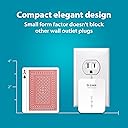
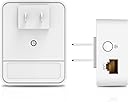
⚡ Power your network with speed and simplicity—ditch WiFi dead zones for good!
The D-Link DHP-601AV Powerline Adapter Starter Kit transforms your home’s electrical wiring into a high-speed wired network delivering up to 1000Mbps via AV2 Gigabit and 2x2 MIMO technology. Designed for plug-and-play ease, it instantly boosts connectivity for gaming, streaming, and large file transfers without new cables. Compact and expandable, it’s the perfect solution for professionals demanding reliable, lag-free internet in every room.


| ASIN | B00F0RC97A |
| Best Sellers Rank | #419 in Powerline Network Adapters |
| Brand | D-Link |
| Built-In Media | 2x DHP-600AV Device, Ethernet Cable (RJ45 Cable), Quick Install Guide |
| Color | White |
| Compatible Devices | Desktop, Game Console, Internet Protocol Camera, Smart TV |
| Customer Reviews | 3.9 out of 5 stars 1,278 Reviews |
| Data Link Protocol | Fast Ethernet , Gigabit Ethernet |
| Data Transfer Rate | 1000 Megabits Per Second |
| External Testing Certification | - CE\n- FCC\n- UL \n- CE/LVD |
| Global Trade Identification Number | 00790069394263 |
| Hardware Interface | Ethernet |
| Item Type Name | D-Link Powerline Adapter Starter Kit Ethernet Over Power Gigabit AV2 Up to 1000Mbps MIMO Internet Network Wall Plug In (DHP-601AV) |
| Item Weight | 3.2 ounces |
| Manufacturer | D-Link Systems, Inc. |
| Mfr Part Number | DHP-601AV |
| Model Number | DHP-601AV |
| UPC | 069060201086 790069394263 |
| Warranty Description | 1-Year Limited |
H**L
Great performance!! Very easy to use.
If you have an older specification powerline kit, and you're unsure if it'll help... Well, it most certainly will! he house I currently live in is old as hell; built back in the 1800's, so the construction is really thick and doesn't really allow for the penetration of wifi signals. Very unreliable, makes it very hard if not impossible to play FPS games since the signal drops out a lot. Powerline adapters are fantastic because instead of utilizing wifi, they use your existing power lines running throughout your house as the wire. It's basically turning your powerlines into ethernet cables, thus you get the latency and reliability of a wired connection. So, I figured I could try a powerline adapter set. I've been using a TP-link powerline AV200 for a few months now and it was ...okay. Better and MUCH more reliable than wifi, but i was still limited speedwise; My internet is supposed to be 100 mbps down and 10 mbps up... But I was getting anywhere between 25-40 mbps down and 10 mbps up with the TP-link. I wanted better. I know I could do better. Warehouse deal'd a set of these puppies. Setup was very VERY easy, just plug them in, press the button on each of them so they link up and you're ready to go. Instantly, my speeds increased 2 fold. Now I get anywhere between 70-100 mbps. And one of the biggest things to keep in mind too, PLEASE don't plug them into a surge protector. When I switched it out I got roughly 10 mbps more speed without one, so it helps. And don't be afraid to experiment with where you plug in your powerline adapter either. Different outlets might be on different breakers, so it helps to fiddle around a little to get the best speeds you can. Get a decent ethernet cord too, cat6.
H**T
Highly recommend the D-Link DHP-601 Starter Kit, solved my WiFi nightmare.
Purchased a pair of these D-Link DHP-600's (pair listed as DHP-601) about two months ago and they have met all my expectations. Previously I was using a wireless range extender to stream a 1080P IP cam located in my garage. The garage is about 30 feet from the house and the wireless connection via the range extender was intermittent. Sometimes working fine while at other times dropping out completely and unexpectedly. Tried changing locations of the range extender, changed wireless channel several times, firmware updates etc. but could not get a reliable connection. It seemed that the connection would be lost at the most critical times, the constant resetting of the range extender and IP cam became infuriating. The DHP-600's solved my problem, had them working in minutes after unpacking and they have proven to be rock solid without a single instance of signal loss over an 8 week period. I have not tested the actual speed of the connection with a computer but the D-Link utility indicates a connection speed of around 500 Mbps. The connection speed varied depending on what circuit the router side adaptor was plugged into. The worse case scenario indicated a speed of 350 Mbps so some experimentation by moving the adaptors (in my case only the router side was movable) and checking connection speed via the D-Link utility will ensure the best results. Another interesting anecdote is that when the powerline adaptor is unplugged would reestablish a link in about three seconds. Not bad! I highly recommed the D-Link DHP-601 starter kit.
J**T
D-Link is Garbage
Piece of garbage. Spent 30 minutes on the phone with D-Link to determine the units are defective. Receive a link to obtain an RMA that ends in an error message stating " D-Link RMA We have just encountered an error while trying to process your request. We apologize for the inconvenience. Thank You. D-Link IT Web Staff" So no RMA!? Plus, I have to pay to return it for a replacement. Never buying another POS from D-Link again. UPDATE - 09/16/2014 I bought the TP-LINK TL-PA6010KIT AV600 TP-LINK TL-PA6010KIT AV600 Powerline Adapter Starter Kit, Up to 600Mbps, Gigabit Ports, Plug and Play, Power Saving Mode Works perfectly and setup took 7 seconds.
A**R
works great in our house
works great in our house. it is hard to wire cable around house, wifi extension devices doesn't work well. these little device solves all my problem. the only issue I have is to change the default security code among those devices (it is VERY IMPORTANT, if you don't want someone else connecting into your network from house's outside outlet, or you live in an apartment). the instruction included is not totally correct, it tells you press button for less than 3 seconds and release, the power light will flash, that's wrong, to get power light flash is not that easy, you need hold the button for 8-9 seconds, (keep holding) you will 1st see the house and network light flash together twice, then the power light start flash, you need release the button right before the power light start flash 2nd time (you have to wait it finish 1st flash, then release just right before the 2nd flash). if you release too soon, the power light would flash, if you hold too long, after it flashed 2 or 3 times, you are doing a reset to default. do the same thing to the other device within 5 min, you will change the default security code b/w this 2 devices. to set up 3rd or 4th one, you need to follow the instruction from their website (the included instruction doesn't teach you how to do it, go to the website). download the D-Link PLC utility from product's support page will help you to rename each device, and change the security code. but there's no manual for this software anywhere, you have to find it out how to use it by your own. I used auto lock to change the security code among my 4 devices (but I can't confirm if it is really changed or not). I give it 3 stars because this security code change is very important for me, but the lack or wrong of instruction about setting up new security code make me almost give up. I'm not a newbie around, I build my own computers and labtop, set up couple houses networks with NAS. But, D_Link, you really did a bad job on this important fuction.
M**Y
It really works!
My WiFi doesn’t reach a corner of my house where I wanted to use Roku. I bought a 50 foot Ethernet cable which I would run though the house across the floor of two rooms, down a hallway, and down a flight of stairs, and into a room to plug into the Roku device. I would disconnect the Ethernet when finished and wind the Ethernet back up and store it until the next time. This got old real fast! I could have tacked the Ethernet against the baseboards up and down walls until I reached the Roku, but that would look horrible. So, I decided to have Ethernet professionally run from my cable modem to the TV. This would require a significant investment to get a professional to run the Ethernet through walls and floors to reach the TV. That would give me the optimal quality and look the best, but before spending the money to do this, I searched Amazon one more time to see if there were any products available which might be less intrusive and cheaper. That’s when I ran across this product. I was skeptical, but decided to give it a try. The setup was easy and I didn’t run into any problems and the result is a very good connection! The quality is not Up to Ethernet standards, but it is superior to anything else I tried. Periodically, there are short signal degradations and the picture quality is pixilated a little, but this quickly returns to a more normal good quality! That’s the only reason I gave this product a 4 star rating. I’m not a networking expert or an electrician, so I can’t confidently ascribe the signal quality fluctuations to this device, so this device might really deserve a 5 star rating. The occasional signal quality degradation is an acceptable trade off for me. I’m extremely satisfied with this product and I am very happy I found it before I spent the money to professionally run Ethernet!
R**E
Powerline adapters can work great, but results depend on your house wiring
This device works great as far as it is able and I am pleased, but there are realistic limitations when trying to run a megabit signal through house wiring. This is true for all powerline adapters, not just this brand or model. The speeds you will obtain will be different from outlet to outlet depending on your house wiring including: the DISTANCE between the two devices and the electrical panel, the number of WIRING SPLICES in the wiring between the two devices and the electrical panel. If possible try not to use the device in an outlet controlled by a wall switch. To get a baseline speed, plug the two devices into the same outlet and run a speed test. This will be your maximum obtainable speed. Then move the second device to other outlets around the house and re-run the speed test. Lower speeds obtained in some outlets are not the fault of the device but rather due to differences in the electrical wiring between the two devices. Even within the same room different outlets may give greatly different speeds because of electrical wiring differences. As an example, I plugged the second device into five different outlets in the same room and got speeds ranging from 20mbps to 70 mbps. What a difference! As a practical matter it's very hard to predict if powerline adapters will help in your specific situation, so test them out and return them if they don't help you. Running an Ethernet cable will almost always give better and more predictable results if it is possible in your situation. Even running an Ethernet cable as far as possible to a remote Wi-Fi router may be a better solution for you. So in the right situation powerline adapters work great but the results are hard to predict ahead of time.
J**.
Actual throughput is about 30 Mbps
I purchased this product to be able to relocate a high speed (802.11ac) wireless router to the downstairs floor in my house. My Internet speed is consistently over 100 Mbps down. So I chose this product because of the advertised speeds of 600 Mbps. I understood that speed would be a theoretical maximum (as D-Link states) but figured that even if I got 1/6th of that speed it would be enough to deliver the full 100Mbps Internet connection. Unfortunately, the actual speeds in my scenario were barely above 30 Mbps. I tried a number of different pairs of outlets in the house, and followed the troubleshooting instructions, regarding plugging in both units directly into the wall (not through surge protectors, etc), and made sure that the outlets were not near "EM interference from induction motors such as refrigerators, washer/dryer, microwaves, hair dryers, etc." In some cases, the speeds dropped in 20 Mbps, but they were never more than 30 Mbps. This appears to be a common problem, based on both other reviews here on Amazon, as well as the fact that the only entry in D-Link's support FAQ for this product is "Q: Why is my powerline ethernet adapter slower than advertised?" [...] I'm giving this product a 2-star rating (as opposed to a 1-star rating), because it was very easy to setup and establish a solid network connection. It literally took about 2 minutes to setup. So from that point of view, it worked well. And if you don't need 30 Mbps+ speeds, it might be a good product for you. However, the real-world speed being less than 5% of the advertised speed is really unacceptable.
J**O
These Work Amazingly Great To isolate a bad P2P device that tries to phone home
Attached one to another and moved one to multiple different circuits, opposite ends of the house, on long extension cords, etc. They just worked great no matter where I put the second one. I used them to isolate and connect an NVR to POE switches with IP cameras allowing me to not have to wire my entire house with rj45. They allowed me to remove the NVR from my google wifi which I needed to do because the Chinese manufacturer of the NVR hid a P2P feature in the device which I discovered was opening up my network to the world for anyone to come in and steal my identity, view my cameras and generally have their way with all my data. Using a couple of these baby's fixed all that! Created a separate network that cannot connect to the internet! Love them. Great solution for camera systems if you wish to isolate them and have privacy. Note that using this solution takes away the features of remotely viewing your cameras but it's a trade off. From what I have read, all of those remote camera systems leave your network wide open.
A**.
Works Well
Plug and Play. Speeds of up to 45 Mbps being achieved. Works on Indian 240 V Power Supply
D**N
Super fast and super easy set up, works as promised.
There are a lot of factors to consider with products like these. The floor where the modem is located, the floor where you are trying to set up your connection, house construction, etc. For my situation, the modem is tucked into a bedroom at the very back of the rooming house I currently reside in. My bedroom is one floor up and at the very front of the house. I would say I am approximately 70 feet away from the modem. I plugged the modem into one of the two outlet units with a Cat5 cable. I am sure I could’ve upgraded to a cat six, but the CAT5 works perfectly for me. I plugged the sister unit into an outlet in my bedroom and plugged in a CAT5 cable to the unit and to my laptop. After following simple, clear installation instructions, the whole system fired up flawlessly. There are easy to see green lights on the outlet boxes to indicate everything is working perfectly and when it’s not. It’s been two weeks, I unplugged once to reboot the system, and it is worked flawlessly ever since. Using existing house wiring is great, takes the guesswork out of Wi-Fi signal strength and you don’t have to run additional cables throughout the house. It’s simple and a great option for most applications. I highly recommend this product.
S**Z
Satisfactorio
Cumplen con mis necesidades de eliminar un cable que no estaba oculto. Todavía tengo que probar su funcionamiento en otra ciudad, ya que lo tengo conectado a un Sling box alámbrico.
R**K
Able to get speeds upto 300 Mpbs
Works with 240 V supply in India too. I can get speeds up to 300 Mbps with this. Works in houses with old wiring too.
S**K
Works But… Unreliable and Slow Network Extension
The D-Link PowerLine AV2 1000 Gigabit Starter Kit fell short of expectations in my new home. Despite being advertised as delivering up to 1 Gbps, the speeds I observed ranged between 50-100 Mbps, which is far below what I needed for smooth streaming and gaming. Connection drops were frequent and frustrating, making the setup unreliable for any consistent use. Given that my home is newly built, I doubt the wiring is to blame. The plug-and-play setup was simple enough, but the performance issues overshadowed any convenience. I had hoped for a dependable solution to extend my network, but this product didn’t deliver on its promises.
Trustpilot
2 weeks ago
3 weeks ago