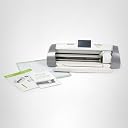
โ๏ธ Cut Above the Rest: Elevate your creativity with precision and style!
The Cricut Expression 2 is a versatile electric cutting machine featuring a large 12โ x 24โ cutting area, a vibrant full-color LCD touchscreen with stylus control, and compatibility with all Cricut cartridges. Designed for both hobbyists and pros, it streamlines crafting with faster cutting speeds and pre-loaded cartridge content, making it a must-have for personalized projects and professional-quality designs.
| ASIN | B0018N7VDC |
| Active Surface Area | 288 square inches |
| Best Sellers Rank | #213,435 in Arts, Crafts & Sewing ( See Top 100 in Arts, Crafts & Sewing ) #172 in Scrapbooking Die-Cut Machines |
| Brand | Cricut |
| Brand Name | Cricut |
| Color | Grey |
| Customer Reviews | 4.1 out of 5 stars 380 Reviews |
| Global Trade Identification Number | 00093573044649 |
| Item Weight | 10 Pounds |
| Manufacturer | Provo Craft & Novelty |
| Material | Paper |
| Material Type | Paper |
| Model | 2001186 |
| Operation Mode | Automatic |
| Part Number | 2001186 |
| Print media | Paper (plain) |
| UPC | 100061571713 093573044649 151903556122 163120659760 951062859344 |
| Unit Count | 1.0 Count |
S**S
It Will Help You With Almost Any Project!
After having only owned this Cricut machine for some months, I have used it to help with so many projects that I cannot even keep count. I would recommend purchasing this machine not only if you are already a crafty person looking for a new tool, but also if you are just beginning to have an interest in crafts, paper projects, or even looking to decorate bulletin boards or a classroom. Pros: - There is an online Cricut Craft Room that allows you to put together a collection of cuts much easier that using the tiny screen on the machine. - Once you get the hang of it, large numbers of cuts or cuts of different sizes are very easy. - There are larger mats (24x12) that allow for even more cuts per mat. - You can plug in cartridges directly into the machine and use them, allowing for Cricut groups or friends to swap/borrow cartridges. This will save a substantial amount of money! Cons: - Sometimes the cartridges can be expensive. Most chain craft store run sales from time to time for 20 to 30 percent off. You can also find cheap or used cartridges on Amazon or eBay. - Learning a new tool can be daunting; however, there are many websites with how-to information. There is also bound to be a Cricut user at your local craft store that may be knowledgeable. Pinterest has a wealth of articles and ideas. - Materials and accessories (mats, paper, vinyl sheets) may be expensive. Check for sales and specials. Share your remaining materials with your friends and maybe they will do the same.
D**N
Amazing machine. But do your research. Know what you're getting.
My wife did all the research on this machine. She came to the conclusion that she did not like the locked down nature of the Cricut - buying cartridges, using their own locked down software, etc. So I purchased the Silhouette for her. After months of using and loving the Silhouette she decided she wanted the Disney Licensed materials that only Cricut has. So she now has 2 cutting machines. Both do the same things but so much drastically different. Do your own research and find out what machine you want and or need. There are many on here giving 1 star reviews because they did not simply do their research. How can you spend over $200 on a product and not know what you are getting.? The Cricut is the best cutting machine there is. Simple to use and set up. My wife had things cut within minutes of opening the box. Not the case with the Silhouette. She uses both machines regularly. Both have pros and cons. Just do your research first.
A**F
Great for iron-on!
I made this impromptu purchase when I found out it could do iron-on materials. As bowlers, we need to have our names on the back of our shirts for tournaments and it is difficult to find local companies who will embroider/screen print just one item, they usually require a bulk order. Buying shirts with names online can be quite spendy. I purchased three colors of iron-on vinyl at a local craft store and in just one short evening we had figure out how to design and cut our names for the back of our shirts. It was very easy to figure out how to use the machine and I was very impressed with the quality! I also purchased the 7-piece tool kit which helped tremendously when removing the negative vinyl from our projects. Since wearing our shirts I've already had a handful of people ask if I can make them name shirts, definitely a good investment!
G**I
Two Broken Machines
Please read before purchasing: I first ordered a Cricut Expression 2 from Amazon for my wife's birthday and received it on March 13th. After testing the machine when I received it I quickly determined it was broken. The part that controls the vertical movement of the blade (moving it down to cut, and back up between images) was broken and didn't move at all, so the blade always hovered over the paper when trying to cut. I called Provocraft (I should have contacted Amazon instead in hindsight) and went through the process of getting a replacement. It took three phone calls to get my first shipping label. I packed up the Cricut and sent it back to the Provocraft's warehouse and awaited a new machine, which unfortunately arrived a week after my wife's birthday with a two week turn-around time. Their warehouse is on the west coast and I live on the east, so slow shipping is understandable. The second machine arrives on March 30th, a Friday. I immediately test it out as soon as I get home from work. What do you know, this time the software is messed up and it's stuck on the welcome screen, never allowing me to calibrate it, select an image to cut, or use it at all. I call up Provocraft again, and walk through the steps of trying to reset the machine. After all that fails, the older lady on the phone says "Oh noooo! I'm sorry this happened to you again! We're going to have to replace it again, but this time we'll give you 2 day shipping." My wife is extremely disappointed now. I await the email for my shipping label (which doesn't get sent until Tuesday afternoon, 4 days after my call). When I get it, what do you know, the file they sent has no file extension and is unreadable as a .pdf file, so I have call Provocraft again and have them email me another one. So, another 20 minutes on the phone (this is 5 calls now), and I have my shipping label. I get off the phone with the customer service representative, get ready to print my label, and lo and behold, it's Fedex ground shipping, not 2 day shipping. This process has taken over 3 weeks, and I haven't even shipped out the 2nd machine yet. I would have returned this immediately if it wasn't what my wife wanted for her birthday. She'd heard great stories about the Cricut 1, and from what I've heard the Cricut 1 works pretty well. However, buyer beware. If you're unlucky like me you have to go through one heck of a process to get a working machine, and I highly doubt it will be worth it in the end.
K**C
Cricut Expression 2
This is my first Cricut. Only had it one week, but so far, so good. I have used a friend's original Cricut and loved how it was so easy to use. I was not sure about getting one with all the bells and whistles, but I wanted the larger size. Cuts just fine after adjusting the blade tension to the type of paper used. Best cuts made on good quality heavy cardstock. Still trying to figure out the online craft room. The instructions aren't that user-friendly, but then again, I'm not a computer techie. My BF will figure it out for me, since I definitely want to use the "weld" feature - which can only be done online from what I understand. I love that it cuts shapes as big as your 12x12 sheet of paper. The 2 pre-loaded cartridges are great - lots of shapes and nice fonts to choose from. I plan to get more......still not sure if I want to download electronic cartridges or just buy the regular ones. They are almost the same price either way. Amazon free shipping was speedy - ordered it on a Saturday afternoon, and by Friday, it was waiting for me at my door!
M**O
FINALLY - everything in ONE machine! YES!
I already loved the Cricut brand (and was using the Cricut Expression). I used my former machine for literally years and gained hours and hours of joy from creating as well as from giving custom cards as gifts. PROVOCRAFT only improved upon the magic of this die-cutting machine with the addition of the touchscreen, the ports for Imagine and traditional cartridges. For me, this was a HUGE plus as I purchased Imagine catridges thinking they would work with my Expression and NOPE - no luck. This device also has the simple (but absolutely necessary) feature of the sticky mat "guide." I don't go through my usual course of cursing at the machine when the mat would not feed properly - requiring me to "unload" and line up the mat AGAIN. This is a thing of the past for me now! WOO HOO. Another great aspect wtihin the capability of this newer machine is its ability to allow you (while using the GYPSY) to set the speed, number of cuts and depth all from the GYPSY itself (rather than having to manipulate these items on the device (as in the "old days" with the Expression). I love this machine and have only just begun to explore it's capabilities and additional features. I am tuning into YouTube for tutorials in order to maximize the features as the initial instruction book is clear but very basic information. Hours and hours of creating - here I COME!
R**R
Very cool machine, limited by crummy software limited to drive corporate profits
I really like this machine. We have cut several shapes in varying stocks of paper with it. They claim that it can also cut vinyl, fabric and other materials but I haven't tried them yet. The cutting mat that came with my machine had been curled up into a tube for packaging in the box. Unfortunately it took a lot of effort to uncurl the mat which needs to be flat to proper feed into the machine. I would plan on just buying a new cutting mat and tossing the included one. If you're into scrapbooking or making other paper crafts and will be making several different projects this tool gives you much more versatility than using traditional die cutters, etc. You can resize, scale and stretch shapes as well cut out fonts to make unique lettering. It has a USB plug that allows you to connect the cutter to a computer and use their software to layout your shapes before cutting them. You can even use layering within the software to preview your layered cuts before ever putting knife to paper. Unfortunately the software makes it difficult to access just your available shapes. It seems more like a sales tool that tries to steer you into buying more shape packs which I found very annoying. Unfortunately, there is one more very serious (in my opinion) drawback to their soft are. It only allows you to cut shapes purchased from Cricut. You can not create or cut your own custom shapes. I don't want to believe that it was probably designed that way just so they could sell more shapes, but it probably was. Especially considering that you can control it via a computer, there is no reason that you have to use their shapes exclusively other than the fact that they want you to buy their shapes. Nevermind that you may want to something unique not part of their shape packs (such as cutting a custom backdrop for a cut photo). In summary, it seems like a well built quality machine with a lot of potential, but is crippled by crummy software.
D**D
Love the Cricut
Before I purchased this, I read a lot of reviews and was hesitant about buying. I purchased it anyway and love it. I have made several gifts already and ready to use it a lot more. Have only used the program that comes in it for now. I am looking forward to purchasing more programs for it. I don't think I will go online and try to use the software. Sounds a bit more complicated than I want. I have not had any problems with the computer or the cutting mechanism. My Cricut works great and was easy to learn how to use it.
A**M
Highly Recommend
After much research prior to purchase, this was the machine my wife decided she wanted. Knowing my wife to want something and then never use it after purchase I was very surprised that she loved the machine. She can not say enough good about this machine. The ease of use and quality of this product amazed her, especially after she read the negative reviews. This seller was great. Very easy transaction and very fast shipping.
A**K
Better products out there.
If you want design your own projects, save your money and buy a Cameo Silhouette. I have used this one a couple times, but since getting the Cameo Silhouette, it sits in the back of the closet. This Cricut Expression 2 has no print and cut functionality and will not allow third party software to connect with it.
K**N
Incorrectly assembled.
Received machine and there was a problem. My husband was able to fix it, but I almost returned it right away. Provo Craft needs to do more quality control checks. Little more complicated than Expression's, but cuts great.. With CCR it works well.
W**E
I am very happy with my purchase
I am very happy with my purchase, I have only cut paper and cardstock yet but the Expression 2 performed beautifully
D**N
What a great machine!
Been wanting to purchase a Cricut and finally did. Having so much fun with it. For newbie's - if you plan to use vinyl find a sign shop and ask to purchase ends to practicing on. Happy Creating.
Trustpilot
3 weeks ago
1 month ago