Buy anything from 5,000+ international stores. One checkout price. No surprise fees. Join 2M+ shoppers on Desertcart.
Desertcart purchases this item on your behalf and handles shipping, customs, and support to Hungary.
⚡ Elevate your calculations with the TI-36X Pro — where precision meets power!
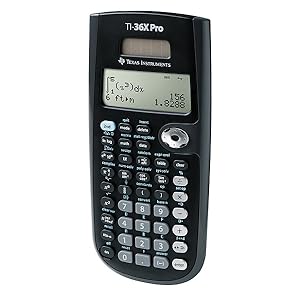
The Texas Instruments TI-36X Pro is a professional-grade scientific calculator designed for high school to college-level STEM students and professionals. Featuring a MultiView display and MathPrint technology, it allows simultaneous viewing of multiple calculations and textbook-style math notation. It supports advanced functions including matrices, numerical integration, derivatives, and unit conversions, all in a compact, solar-powered design. Approved for standardized exams where graphing calculators are restricted, it’s the ultimate tool for engineering, math, and science success.

| ASIN | B004NBZB2Y |
| Best Sellers Rank | #3,612 in Office Products ( See Top 100 in Office Products ) #5 in Scientific Calculators |
| Brand | Texas Instruments |
| Calculator Type | Engineering/Scientific |
| Color | Black |
| Compatible Devices | TI 36X Pro |
| Customer Reviews | 4.8 out of 5 stars 22,771 Reviews |
| Display Type | LED |
| Enclosure Material | Plastic |
| Global Trade Identification Number | 00033317029860, 03243480103572, 03243480104739 |
| Item Dimensions L x W | 7.22"L x 3.27"W |
| Item Weight | 0.33 Pounds |
| Manufacturer | Texas Instruments |
| Mfr Part Number | 36PRO/TBL/1L1 |
| Model Name | TI-30X |
| Model Number | 36PRO/TBL/1L1 |
| Number of Batteries | 1 Lithium Metal batteries required. (included) |
| Power Source | Battery Powered |
| Screen Size | 3 |
| UPC | 197274678803 012303264850 527645823516 763615999007 778888085951 999997114824 791583761272 033317203666 734911329478 666672977165 640206706346 803982780126 806293526162 033317070251 872182668381 080175314317 033317029860 641438187811 523160308910 809302183899 999997491543 172302617702 012951710266 168141372360 067224971325 809385664070 702658636043 801593400624 638458801209 809186269108 1631207457… |
| Unit Count | 1.0 Count |
| Warranty Description | Contact Manufacturer |
C**D
The TI-36X Pro churns out exact answers that graphing calculators won't do.
There are some great reviews for this product, but I have seen the lack of mention of one outstanding thing about this calculator. I haven't owned many calculators, but I have used a Ti84 Plus and a Ti84 Plus CE for many years through high-school and college. Albeit this calculator is not a graphing calculator it performs very well and meets my expectations for engineering courses. In fact something stands out. This calculator by default does EXACT math! One thing I have never encountered (and long stopped expecting) was putting the square root of 8 in a calculator and getting back a simplified radical (2) X (the square root of 2). The TI Graphing calculators will always give, an irrational number (2.828427.....) If you want to get a simplified exact answer, you better know how to program or download from the internet an app for it. With the TI-36X Pro, you put it in and it churns out your simplified radical (even rationalizing the denominator of a fraction), every time, not only this, it does the same with pi, opting to display the pi symbol with the most simplified fractional form of your answer. Even if you don't want an exact answer, there is an operator key that will give you the decimal approximation if you desire. This would have been very convenient in classes I took, such as Calculus 2 and 3. Where during a test or on homework, you are often left with very long strings of numbers you have to use add/subtract - multiply/divide. Most teachers want you to give an exact answer so you can't just throw it all into a Graphing calculator, it will give you an approximated number. The TI-36X Pro, will take all of this math and give you a perfectly simplified and exact answer. A $30 dollar calculator capable of something my $150 dollar calculators don't do.
A**W
Excellent function for such a small, inexpensive package.
I bought this calculator for my upcoming FE Exam in October 2013. I have been using it for the past couple of months to get acquainted and to study. When I was in school I used the TI-89 Titanium religiously. Unfortunately that's not permitted on the FE exam so I chose this one. Upon using it I must say that for a non-graphic calculator it's fantastic. The shortcut keys (for exponents, powers of 10, fractions, etc.) are a nice touch. The built in equation solver, polynomial equation solver, system of equation solver certainly shave a lot of time off of my calculations concerning static equilibrium, quadratic equations and circuits. This calculator also does Matrices, up to 3x3 and vectors in three dimensions. It even has popular constants (permittivity, Boltzmann, Ideal Gas, standard atm, etc) built in along with a whole conversion menu. On top of that it does numerical integration and numerical derivatives and plenty of other things I'm probably not going to mention. I consider it to be more user friendly than the TI-89 Titanium because of the shortcut keys and nice interface. For example, to calculate a determinant on the TI-89 you must press 2nd, MATH then scroll to Matrix, then select Det( and press enter. Then you have to remember the syntax which is det([a1, a2, a3][b1, b2, b3][c1, c2, c3]) and finally press enter. On the Ti-36X Pro all you have to do is press 2nd, Matrix and scroll to edit and enter how many columns and rows you want in the specified matrix, press enter and then put in your values. Then once the values are saved you go back to the Matrix menu and select Determinant and put in the name of the matrix where you saved the information. Pretty slick for a smaller calculator. The four line display provides enough room to see what your doing and the text is fairly large which I like. With the bigger calculators you usually have to squint to see some numbers, especially in low-light situations. This calculator also features Mathprint. This means that fractions, integrals and most other mathematical notation shows up as it's supposed to. However if you don't like this there is a feature to turn it off. This is especially useful for when you're calculating something like a parallel resistance circuit and you want to see that big fraction to make sure you didn't make a mistake. Of course no review is complete without listing the gripes. There's not too many problems with this calculator however there are something that really bug me. The first one being that there is no option to toggle "insert" like the TI-89 has. Usually I find myself needed to edit an equation that I just entered. Therefore I have to press second, then insert and put whatever I needed into the equation. Not a big deal but can get annoying at times. Second, I don't like the chrome arithmetic buttons. At times I find myself hitting the subtract button when I wanted to do some addition. However I solved this problem by running a fine-tipped sharpie over the buttons and rubbing off the excess on the surface. Now the symbols have a black color in contrast with the chrome. Much easier to see and I suggest this method if anyone else has this problem. Third, you must press a button multiple times to get what you need. For example say I want to type a complex number (3+5i) on the screen. I press 3, +, 5 and then I have to press the "pi, e, i" key three times just to get the "i" symbol. Can be a bit annoying/frustrating and you might make a mistake if you've had way too much caffeine as I normally do. Although I suppose they had to do this to consolidate space in the design process so I can respect that. Just a little annoying but I guess it comes with the territory. This can add a bit of time to the learning curve if you're not used to these "multipress" buttons. That's basically it. For a non-graphing calculator I give it a 9/10. Comparing budget calculators, I've had the TI-30Xa and the Ti-30XIIS before and this one blows them out of the water obviously, hence the name TI-36X PRO. I've never had a Casio calculator so I can't compare. With this many features and usability at the price of $17 or so it's certainly an exemplary buy. A great budget engineering calculator and certainly the best to use on the FE exam in my opinion. Go with this one!
S**A
Excellent Scientific Calculator for Engineering Students and Middle Schoolers Alike
I bought the TI‑36X Pro Calculator while preparing for engineering exams and it has quickly become my go-to calculator for both studying and everyday calculations. The multi-line display is one of the best features. Being able to see equations exactly as they’re typed makes it much easier to catch mistakes when working through longer problems. It also handles fractions, matrices, complex numbers, and unit conversions surprisingly well for a non-graphing calculator. Pros Clear multi-line display Powerful functions for engineering and science Allowed on many standardized exams Durable and easy to navigate once you learn the layout (even my 11yo uses it) Cons Not a graphing calculator Some advanced functions take a little time to learn Overall, this is a fantastic option for students in engineering, math, or science who want something more capable than a basic scientific calculator without stepping up to a full graphing model. This is also a really nice calculator for middle school students! Highly recommended.
D**L
amazing calculator
In my opinion, this is the best calculator to get at this price point. would recommend it for anyone who is taking algebra II or higher, even for calculus.
C**O
Should have been released earlier!
TI-36X Pro calculator (A non-graphing scientific calculator) I originally reviewed a TI-30XS Multi-View and a Casio FX-115ES when I took the Professional Engineer exam because they were the only ones available at the time that I could use without too much difficulty. I took 3-4 months before the exam to familiarize myself with the calculator before I took the actual exam. I felt the Casio FX-115ES was far superior, although the TI-30XS MV had a much cleaner interface and a sensible layout. But the FX-115ES was very easy to use once you got used to the menu/layout as Casio hasn't changed its scientific calculators very much over the years. Many of the features I favored in the FX-115ES were not available in the TI-30XS MV such as complex numbers and handling matrices, and even working with different base numbers. The TI-36X Pro seems to have resolved many, if not all, of the TI-30XS MV shortcomings. Had the 36X Pro been available in late 2008, I would have most likely used it for the exam along with my FX-115ES as a backup calculator. The 36X Pro interface/layout is similar to the TI-30XS MV which makes it easy to use. The answers default in approximations (decimals) versus exact numbers (fractions) with the FX-115ES. This makes it easier for engineers since I always had to press the convert key on the FX-115ES. The TI-36X Pro treats complex numbers the same way as the FX-115ES, just make sure to set it in the Complex mode for polar or rectangular values. I still prefer the TI-89's treatment of complex numbers without having to deal with different modes (square root of -1 = i without going to any different modes), but it isn't too hard to change a few settings in the 36X Pro and it even has a key for i albeit it is a multi-tap key, but it works in the REAL mode. Different number bases with the 36XP Pro require navigating more menu layers versus the FX-115ES. With the Casio, you could directly switch between DEC, HEX, BIN, etc... whereas the TI 36X Pro requires you to convert the values. Again, this isn't a big deal it is just a matter of a few extra seconds of time. The TI 36X Pro has a better menu, but the FX-115ES is more direct. I guess that is probably a Japanese trait as well! The TI-36X Pro has lots of conversions and constants, and they are actually described in the menu which makes it very easy to use versus the cryptic FX-115ES. Again, the FX-115ES can be more direct - but that is the same for Microsoft DOS or Unix. They can be very quick and direct, but no one wants to use cryptic commands. A GUI or touch-screen is far more intuitive and that is where the TI-36X Pro shines. However, the TI-36X Pro conversions are very basic and limited to some common conversions. For exams, this isn't as big of a problem. For scientific or engineering work, I would prefer more conversions available on the spot. The multi-tap keys on the 36X Pro are an excellent idea. TI probably had to do this because they ran out of room for more buttons or a "3rd" key. The multi-tap keys are easy to use, just repeatedly press them until you get the command you want. The color scheme of the calculator itself is an improvement over the TI-30XS MV. The 30 was white with a teal/blue green color. The white has now turned yellow, and the 30 always looked like a kid's calculator. The TI-36X Pro is a black/dark gray motif and there are 7 keys coated with a metallic color. It makes it hard to read the symbols, but TI did etch the 6 keys with their commands. My only guess as to why they did this was that the keys tend to rub smooth with repeated use. I had my TI-86 for the longest time since 1996, and most of the keys were polished smooth by the time it started to malfunction and use up batteries in a few days. So the etching/molded keys aren't a bad idea - I just wish they used a more visible/contrasting scheme for those keys. The solar assist comes in handy for exams because you don't have to worry about changing your batteries too often. Although TI does mention this is just a solar assist to lengthen the battery life probably by using whatever photovoltaic source you can get via the cell but relying mainly on the CR2032 lithium coin cell. I removed the battery and the calculator refused to turn on even under direct sunlight. So apparently the calculator does run on the CR2032 battery and utilizes some assistance from the solar cells. I am not a big fan of the hard case, as it clips at the bottom and top. I prefer the slide case of the TI graphing calculators although the 30XS/36X Pro case has better retention. It's not going to come apart in a backpack. To sum it up, I'd recommend the TI 36X Pro in situations where you cannot use a graphing calculator. I am still split on the Casio FX-115ES and the TI-36X Pro, although I feel both are on-par in terms of features. The TI-36X Pro is definitely more user friendly. Overall: 4/5 stars
A**O
Great upgrade for my 6 year old 30XII
Finally had to graduate from my TI-30XII, served me way longer than it should have. Literally almost out of college and it finally couldn't keep up with big physics equations anymore. The 36 is just so much more convenient, love the ability to do fractions right on the screen, you can set up entire problems and not have to do like 5 steps.
A**G
Must-have calculator for STEM/Engineering students
Great calculator for STEM/Engineering students. It has most features you need for courses where only scientific and non-graphing/programmable calculators are permitted. Definitely has a learning curve if you intend to use many of its features but it is worth the time. Size-wise, it's slim and light-weighted compared to other graphing/programmable calculators (my favorite trait of TI-36X Pro). If your kid is going to college soon, buy them at least two of these.
B**H
Great item but make sure courses accept this.
Good price for all you get. Cover helps and it’s durable. Trusted brand for a reason. Learn to use it in courses and use the manual or google it or YouTube for button instructions if lost. Otherwise excellent.
K**S
Better than the most advanced Casio or Sharp Scientific Calculators and has replaced my graphing calculator for many situations!
I am a 3rd-year Engineering student, and this calculator has become my goto calculator for exams. I own at least 7 or 8 scientific calculators (lost count now), and 3 graphing calculators: these include the HP 50G Graphing calculator, the Sharp EL-516 and I have also used the Casio 115/991ES in the past (same calculator, just different branding between the US and Canada). The Sharp and Casio calculators are the most direct comparisons, while graphing calculators are obviously usually seen in a separate league. I won't compare this to TI's other scientific calculators, because this is simply the most powerful scientific calculator that TI makes. PROS compared to Sharp/Casio's most advanced scientific calculators: 1) Multiline display, and the interface actually uses the multi-lines. If you look at the Casios and Sharps, they use the mult-lines for displaying fractions and the last answer, but never display more than the last answer. In comparison, this TI-36X Pro uses all four lines, so that the last three answers/equations can all be displayed. It's much more like a graphing calculator in this respect. 2) One single mode for all functions; no need to switch between complex mode, normal mode, polynomial mode etc., like the Sharp and Casios do. It's merely for historic reasons that the Casios and Sharps still do this, and it makes so much more sense to have everything done in one mode (like a graphing calculator). 3) Solid, tactile buttons that have a slight "click" when you push them. I really like this, because I don't even need to be looking at the keys to know whether my keypress has registered or not. I find with the Casios and Sharps (particularly the Sharps) that they have keys that are really easily depressed, and don't give you great feedback on whether they've been clicked. 4) Really, really good interface. If you have ever used a graphing calculator from TI, you will feel right at home. The matrix equations, polynomial solver and and linear equation solver all have graphing calculator-like input, which should be both very familiar to many users, as well as intuitive for those new to TI UI design. For example, the polynomial solver is like a computer wizard, taking you through the steps for entering the coefficients of your equation. Really easy to use. 5) Cycling through functions with a single button is pretty innovative, and I think faster than using the 2nd function or (even worse) relying on entering another mode or menu. For example, in order to access ASIN, you just hit the SIN/ASIN button twice to cycle to ASIN. It's really easy and doesn't require you to use two separate buttons. 6) Really good definite integration and derivation. It works really well, and is faster than my Sharp (I performed a side-by-side comparison multiple times for speed). CONS 1) The intuitive interface comes at the expense of a few more button clicks in a few situations. For example, the polynomial solver is dummy-proof for entering your coefficients, but I generally feel that the Casio and Sharp calculators can accomplish the same thing with 1-2 less clicks occasionally. 2) Variables (other than 'x') are difficult to access. The variables are all stored under one button, which you cycle through. 'x' is easy to access since it is the first variable, but to access 'z', you need three button clicks. To access 'b' requires 6 button clicks. I would have preferred an alpha key for access keyboard variables, or a menu with number shortcuts. 3) The silver buttons and silver rocker colour are poor. I know that many other reviews have complained about this too, and it is a bit annoying. It definitely doesn't make the calculator unusable or anything, but they are a bit hard to read, and I personally also feel that they look out-of-place on a calculator that otherwise has rather dull (and more professional) colours. 4) This is a personal pet peeve, but above the "enter" button on the button-right, the TI-36X Pro has a Decimal/Fraction conversion button instead of the "multiplication" operator button; instead, the operator buttons have all been shifted up by one. TI has many other calculators, and most of them have the operator buttons right above the Enter key... which makes sense to me, since they are frequently used. I would have preferred to have the Decimal/Fraction conversion button above the operator keys, to make this keyboard more standard in comparison to other TI and HP calculator layouts. I sometimes hit the conversion key instead of the "addition" operator key as I am used to from other calculators (as a side-note, TI and HP prefer the single-column 1x4 layout of operator keys, whereas Casio and Sharp prefer the 2x2 layout of operator keys. You can easily adjust to either, although I personally prefer the TI/HP layout, as it's easier to access single-handed I think). PROS to graphing calculators What really pushes this calculator over-the-edge for me is that it feels like a graphing calculator in many respects; the interface is intuitive, the line display maximizes all your command history... and it does this while focussing on the main features you might need, such as matrix calculations or solving polynomial expressions. Obviously this can't do graphing, since it isn't a graphing calculator, but it does have a "function table" where you can enter a function and it automatically gives you the y values for an interval of x. That allows you to quickly plot a function's general curve on paper using the provided xy points. Very useful, and for this I have been able to stop needing a graphing calculator. Not only are graphing calculators not allowed on many exams, but some of the more advanced functions on graphing calculators (ie. matrixes) actually require fewer button presses to do on the TI-36X Pro. And I'm tired of changing batteries on a graphing calculator. In other words, I can actually accomplish stuff faster and more reliably on the TI-36X Pro. Honestly, this is a fabulous calculator. The Casio and Sharp calculators have been around far longer, so that's why you may hear some older users advocating for them, but the TI-36X Pro embraces a more intuitive UI with single-mode operation, and packs a few graphing calculator features which cover 99% of everything I do on a calculator in Engineering. I highly recommend this calculator for anyone in need of the most powerful scientific calculator on the market, or a graphing calculator user who finds that they don't need all that functionality and just want something a bit lighter to carry with them.
I**I
Super
Elle fait très bien le boulot
O**Z
Chulada de calculadora
Esta es la primera calculadora de Texas Instruments que pruebo después de toda la vida utilizar Casio y tenía algo de miedo de que no me fuera a acostumbrar a la distribución de las teclas o funciones pero la verdad fue una transición muy sencilla y estoy mucho más a gusto con ella. Este modelo es perfecto desde prepa hasta universidad, resuelve ecuaciones, derivadas, integrales, matrices y cálculos estadísticos, es muy completa, equivalente a una 991 de Casio. Comparación Casio Vs TI Ventajas • Historial, tanto resultados como operaciones que se guarda incluso después de apagarla, esto es la cosa más útil que he visto para problemas en los que tienes que hacer varios pasos, es muy cómodo tenerlos anotados en la misma calcu y volver a escribirlos con una tecla, para mí esto fue lo más decisivo para probarla • Teclas muy intuitivas: la distribución se ve rara al inicio pero sólo es agarrarle, por ejemplo la tecla que tiene Pi le das una vez y poner Pi, otra vez y es e, una vez más y es i, se me hace más rápido y menos complicado que el shift + tecla de las Casio. Contras: • El menos no funciona como signo negativo, son 2 teclas diferentes, al inicio se te puede ir y que no salga una operación por lo mismo • Si quieres notación científica tienes que ponerlo en la configuración, no hay una opción intermedia de que a partir de tantos decimales se ponga en automático, entonces me ha pasado algunas operaciones que el resultado es por ejemplo 1.6393627x10^-8 y si no activo notación científica me lo muestra como 0.000000001, entonces esto es un poquito molesto, pero es rápido cambiar la configuración y ya que la operación se guarda en el historial no es algo tan malo.
A**Z
Good
Good
O**N
Great for stats
Mainly use it for distributions, makes life a whole lot easier.
Trustpilot
1 week ago
1 week ago