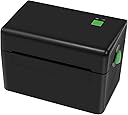
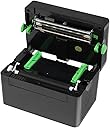
⚡ Print fast, save green, stay ahead.
The Meihengtong MHT-DT108B is a compact, high-speed thermal receipt printer delivering up to 250mm/s print speed via USB. Designed for Windows compatibility, it uses eco-friendly direct thermal technology requiring no ink or toner. Its automatic cutter ensures neat receipts, making it ideal for efficient, professional POS environments.
| ASIN | B07NYPRBV5 |
| Additional Printer functions | Scan |
| Compatible Devices | Laptops, PC |
| Control Method | Remote |
| Customer Reviews | 3.9 3.9 out of 5 stars (263) |
| Date First Available | February 19, 2019 |
| Dual-sided printing | No |
| Duplex | n |
| Hardware Interface | USB |
| Item Weight | 2.42 pounds |
| Item model number | MHT-DT108B |
| Manufacturer | Meihengtong |
| Model Series | MHT-DT108B |
| Product Dimensions | 7.2 x 4.65 x 5.04 inches |
| Scanner Type | n |
| Sheet Size | 4 inch x 6 Inches |
| Supported Media Sizes | 4 x 6 inches |
| UPC | 192242388005 |
R**D
Good, cheap and working!
So, I don't use a normal computer. I run my entire business from my Samsung phone and use a Dex dock. This works great, but can cause some problems with things like thermal printers. I've wanted one for a while, but did not want to spend $300+ on a wireless that would work with my phone. After seeing some YouTube videos and doing a bit of reading this really fit the bill. Note: You need to calibrate this when you put in new labels or change sizes. If you don't, you are going to want to pull your hair out. With the printer off, hold the green button and turn it on. Once you see the red light and hear the beep you can let go and it will adjust to the label size. If you need drivers for your computer then search the model number on Google and look at Seagull Scientific. They are easy to find and download. If you want to use this with Samsung Dex or any other Android Phone/tablet you can use the Nokoprint or Printshare apps and plug it in directly or through a USB hub. To adjust settings, like making it print darker, you will need to connect it to a Windows or Mac computer. Overall I haven't had it for that long, but it is working really well and doing exactly what I need it to. So far I've used stacked and rolled labels with no issues. The stacks are easier, but I can get the rolls for free. Is this the perfect solution for everyone's thermal printer needs? Probably not, but it works and it works well. If you are expecting stellar customer support then you'll probably need to spend more on a printer with a bigger brand name behind it. Like most lesser known products this has to have a community behind it to really see support. Use Google and YouTube to really get the most out of this and almost every other product on the market.
A**N
Best value for money
I didn't want to spend a ton of money on a printer and this is the cheapest thermal printer I could find. I was a little hesitant as I didn't see many reviews about it, but after watching The College Picker's Youtube video, I decided to give it a try. And it's been the best decision! You have to follow his instructions on how to install the driver and you'll be good to go. I'm not a tech-savvy at all and I was printing labels 10 min after I got the printer. If you are on the fence, buy it! You won't regret it. Btw, I have a Mac and sell on Etsy.
G**R
DOES NOT WORK
I bought this to use to create labels for items I was selling and for general returns when purchasing items online. I was in the middle of moving when I purchased this and kept it unused in the box for too long and missed the return window on this. BIG MISTAKE. I am now stuck with a non-printing printer. It turns on and has been calibrated, but the printer cord that connects via USB to the laptop does not work. I purchased another more heavy duty cord and it still will not connect when attempting to reinstall the driver and set up the printer. My laptop does not have USB plug in, so I have purchased a USB to type C that fits my laptop. I know that it works because I have my wireless mouse connected and plugged in and I have no issues at all with that. I am out $100 on something that I cannot use and I am upset about it! :(
N**K
Great Product, Saves Time and Money
Decided to try this out instead of using my ink jet printer. Never going back!!! Couple points of interest: 1) This does not use ink so you save on ink cost and hassle with cartridges. 2) it's small so it doesn't take much space. 3) it prints quickly, much faster than an ink jet 4) labels are small and fits on a size 000 bubble envelope. I had some difficulty setting it up on my computer, didn't have a plug and play set up. I think I had to download a driver from the internet. However, the computer I'm using it on has an older operating system so that may have been the issue. All and all, I'd recommend this printer.
H**N
Printing issues. Works good but have some work cut out for you.
First forget the CD they include. Google the model number xp-dt108B use those drivers, it comes up through a site "bartender software". Once drivers are installed. On your PC, go to "My computer" then select "devices and printers" select the printer. Under the PAGE SETUP tab select from the drop down menu Name: 4x6. It defaults to a 3.94x7.09. If you don't do this you will get a very messed up label printing experience as I did. Barely and tech support for this model. But so far so good for a cheap starter model.
C**N
Does the job!
I got this printer to help me start off my small Etsy shop! Not bad at all for the price in my opinion. It took a long time for me to set it up on my Mac since the driver provided and mentioned in other comments did not work for me. But with a quick youtube search I found a video that gave me the driver and tips on setting that are recommended and it worked great! Just make sure to calibrate it first!
C**A
Not worth the time
So far this printer has been decent. It gets the job done at least. But it has an issue. Let’s say I print five labels after every two labels it stops printing, and you have to print the button at the top to continue printing... but it reprints the first two labels. This might sound confusing, but it reprints the labels and it uses two labels to reprint one. I know it sounds confusing. It’s a head ache and I waste so many labels because of this. Imagine printing 50 labels, it takes forever and wastes labels. Super annoying
L**L
Great printer for the price
It took me a bit of time to setup the printer with my two windows 10 computers.Initially my computers were automatically setting up the printer as an unknown usb printer device. I had to delete this setup manually and then I used the 2019 xprinter driver instead of the 2020 driver. That seemed to fix my problems. Also had to the change the printer preferences settings to make it print darker and to print in 4 X 6 format. Very happy happy with the purchase once I got everything setup.
Trustpilot
2 weeks ago
4 days ago